
This is the universal build of auセルフケア 7.9.7.47. It contains native libraries for every CPU architecture (arm64-v8a, armeabi-v7a, x86, x86_64), so it installs on any Android device. The trade-off is size — it's larger than per-architecture variants. Pick this one if you're unsure which CPU your phone has, or if you plan to share the APK with multiple devices.
File size: 30.4 MB • Min Android: 28 • Target Android: 35 • Version code: 70907047 • Framework: Native (Java/Kotlin) • Permissions: 27
Screenshots
File Information
| Package Name | com.kddi.selfcare.client |
|---|---|
| Version Name | 7.9.7.47 |
| Version Code | 70907047 |
| Architecture | Universal |
| Min Android Version | Android 28 (API 35) |
| Main Activity | com.kddi.selfcare.client.StartupActivity |
| Framework | Native (Java/Kotlin) |
| File Size | 30.39 MB |
| Signature (SHA1) | 53F4EE7EBA56D295B76B98959D7D51620155E14C |
| File Hash (SHA256) | f542aa402aad445af481525f0444f4ebcf579080c00a6cca710c583613b05820 |
What's New
v7.9.7.43
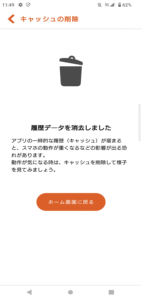
一部機種で、キャッシュ削除後に「 『auセルフケア』が繰り返し停止しています」と表示される不具合を修正しました。
一部機種で、キャッシュ削除後に「 『auセルフケア』が繰り返し停止しています」と表示される不具合を修正しました。
App Description
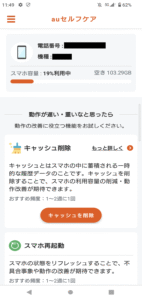
au Self Care is an app that helps resolve concerns regarding smartphone operation and settings.
Do you have this problem?
・Smartphone is slow/heavy
・Smartphone battery life is poor
・Can't connect to the internet
・Ringtone does not sound
In such a case, let's try out the convenient functions of au Self Care such as deleting the cache!
◆The number of installations has finally reached 10 million!
~Explanation of useful functions~
●Easy smartphone care
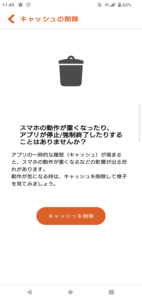
・Delete cache
You can delete temporary history data (cache) accumulated for each app all at once.
*This feature is available on devices running Android OS9 or higher.
・Restart smartphone
You can easily restart your smartphone. By refreshing the state of your smartphone by restarting it, you can expect to see improvements in malfunctions and operations.
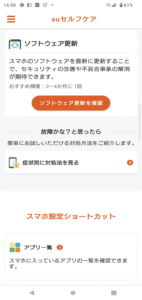
・Software update
By updating your smartphone's software to the latest version, you can expect to improve security and eliminate problems.
・Application list
・List of suspicious apps
・Battery health management
You can check the battery temperature and charging status.
・List of countermeasures in case of failure
●Smartphone information confirmation (phone number, model name, smartphone capacity)
●Smartphone settings shortcuts
・Switch manner mode
・Internet settings
・Wi-Fi tethering settings
・Volume setting
・Battery saver switching
・Refresh rate switching
・Setting the screen off time
・Dark theme settings
・Night mode setting
・Setting automatic brightness adjustment
●Smartphone class
*Some functions may not be available depending on the model.
~Notice~
◆ (Limited to Android OS10 and below) About the au Self Care icon display
Previously, on some models with Android OS 10 or lower, it was launched from the Settings app, but to make it easier to use, we have changed the format to launch it from the app icon, just like other apps.
If you cannot delete this app, you can hide the app icon by disabling it by following the steps below.
[procedure]
Settings → Apps → au Self Care → Disable
*The information may vary depending on the model.
*During the operation, you will receive an alert saying ``The system may be affected,'' but there is no particular problem.
*If disabled, the app will no longer be updated automatically.
[Models whose startup format has been changed]
AQUOS R compact SHV41
AQUOS R2 SHV42
AQUOS R3 SHV44
AQUOS R5G SHG01
AQUOS sense SHV40
AQUOS sense3 basic SHV48
Find X2 Pro OPG01
Galaxy A21 SCV49
Galaxy A30 SCV43
Galaxy A41 SCV48
Galaxy Fold SCV44
Galaxy Note10+ SCV45
Galaxy Note8 SCV37
Galaxy Note9 SCV40
Galaxy S10 SCV41
Galaxy S10+ SCV45
Galaxy S20 5G SCG01
Galaxy S20 Ultra 5G SCG03
Galaxy S20+ 5G SCG02
Galaxy S8 SCV36
Galaxy S8+ SCV35
Galaxy S9 SCV38
Galaxy S9+ SCV39
Galaxy Z Flip 5G SCG04
Galaxy Z Flip SCV47
GRATINA KYV48
HTC U11 HTV33
HUAWEI P20 lite HWV32
HUAWEI P30 lite Premium HWV33
isai V30+ LGV35
LG it LGV36
Mi 10 Lite 5G XIG01
Qua phone QZ KYV44
TORQUE G04 KYV46
URBANO V04 KYV45
Xperia 1 SOV40
Xperia 5 SOV41
Xperia XZ1 SOV36
Xperia XZ2 Premium SOV38
Xperia XZ2 SOV37
Xperia XZ3 SOV39
◆About using functions with accessibility privileges (AccessibilityService API)
This permission is required to use the following functions aimed at improving smartphone operation.
①Delete unnecessary temporary files (cache)
Delete cache accumulated in multiple apps on your smartphone.
②Restart your smartphone
Call up the power menu for restarting.
*This authority will not be used to access customer data or collect customer information.
◆ (Only for Android OS 9 or lower) Regarding the phenomenon where "This app is no longer compatible with your device" is displayed on Google Play.
We have confirmed that this issue is occurring due to an issue with Google Play.
If you do not use this app, the issue may be resolved by disabling or uninstalling it using the following method.
[procedure]
Settings → Apps → au Self Care → Disable or Uninstall
*The information may vary depending on the model.
*During the operation, you will receive an alert saying ``The system may be affected,'' but there is no particular problem.
Do you have this problem?
・Smartphone is slow/heavy
・Smartphone battery life is poor
・Can't connect to the internet
・Ringtone does not sound
In such a case, let's try out the convenient functions of au Self Care such as deleting the cache!
◆The number of installations has finally reached 10 million!
~Explanation of useful functions~
●Easy smartphone care
・Delete cache
You can delete temporary history data (cache) accumulated for each app all at once.
*This feature is available on devices running Android OS9 or higher.
・Restart smartphone
You can easily restart your smartphone. By refreshing the state of your smartphone by restarting it, you can expect to see improvements in malfunctions and operations.
・Software update
By updating your smartphone's software to the latest version, you can expect to improve security and eliminate problems.
・Application list
・List of suspicious apps
・Battery health management
You can check the battery temperature and charging status.
・List of countermeasures in case of failure
●Smartphone information confirmation (phone number, model name, smartphone capacity)
●Smartphone settings shortcuts
・Switch manner mode
・Internet settings
・Wi-Fi tethering settings
・Volume setting
・Battery saver switching
・Refresh rate switching
・Setting the screen off time
・Dark theme settings
・Night mode setting
・Setting automatic brightness adjustment
●Smartphone class
*Some functions may not be available depending on the model.
~Notice~
◆ (Limited to Android OS10 and below) About the au Self Care icon display
Previously, on some models with Android OS 10 or lower, it was launched from the Settings app, but to make it easier to use, we have changed the format to launch it from the app icon, just like other apps.
If you cannot delete this app, you can hide the app icon by disabling it by following the steps below.
[procedure]
Settings → Apps → au Self Care → Disable
*The information may vary depending on the model.
*During the operation, you will receive an alert saying ``The system may be affected,'' but there is no particular problem.
*If disabled, the app will no longer be updated automatically.
[Models whose startup format has been changed]
AQUOS R compact SHV41
AQUOS R2 SHV42
AQUOS R3 SHV44
AQUOS R5G SHG01
AQUOS sense SHV40
AQUOS sense3 basic SHV48
Find X2 Pro OPG01
Galaxy A21 SCV49
Galaxy A30 SCV43
Galaxy A41 SCV48
Galaxy Fold SCV44
Galaxy Note10+ SCV45
Galaxy Note8 SCV37
Galaxy Note9 SCV40
Galaxy S10 SCV41
Galaxy S10+ SCV45
Galaxy S20 5G SCG01
Galaxy S20 Ultra 5G SCG03
Galaxy S20+ 5G SCG02
Galaxy S8 SCV36
Galaxy S8+ SCV35
Galaxy S9 SCV38
Galaxy S9+ SCV39
Galaxy Z Flip 5G SCG04
Galaxy Z Flip SCV47
GRATINA KYV48
HTC U11 HTV33
HUAWEI P20 lite HWV32
HUAWEI P30 lite Premium HWV33
isai V30+ LGV35
LG it LGV36
Mi 10 Lite 5G XIG01
Qua phone QZ KYV44
TORQUE G04 KYV46
URBANO V04 KYV45
Xperia 1 SOV40
Xperia 5 SOV41
Xperia XZ1 SOV36
Xperia XZ2 Premium SOV38
Xperia XZ2 SOV37
Xperia XZ3 SOV39
◆About using functions with accessibility privileges (AccessibilityService API)
This permission is required to use the following functions aimed at improving smartphone operation.
①Delete unnecessary temporary files (cache)
Delete cache accumulated in multiple apps on your smartphone.
②Restart your smartphone
Call up the power menu for restarting.
*This authority will not be used to access customer data or collect customer information.
◆ (Only for Android OS 9 or lower) Regarding the phenomenon where "This app is no longer compatible with your device" is displayed on Google Play.
We have confirmed that this issue is occurring due to an issue with Google Play.
If you do not use this app, the issue may be resolved by disabling or uninstalling it using the following method.
[procedure]
Settings → Apps → au Self Care → Disable or Uninstall
*The information may vary depending on the model.
*During the operation, you will receive an alert saying ``The system may be affected,'' but there is no particular problem.
Download auセルフケア APK
Fast, free and safe download.
APK Permissions 27
- android.permission.ACCESS_ADSERVICES_AD_ID
- android.permission.ACCESS_ADSERVICES_ATTRIBUTION
- android.permission.ACCESS_NETWORK_STATE
- android.permission.ACCESS_NOTIFICATION_POLICY
- android.permission.CLEAR_APP_CACHE
- android.permission.DELETE_CACHE_FILES
- android.permission.FOREGROUND_SERVICE
- android.permission.GET_PACKAGE_SIZE
- android.permission.INTERNET
- android.permission.MODIFY_DAY_NIGHT_MODE
- android.permission.PACKAGE_USAGE_STATS
- android.permission.POST_NOTIFICATIONS
- android.permission.POWER_SAVER
- android.permission.QUERY_ALL_PACKAGES
- android.permission.READ_PHONE_NUMBERS
- android.permission.READ_PHONE_STATE
- android.permission.READ_PRIVILEGED_PHONE_STATE
- android.permission.REBOOT
- android.permission.RECEIVE_BOOT_COMPLETED
- android.permission.SCHEDULE_EXACT_ALARM
- android.permission.VIBRATE
- android.permission.WAKE_LOCK
- android.permission.WRITE_SECURE_SETTINGS
- android.permission.WRITE_SETTINGS
- com.google.android.c2dm.permission.RECEIVE
- com.kddi.selfcare.client.permission.INTERNAL_DELETE_CACHE_FILES
- com.kddi.selfcare.external.permission.ACCESS_EXTERNAL_SERVICE
APK Verified
The cryptographic signature guarantees that the file is safe to install and was not tampered with in any way.
Similar in Tools


Frequently Asked Questions about auセルフケア APK
This is the universal variant — a single APK that contains native libraries for every CPU architecture. It installs on any Android device but is larger than per-architecture variants.
Yes — the APK's signature has been cryptographically verified against the publisher's signing key. The SHA-256 hash is shown in the File Information panel so you can independently confirm the file matches the original release.
Android 28 (API level 35) or newer. Older devices will refuse the install.
Install a free app like 'CPU-Z' or 'Droid Hardware Info' from the Play Store and look at the ABI / Instruction Set row. Most phones made after 2017 are arm64-v8a; if in doubt, download the universal variant.
All variants are functionally identical — same features, same version. They differ only in which CPU architectures the native code is compiled for, and (sometimes) which screen densities the included graphics target. Pick the one that matches your device for the smallest install size, or pick 'Universal' if you're unsure.