
This is the universal build of auメール 11.03.3G. It contains native libraries for every CPU architecture (arm64-v8a, armeabi-v7a, x86, x86_64), so it installs on any Android device. The trade-off is size — it's larger than per-architecture variants. Pick this one if you're unsure which CPU your phone has, or if you plan to share the APK with multiple devices.
File size: 90.2 MB • Min Android: 28 • Target Android: 34 • Version code: 110303 • Framework: Native (Java/Kotlin) • Permissions: 25
Screenshots
File Information
| Package Name | com.kddi.android.aumail |
|---|---|
| Version Name | 11.03.3G |
| Version Code | 110303 |
| Architecture | Universal |
| Min Android Version | Android 28 (API 34) |
| Main Activity | com.kddi.android.aumail.MainActivity |
| Framework | Native (Java/Kotlin) |
| File Size | 90.17 MB |
| Signature (SHA1) | 3C0DAE9E054106D2BB4BCC4C97E2E0CC1D3647D6 |
| File Hash (SHA256) | 139c14576c6260fefd56d3e0e0b8a6be431a086d904d0fb9a420867fc1be416a |
What's New
・メール長押しによる操作の機能追加
・電話番号、メールアドレス、差出人タップ時のメニュー調整
・軽微な不具合に対処
【アプリ不具合のご連絡】
現在一部のお客様におきまして、本文のスクロール時に白く点滅する不具合が発生しております。
以下アプリのアップデートにて解決する場合がございますのでお試しくださいますようお願いいたします。
AndroidシステムのWebView:
play.google.com/store/apps/details?id=com.google.android.webview
・電話番号、メールアドレス、差出人タップ時のメニュー調整
・軽微な不具合に対処
【アプリ不具合のご連絡】
現在一部のお客様におきまして、本文のスクロール時に白く点滅する不具合が発生しております。
以下アプリのアップデートにて解決する場合がございますのでお試しくださいますようお願いいたします。
AndroidシステムのWebView:
play.google.com/store/apps/details?id=com.google.android.webview
App Description
■auメールアプリについて
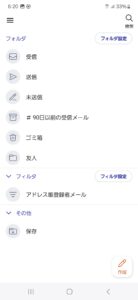
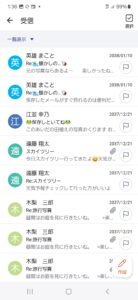
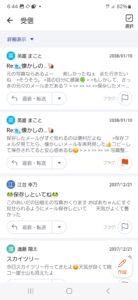
・携帯通信会社であるKDDI株式会社がauブランド回線契約者向けに提供するauメールサービス(@au.com/@ezweb.ne.jp)をご利用いただくための公式アプリです。
・auメールサービスはお客様の携帯回線契約に紐づいており、回線契約に合わせてメールアカウントが発行され、契約や料金に関する重要なお知らせが配信されます。
・本アプリはau回線契約情報を利用して、auメールアドレスの管理/変更、自動転送設定、迷惑メールフィルター設定等を行う事ができます。
・auメールプライバシーポリシーについては、
サイドメニュー>Eメール設定>お客様情報取得・収集設定>
[auメールプライバシーポリシーはこちら]からご参照ください
■ご注意
・初期設定は4G(LTE/WiMAX 2+)データ通信を使って行ってください。
・携帯通信会社であるKDDI株式会社がauブランド回線契約者向けに提供するauメールサービス(@au.com/@ezweb.ne.jp)をご利用いただくための公式アプリです。
・auメールサービスはお客様の携帯回線契約に紐づいており、回線契約に合わせてメールアカウントが発行され、契約や料金に関する重要なお知らせが配信されます。
・本アプリはau回線契約情報を利用して、auメールアドレスの管理/変更、自動転送設定、迷惑メールフィルター設定等を行う事ができます。
・auメールプライバシーポリシーについては、
サイドメニュー>Eメール設定>お客様情報取得・収集設定>
[auメールプライバシーポリシーはこちら]からご参照ください
■ご注意
・初期設定は4G(LTE/WiMAX 2+)データ通信を使って行ってください。
Download auメール APK
Fast, free and safe download.
APK Permissions 25
- android.permission.ACCESS_NETWORK_STATE
- android.permission.CHANGE_NETWORK_STATE
- android.permission.FOREGROUND_SERVICE
- android.permission.FOREGROUND_SERVICE_DATA_SYNC
- android.permission.FOREGROUND_SERVICE_REMOTE_MESSAGING
- android.permission.GET_TASKS
- android.permission.INTERNET
- android.permission.POST_NOTIFICATIONS
- android.permission.READ_CONTACTS
- android.permission.READ_EXTERNAL_STORAGE
- android.permission.READ_PHONE_NUMBERS
- android.permission.READ_PHONE_STATE
- android.permission.RECEIVE_BOOT_COMPLETED
- android.permission.RECEIVE_MMS
- android.permission.RECEIVE_SMS
- android.permission.REQUEST_IGNORE_BATTERY_OPTIMIZATIONS
- android.permission.SCHEDULE_EXACT_ALARM
- android.permission.VIBRATE
- android.permission.WAKE_LOCK
- android.permission.WRITE_EXTERNAL_STORAGE
- com.google.android.finsky.permission.BIND_GET_INSTALL_REFERRER_SERVICE
- com.google.android.gms.permission.AD_ID
- com.huawei.android.launcher.permission.CHANGE_BADGE
- com.kddi.android.aumail.DYNAMIC_RECEIVER_NOT_EXPORTED_PERMISSION
- com.sonymobile.home.permission.PROVIDER_INSERT_BADGE
APK Verified
The cryptographic signature guarantees that the file is safe to install and was not tampered with in any way.
Similar in Tools


Frequently Asked Questions about auメール APK
This is the universal variant — a single APK that contains native libraries for every CPU architecture. It installs on any Android device but is larger than per-architecture variants.
Yes — the APK's signature has been cryptographically verified against the publisher's signing key. The SHA-256 hash is shown in the File Information panel so you can independently confirm the file matches the original release.
Android 28 (API level 34) or newer. Older devices will refuse the install.
Install a free app like 'CPU-Z' or 'Droid Hardware Info' from the Play Store and look at the ABI / Instruction Set row. Most phones made after 2017 are arm64-v8a; if in doubt, download the universal variant.
All variants are functionally identical — same features, same version. They differ only in which CPU architectures the native code is compiled for, and (sometimes) which screen densities the included graphics target. Pick the one that matches your device for the smallest install size, or pick 'Universal' if you're unsure.