
This is the universal build of LG Mobile Gamepad : Wi-Fi 1.0.1. It contains native libraries for every CPU architecture (arm64-v8a, armeabi-v7a, x86, x86_64), so it installs on any Android device. The trade-off is size — it's larger than per-architecture variants. Pick this one if you're unsure which CPU your phone has, or if you plan to share the APK with multiple devices.
File size: 23.8 MB • Min Android: 24 • Target Android: 35 • Version code: 9 • Framework: Native (Java/Kotlin) • Permissions: 14
Screenshots
File Information
| Package Name | com.lge.mobilegamepadwifi |
|---|---|
| Version Name | 1.0.1 |
| Version Code | 9 |
| Architecture | Universal |
| Min Android Version | Android 24 (API 35) |
| Main Activity | com.lge.mobilegamepadwifi.MainActivity |
| Framework | Native (Java/Kotlin) |
| File Size | 23.85 MB |
| Signature (SHA1) | B54D2B6BD1193B65F6FFD642495699D0005A605B |
| File Hash (SHA256) | be6850ad6481ce13b5e1ce7ef0ab5c86d0b3547b7e9d23aede38c7122dc92051 |
What's New
We've improved stability and fixed minor bugs.
App Description
Experience a new level of gaming with the LG Mobile GamePad.
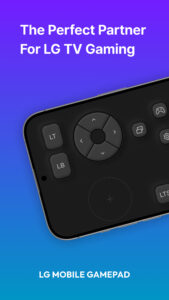
This app turns your smartphone into a virtual game controller, offering a smooth and responsive gaming experience on LG Smart TVs.
Key Features:
· Game Portal Integration – Instantly connect to the LG Game Portal on webOS TV for quick access to a variety of cloud and casual games.
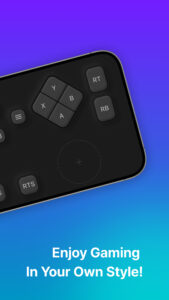
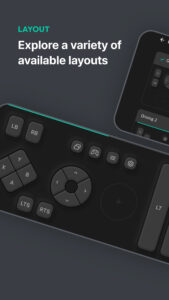
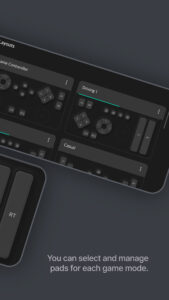
· Customizable Layouts – Choose from multiple preset layouts, including Game Controller, Driving Mode, and Casual Mode, to match your play style.
· Touch & Motion Control – Utilize touch-based joysticks and buttons with vibration feedback for enhanced interaction.
· Seamless TV Connectivity – Effortlessly sync with your LG Smart TV via Wi-Fi or Bluetooth for lag-free gameplay.
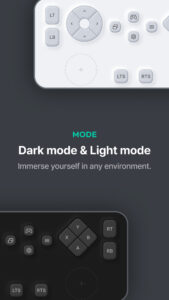
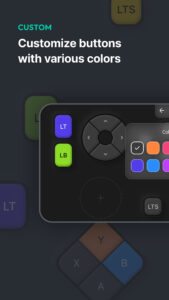
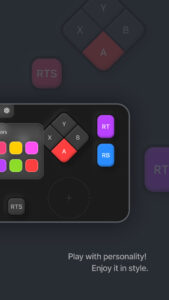
· Personalized Settings – Adjust button colors, display brightness, haptic feedback, and more to optimize your gaming experience.
· Smart Integration with LG ThinQ – Easily switch between gaming and home automation by linking the app with LG ThinQ.
Get ready to elevate your gaming experience—download LG Mobile GamePad today!
[Required Permissions]
To use all features of the app, required permissions must be granted.
(The app may not function properly without allowing the following permissions.)
• Location (Wi-Fi)
- Location permission is required to discover and connect to your LG Smart TV via Wi-Fi.
[Notes]
• Users can change or revoke app permissions anytime in their smartphone settings menu.
• If you have any questions or encounter issues while using the app, please contact us via the provided email, and we’ll assist you promptly.
[Support Information]
• This app may not be supported on certain LG Smart TV models.
• Additionally, it may not function properly on some mobile devices from other manufacturers.
This app turns your smartphone into a virtual game controller, offering a smooth and responsive gaming experience on LG Smart TVs.
Key Features:
· Game Portal Integration – Instantly connect to the LG Game Portal on webOS TV for quick access to a variety of cloud and casual games.
· Customizable Layouts – Choose from multiple preset layouts, including Game Controller, Driving Mode, and Casual Mode, to match your play style.
· Touch & Motion Control – Utilize touch-based joysticks and buttons with vibration feedback for enhanced interaction.
· Seamless TV Connectivity – Effortlessly sync with your LG Smart TV via Wi-Fi or Bluetooth for lag-free gameplay.
· Personalized Settings – Adjust button colors, display brightness, haptic feedback, and more to optimize your gaming experience.
· Smart Integration with LG ThinQ – Easily switch between gaming and home automation by linking the app with LG ThinQ.
Get ready to elevate your gaming experience—download LG Mobile GamePad today!
[Required Permissions]
To use all features of the app, required permissions must be granted.
(The app may not function properly without allowing the following permissions.)
• Location (Wi-Fi)
- Location permission is required to discover and connect to your LG Smart TV via Wi-Fi.
[Notes]
• Users can change or revoke app permissions anytime in their smartphone settings menu.
• If you have any questions or encounter issues while using the app, please contact us via the provided email, and we’ll assist you promptly.
[Support Information]
• This app may not be supported on certain LG Smart TV models.
• Additionally, it may not function properly on some mobile devices from other manufacturers.
Download LG Mobile Gamepad : Wi-Fi APK
Fast, free and safe download.
APK Permissions 14
- android.permission.ACCESS_NETWORK_STATE
- android.permission.ACCESS_WIFI_STATE
- android.permission.BLUETOOTH
- android.permission.BLUETOOTH_ADMIN
- android.permission.BLUETOOTH_CONNECT
- android.permission.BLUETOOTH_SCAN
- android.permission.CHANGE_WIFI_MULTICAST_STATE
- android.permission.FOREGROUND_SERVICE
- android.permission.INTERNET
- android.permission.READ_SETTINGS
- android.permission.VIBRATE
- android.permission.WRITE_SETTINGS
- com.android.vending.CHECK_LICENSE
- com.lge.mobilegamepadwifi.DYNAMIC_RECEIVER_NOT_EXPORTED_PERMISSION
APK Verified
The cryptographic signature guarantees that the file is safe to install and was not tampered with in any way.
Similar in Lifestyle


More by LG Electronics, Inc.


Frequently Asked Questions about LG Mobile Gamepad : Wi-Fi APK
This is the universal variant — a single APK that contains native libraries for every CPU architecture. It installs on any Android device but is larger than per-architecture variants.
Yes — the APK's signature has been cryptographically verified against the publisher's signing key. The SHA-256 hash is shown in the File Information panel so you can independently confirm the file matches the original release.
Android 24 (API level 35) or newer. Older devices will refuse the install.
Install a free app like 'CPU-Z' or 'Droid Hardware Info' from the Play Store and look at the ABI / Instruction Set row. Most phones made after 2017 are arm64-v8a; if in doubt, download the universal variant.
All variants are functionally identical — same features, same version. They differ only in which CPU architectures the native code is compiled for, and (sometimes) which screen densities the included graphics target. Pick the one that matches your device for the smallest install size, or pick 'Universal' if you're unsure.