
This is the arm64-v8a build of LGMV-Business 1.3.0 — the modern 64-bit ARM build that runs on virtually every Android phone released since 2017. It's smaller and faster than the universal variant because Android only loads the native code your CPU actually needs. If your phone is from the last 8 years, this is the right pick.
File size: 38.2 MB • Min Android: 24 • Target Android: 36 • Version code: 1300 • Framework: Native (Java/Kotlin) • Permissions: 10
Screenshots
File Information
| Package Name | com.lge.android.lgmv |
|---|---|
| Version Name | 1.3.0 |
| Version Code | 1300 |
| Architecture | arm64-v8a |
| Min Android Version | Android 24 (API 36) |
| Main Activity | kr.co.ocube.MainActivity |
| Framework | Native (Java/Kotlin) |
| File Size | 38.19 MB |
| Signature (SHA1) | DA43178044010C355B4E454B6163CABAFD128902 |
| File Hash (SHA256) | fb744cca29cff12564935c1537a15eac96f027bd47775f3c70bcd8b1684fe7da |
What's New
1. Added IDU connection
2. Added support for Maximum Power Limitation (EnWG) for Multi V S R32 HR
3. Added monitoring for SV Kit 2~8 port
4. Added monitoring items for DRED control
2. Added support for Maximum Power Limitation (EnWG) for Multi V S R32 HR
3. Added monitoring for SV Kit 2~8 port
4. Added monitoring items for DRED control
App Description
■ New LGMV version released
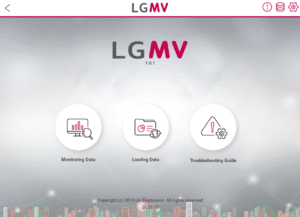
New LGMV has been released in order to expand the supported platforms(Android Tablet, iPhone) and provide the same UX/features regardless of the platform.
■ About LGMV
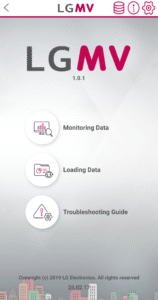
LGMV is designed to monitor the status of LG Electronics Air Conditioner products which helps engineers diagnose products and interpret refrigeration cycle.
Through this app, engineers will be able to identify the operation status of the product and provide a solution to the problems.
※ Please note that this app is only for air conditioning service engineers and cannot be used by general users.
■ Key function
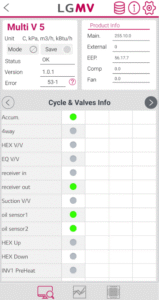
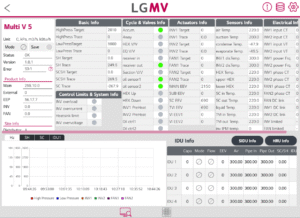
1. Monitoring viewer: Display key information of air conditioner
2. Graph: Display pressure and frequency information of air conditioner in graph
3. Indoor unit operation control: Controls the operating mode of indoor units when the module is connected to the outdoor unit.
4. Save data: Save received air conditioner information as file
5. Save Black Box and Test Report: Receives Black Box data and Test operation result from product.
6. Troubleshooting guide: Display error number and supports resolution plan for the error number list in PDF document.
7. Additional Function (This feature is available on some models.)
• Test run Info
• Serial number Info
• Operating time Info
• Auto Test Run
■ Wi-Fi Module (Sold separately)
Model type : LGMV Wi-Fi Module
Model name : PLGMVW100
New LGMV has been released in order to expand the supported platforms(Android Tablet, iPhone) and provide the same UX/features regardless of the platform.
■ About LGMV
LGMV is designed to monitor the status of LG Electronics Air Conditioner products which helps engineers diagnose products and interpret refrigeration cycle.
Through this app, engineers will be able to identify the operation status of the product and provide a solution to the problems.
※ Please note that this app is only for air conditioning service engineers and cannot be used by general users.
■ Key function
1. Monitoring viewer: Display key information of air conditioner
2. Graph: Display pressure and frequency information of air conditioner in graph
3. Indoor unit operation control: Controls the operating mode of indoor units when the module is connected to the outdoor unit.
4. Save data: Save received air conditioner information as file
5. Save Black Box and Test Report: Receives Black Box data and Test operation result from product.
6. Troubleshooting guide: Display error number and supports resolution plan for the error number list in PDF document.
7. Additional Function (This feature is available on some models.)
• Test run Info
• Serial number Info
• Operating time Info
• Auto Test Run
■ Wi-Fi Module (Sold separately)
Model type : LGMV Wi-Fi Module
Model name : PLGMVW100
Download LGMV-Business APK
Fast, free and safe download.
APK Permissions 10
- android.permission.ACCESS_COARSE_LOCATION
- android.permission.ACCESS_FINE_LOCATION
- android.permission.ACCESS_NETWORK_STATE
- android.permission.ACCESS_WIFI_STATE
- android.permission.BLUETOOTH
- android.permission.BLUETOOTH_ADMIN
- android.permission.CHANGE_NETWORK_STATE
- android.permission.CHANGE_WIFI_STATE
- android.permission.INTERNET
- android.permission.WRITE_EXTERNAL_STORAGE
APK Verified
The cryptographic signature guarantees that the file is safe to install and was not tampered with in any way.
Similar in Tools


More by LG Electronics, Inc.


Frequently Asked Questions about LGMV-Business APK
This variant is built for 64-bit ARM (most Android phones made since 2017). If your device's CPU matches, this is the smallest, fastest version to install.
Yes — the APK's signature has been cryptographically verified against the publisher's signing key. The SHA-256 hash is shown in the File Information panel so you can independently confirm the file matches the original release.
Android 24 (API level 36) or newer. Older devices will refuse the install.
Install a free app like 'CPU-Z' or 'Droid Hardware Info' from the Play Store and look at the ABI / Instruction Set row. Most phones made after 2017 are arm64-v8a; if in doubt, download the universal variant.
All variants are functionally identical — same features, same version. They differ only in which CPU architectures the native code is compiled for, and (sometimes) which screen densities the included graphics target. Pick the one that matches your device for the smallest install size, or pick 'Universal' if you're unsure.