
Download Device Info: View phone info v3.0.1.0 (120-640dpi) (Android APK v3.0.0.0 Universal · Android 23+
Download APK
Verified Safe
This is the universal build of Device Info: View phone info v3.0.1.0 (120-640dpi) (Android v3.0.0.0. It contains native libraries for every CPU architecture (arm64-v8a, armeabi-v7a, x86, x86_64), so it installs on any Android device. The trade-off is size — it's larger than per-architecture variants. Pick this one if you're unsure which CPU your phone has, or if you plan to share the APK with multiple devices.
File size: 12.9 MB • Min Android: 23 • Target Android: 35 • Version code: 324 • Framework: Native (Java/Kotlin) • Permissions: 39
Screenshots
File Information
| Package Name | com.liuzh.deviceinfo |
|---|---|
| Version Name | v3.0.0.0 |
| Version Code | 324 |
| Architecture | Universal |
| Min Android Version | Android 23 (API 35) |
| Main Activity | com.liuzh.deviceinfo.splash.SplashActivity |
| Framework | Native (Java/Kotlin) |
| File Size | 12.87 MB |
| Signature (SHA1) | 1D66149C3A5CA893CE18158D755C61B1142257CD |
| File Hash (SHA256) | d9e9586ceb970d3e5882ccf582b2a8044159a1d25d5631602208a25927950685 |
What's New
1. Brand-new 3.0 version with a fresh look and enhanced experience
2. Fixed camera pixel data issues on certain devices
3. Resolved incorrect Vulkan version detection
4. Optimized OpenGL ES version data retrieval
2. Fixed camera pixel data issues on certain devices
3. Resolved incorrect Vulkan version detection
4. Optimized OpenGL ES version data retrieval
App Description
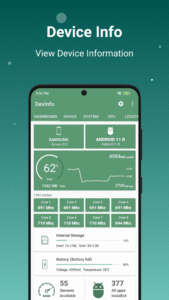
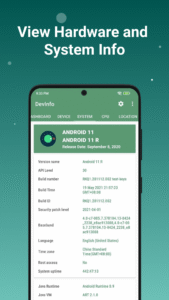
Device Info: View hardware, software and system information. Test Android Device Hardware.
Key Features
👉
Device id, Phone id, Advertising ID, Phone info
View phone info and device id, find your iccid, mcc, mnc, carrier id, etc.
👉
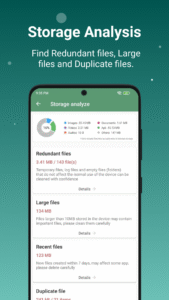
Storage Analysis
Quickly find redundant files, duplicate files, and large files to free up more storage space.
👉
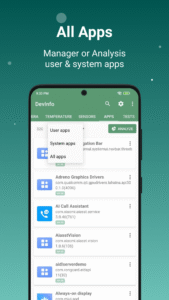
Apps Analysis
Target sdk, min sdk, app installer, native library, sensitive permissions, perform a comprehensive physical examination of the applications in your phone.
👉
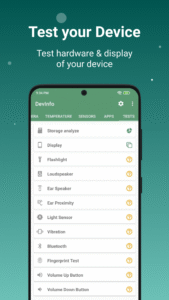
Device Test Benchmark
Screen test, button test, sensor test and hardware test to see if everything is normal on your phone.
👉
Device Benchmark
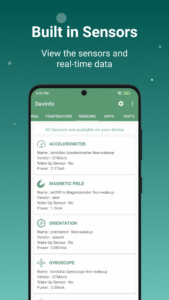
Test Device hardware, view sensors realtime data and test it.
👉
App Detail
Activities, services, broadcast receivers, permissions, view AndroidManifest.xml, you can see all the details of the application.
👉
Management Apps
Export app icons, export app APKs, share apps, uninstall apps, it’s very convenient for you to perform any operations on apps
👉
Floating Monitor
Using the floating monitor, you can see various data of the mobile phone in real time, such as real-time monitoring of FPS, battery current, battery voltage, mobile phone signal, CPU&GPU status, etc.
📱Device Info provides following information of your Android device which grouped as below.
▸
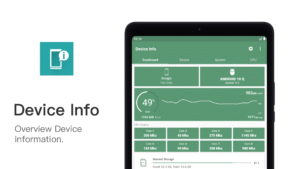
Device information, Phone information
▸
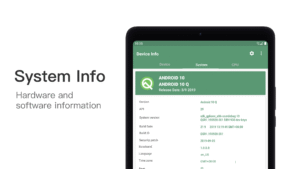
System Information
▸
Hardware Information
▸
Device benchmark
▸
Device Test & Hardware Test
▸
SIM Information
▸
Real time Sensor Information
▸
CPU & Processor Details
▸
Battery Health
▸
Hardware temperature
▸
Network(WiFi & Mobile network)
▸
Camera info
▸
Internal Storage & System Storage & External Storage
▸
Display
▸
GPU & RAM
▸
App details
▸
GPS & Realtime Satellite
Key Features
👉
Device id, Phone id, Advertising ID, Phone info
View phone info and device id, find your iccid, mcc, mnc, carrier id, etc.
👉
Storage Analysis
Quickly find redundant files, duplicate files, and large files to free up more storage space.
👉
Apps Analysis
Target sdk, min sdk, app installer, native library, sensitive permissions, perform a comprehensive physical examination of the applications in your phone.
👉
Device Test Benchmark
Screen test, button test, sensor test and hardware test to see if everything is normal on your phone.
👉
Device Benchmark
Test Device hardware, view sensors realtime data and test it.
👉
App Detail
Activities, services, broadcast receivers, permissions, view AndroidManifest.xml, you can see all the details of the application.
👉
Management Apps
Export app icons, export app APKs, share apps, uninstall apps, it’s very convenient for you to perform any operations on apps
👉
Floating Monitor
Using the floating monitor, you can see various data of the mobile phone in real time, such as real-time monitoring of FPS, battery current, battery voltage, mobile phone signal, CPU&GPU status, etc.
📱Device Info provides following information of your Android device which grouped as below.
▸
Device information, Phone information
▸
System Information
▸
Hardware Information
▸
Device benchmark
▸
Device Test & Hardware Test
▸
SIM Information
▸
Real time Sensor Information
▸
CPU & Processor Details
▸
Battery Health
▸
Hardware temperature
▸
Network(WiFi & Mobile network)
▸
Camera info
▸
Internal Storage & System Storage & External Storage
▸
Display
▸
GPU & RAM
▸
App details
▸
GPS & Realtime Satellite
Download Device Info: View phone info v3.0.1.0 (120-640dpi) (Android APK
Fast, free and safe download.
APK Permissions 39
- android.permission.ACCESS_ADSERVICES_AD_ID
- android.permission.ACCESS_ADSERVICES_ATTRIBUTION
- android.permission.ACCESS_ADSERVICES_TOPICS
- android.permission.ACCESS_COARSE_LOCATION
- android.permission.ACCESS_FINE_LOCATION
- android.permission.ACCESS_NETWORK_STATE
- android.permission.ACCESS_WIFI_STATE
- android.permission.BLUETOOTH
- android.permission.BLUETOOTH_ADMIN
- android.permission.BLUETOOTH_CONNECT
- android.permission.CAMERA
- android.permission.CHANGE_NETWORK_STATE
- android.permission.CHANGE_WIFI_STATE
- android.permission.FLASHLIGHT
- android.permission.FOREGROUND_SERVICE
- android.permission.INTERNET
- android.permission.MANAGE_EXTERNAL_STORAGE
- android.permission.MODIFY_AUDIO_SETTINGS
- android.permission.POST_NOTIFICATIONS
- android.permission.QUERY_ALL_PACKAGES
- android.permission.READ_EXTERNAL_STORAGE
- android.permission.READ_PHONE_NUMBERS
- android.permission.READ_PHONE_STATE
- android.permission.RECEIVE_BOOT_COMPLETED
- android.permission.REQUEST_DELETE_PACKAGES
- android.permission.REQUEST_IGNORE_BATTERY_OPTIMIZATIONS
- android.permission.SYSTEM_ALERT_WINDOW
- android.permission.USE_BIOMETRIC
- android.permission.USE_FINGERPRINT
- android.permission.VIBRATE
- android.permission.WAKE_LOCK
- android.permission.WRITE_EXTERNAL_STORAGE
- com.android.vending.BILLING
- com.applovin.array.apphub.permission.BIND_APPHUB_SERVICE
- com.google.android.c2dm.permission.RECEIVE
- com.google.android.finsky.permission.BIND_GET_INSTALL_REFERRER_SERVICE
- com.google.android.gms.permission.AD_ID
- com.google.android.providers.gsf.permission.READ_GSERVICES
- com.liuzh.deviceinfo.DYNAMIC_RECEIVER_NOT_EXPORTED_PERMISSION
APK Verified
The cryptographic signature guarantees that the file is safe to install and was not tampered with in any way.


Frequently Asked Questions about Device Info: View phone info v3.0.1.0 (120-640dpi) (Android APK
This is the universal variant — a single APK that contains native libraries for every CPU architecture. It installs on any Android device but is larger than per-architecture variants.
Yes — the APK's signature has been cryptographically verified against the publisher's signing key. The SHA-256 hash is shown in the File Information panel so you can independently confirm the file matches the original release.
Android 23 (API level 35) or newer. Older devices will refuse the install.
Install a free app like 'CPU-Z' or 'Droid Hardware Info' from the Play Store and look at the ABI / Instruction Set row. Most phones made after 2017 are arm64-v8a; if in doubt, download the universal variant.
All variants are functionally identical — same features, same version. They differ only in which CPU architectures the native code is compiled for, and (sometimes) which screen densities the included graphics target. Pick the one that matches your device for the smallest install size, or pick 'Universal' if you're unsure.