
This is the universal build of Mevo Studio 3.6. It contains native libraries for every CPU architecture (arm64-v8a, armeabi-v7a, x86, x86_64), so it installs on any Android device. The trade-off is size — it's larger than per-architecture variants. Pick this one if you're unsure which CPU your phone has, or if you plan to share the APK with multiple devices.
File size: 202.7 MB • Min Android: 26 • Target Android: 35 • Version code: 748 • Framework: Native (Java/Kotlin) • Permissions: 30
Screenshots
File Information
| Package Name | com.mevo.multicam |
|---|---|
| Version Name | 3.6 |
| Version Code | 748 |
| Architecture | Universal |
| Min Android Version | Android 26 (API 35) |
| Main Activity | com.mevo.ce.SplashActivity |
| Framework | Native (Java/Kotlin) |
| File Size | 202.73 MB |
| Signature (SHA1) | 7DC282C8D89B24D6D7E0C55224D77206902B1E36 |
| File Hash (SHA256) | c9fc0f67940a31e72b98f5f85e87b62ba0cc9c302a63ef7d7d89ee4b9c3e3adc |
What's New
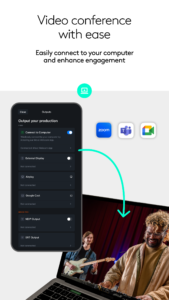
- New: Outputs - you can now output your production through a number of different methods including HDMI through a supported USB-HDMI adapter (compatible device required) and Google Cast.
App Description
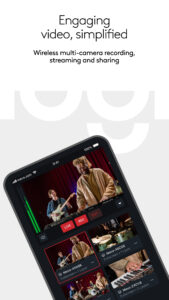
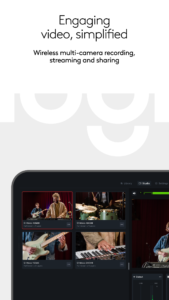
Mevo allows anyone to live stream with ease. With Mevo Multicam, content creators can wirelessly connect multiple sources including Mevo Cameras, Mevo Go*, NDI enabled cameras* and more. Easily switch sources, live stream and record in 1080p HD to multiple platforms like YouTube and Facebook.
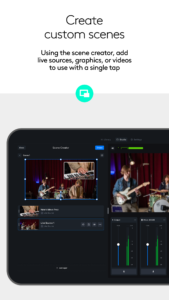
Wirelessly Switch between Multiple cameras
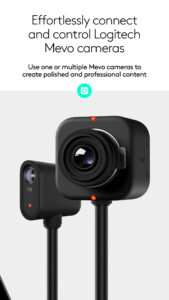
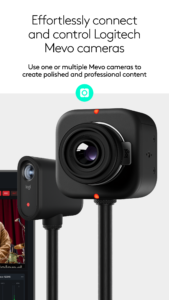
With Mevo Multicam, you can wirelessly control multiple Mevo cameras at the same time and live switch between them. Additionally, you can mix in non-Mevo NDI enabled cameras* with ease.
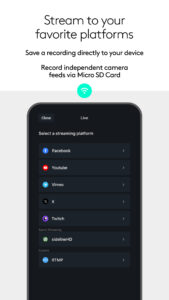
Instantly Stream to Your Favorite Platforms
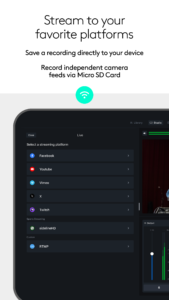
With a few taps, you can stream instantly to popular streaming platforms like YouTube, Twitch and many more. *Subscribe to Mevo Pro to multistream.
Elevate your next Video Conference
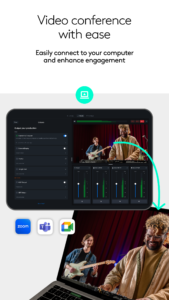
Easily share multiple camera angles with your audience
Record in 1080p HD
Record your program output locally to your phone in full HD. Also record each individual camera feed directly to their local microSD card.
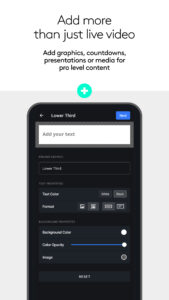
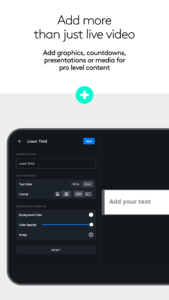
Add Graphics
Add custom graphics including lower thirds, corner bugs, and full screen images and video to elevate your production value.
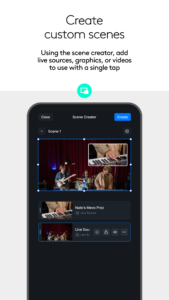
Picture in Picture
Add an inset image or video over your main video to highlight parts of your story.
Advanced Auto-Director
Toggle auto-director and the built in AI will live switch the show for you.
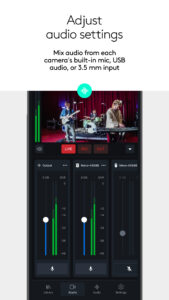
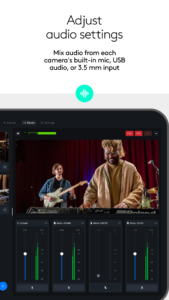
Audio Mixer
Independently mix each camera's audio for the perfect sound
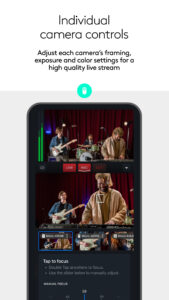
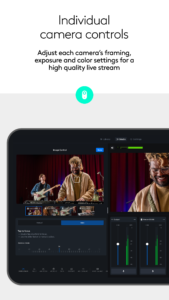
Control Each Cameras Video Settings
Adjust each Mevo camera’s exposure and color settings for a high quality live stream.
Premium Features
Get more Mevo with Mevo Pro subscription.
Compatible with *Mevo Go app, Mevo Core, Mevo Start, Mevo Plus and First Generation Mevo
Additional Support
Visit help.mevo.com
Footnotes
*Requires Mevo Pro Subscription
Terms of Service:
mevo.com/terms
Privacy Policy:
mevo.com/privacy
Wirelessly Switch between Multiple cameras
With Mevo Multicam, you can wirelessly control multiple Mevo cameras at the same time and live switch between them. Additionally, you can mix in non-Mevo NDI enabled cameras* with ease.
Instantly Stream to Your Favorite Platforms
With a few taps, you can stream instantly to popular streaming platforms like YouTube, Twitch and many more. *Subscribe to Mevo Pro to multistream.
Elevate your next Video Conference
Easily share multiple camera angles with your audience
Record in 1080p HD
Record your program output locally to your phone in full HD. Also record each individual camera feed directly to their local microSD card.
Add Graphics
Add custom graphics including lower thirds, corner bugs, and full screen images and video to elevate your production value.
Picture in Picture
Add an inset image or video over your main video to highlight parts of your story.
Advanced Auto-Director
Toggle auto-director and the built in AI will live switch the show for you.
Audio Mixer
Independently mix each camera's audio for the perfect sound
Control Each Cameras Video Settings
Adjust each Mevo camera’s exposure and color settings for a high quality live stream.
Premium Features
Get more Mevo with Mevo Pro subscription.
Compatible with *Mevo Go app, Mevo Core, Mevo Start, Mevo Plus and First Generation Mevo
Additional Support
Visit help.mevo.com
Footnotes
*Requires Mevo Pro Subscription
Terms of Service:
mevo.com/terms
Privacy Policy:
mevo.com/privacy
Download Mevo Studio APK
Fast, free and safe download.
APK Permissions 30
- android.permission.ACCESS_ADSERVICES_AD_ID
- android.permission.ACCESS_ADSERVICES_ATTRIBUTION
- android.permission.ACCESS_ADSERVICES_CUSTOM_AUDIENCE
- android.permission.ACCESS_ADSERVICES_TOPICS
- android.permission.ACCESS_NETWORK_STATE
- android.permission.ACCESS_WIFI_STATE
- android.permission.BLUETOOTH
- android.permission.BLUETOOTH_ADMIN
- android.permission.BLUETOOTH_CONNECT
- android.permission.BLUETOOTH_SCAN
- android.permission.CAMERA
- android.permission.CHANGE_NETWORK_STATE
- android.permission.CHANGE_WIFI_MULTICAST_STATE
- android.permission.CHANGE_WIFI_STATE
- android.permission.FOREGROUND_SERVICE
- android.permission.FOREGROUND_SERVICE_CAMERA
- android.permission.FOREGROUND_SERVICE_CONNECTED_DEVICE
- android.permission.FOREGROUND_SERVICE_MICROPHONE
- android.permission.INTERNET
- android.permission.POST_NOTIFICATIONS
- android.permission.READ_EXTERNAL_STORAGE
- android.permission.READ_MEDIA_VIDEO
- android.permission.RECORD_AUDIO
- android.permission.WAKE_LOCK
- android.permission.WRITE_EXTERNAL_STORAGE
- com.android.vending.BILLING
- com.google.android.c2dm.permission.RECEIVE
- com.google.android.finsky.permission.BIND_GET_INSTALL_REFERRER_SERVICE
- com.google.android.gms.permission.AD_ID
- com.mevo.multicam.DYNAMIC_RECEIVER_NOT_EXPORTED_PERMISSION
APK Verified
The cryptographic signature guarantees that the file is safe to install and was not tampered with in any way.
Similar in Video Players


Frequently Asked Questions about Mevo Studio APK
This is the universal variant — a single APK that contains native libraries for every CPU architecture. It installs on any Android device but is larger than per-architecture variants.
Yes — the APK's signature has been cryptographically verified against the publisher's signing key. The SHA-256 hash is shown in the File Information panel so you can independently confirm the file matches the original release.
Android 26 (API level 35) or newer. Older devices will refuse the install.
Install a free app like 'CPU-Z' or 'Droid Hardware Info' from the Play Store and look at the ABI / Instruction Set row. Most phones made after 2017 are arm64-v8a; if in doubt, download the universal variant.
All variants are functionally identical — same features, same version. They differ only in which CPU architectures the native code is compiled for, and (sometimes) which screen densities the included graphics target. Pick the one that matches your device for the smallest install size, or pick 'Universal' if you're unsure.