
Download Ultimate USB APK 9.7.3 arm64-v8a, armeabi-v7a, x86, x86_64 · Android 24+
Download APK
Verified Safe
This is the arm64-v8a, armeabi-v7a, x86, x86_64 build of Ultimate USB 9.7.3. Pick this build if your device's primary ABI matches.
File size: 105.9 MB • Min Android: 24 • Target Android: 36 • Version code: 90703 • Framework: Native (Java/Kotlin) • Permissions: 20
Screenshots
File Information
| Package Name | com.mixapplications.ultimateusb |
|---|---|
| Version Name | 9.7.3 |
| Version Code | 90703 |
| Architecture | arm64-v8a, armeabi-v7a, x86, x86_64 |
| Min Android Version | Android 24 (API 36) |
| Main Activity | com.mixapplications.ultimateusb.MainActivity |
| Framework | Native (Java/Kotlin) |
| File Size | 105.95 MB |
| Signature (SHA1) | 28E5E11798CE91CF3278D50AB87FFE060306D787 |
| File Hash (SHA256) | 2d836f31861ead3acd765060efc13f9c69f70e3c2173bfa7c3fed3116862c048 |
What's New
*Improve App Performance*
*improve USB Connection*
*New*
Iso Burner Support : Support split .wim file for fat32.
Iso Burner Support : FreeDOS, MS-DOS, Non Bootable Format.
Reduce Coins Cost For Format Fat32 to 1 Coin.
*Bug Fixes*
- UI Bug Fixed.
- All Reported Bugs Fixed.
*improve USB Connection*
*New*
Iso Burner Support : Support split .wim file for fat32.
Iso Burner Support : FreeDOS, MS-DOS, Non Bootable Format.
Reduce Coins Cost For Format Fat32 to 1 Coin.
*Bug Fixes*
- UI Bug Fixed.
- All Reported Bugs Fixed.
App Description
Ultimate USB — Full USB Control on Android
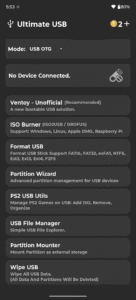
Ultimate USB is a complete USB toolkit for Android. Flash operating systems, format drives, manage partitions, and back up data—directly from your phone. No PC required. Most tools work without root. Only the internal SD card slot requires root access.
---
🛠️ Bootable USB Tools
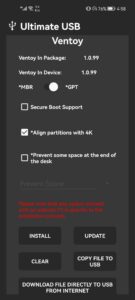
● Ventoy (Unofficial):
- Create multi-boot USB drives with ISO selection at boot
- Supported images: Windows 7, 8, 8.1, 10, 11; all major Linux ISOs
- File systems: NTFS, FAT32, EXFAT (FAT32/EXFAT require Pro)
- Partition schemes: GPT (UEFI), MBR (Legacy) — manual selection
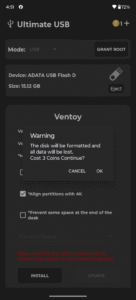
• Coin actions: Install / Update / Clear → 2 coins each
• Free actions: Copy ISO files to USB, download ISO files directly to USB
- Supports bypassing Windows 11 minimum requirements
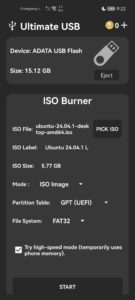
● ISO Burner:
- Burn single OS images to USB
- Supported formats:
– Windows 7, 8, 8.1, 10, 11
– Linux ISO
– macOS DMG
– Raspberry Pi images
– FreeDos, MS-DOS
- Windows ISO: Manual file system and partition scheme selection → 2 coins
- Supports bypassing Windows 11 minimum requirements
- Linux, DMG, Raspberry Pi: Written as-is; no customization
• Free actions: Burn Linux ISO, DMG, and Raspberry Pi images
● RAW Writer:
- Write raw disk images (IMG, DD) sector-by-sector
- Preserves original layout and boot structure
• No coins required
---
🧹 USB Drive Management
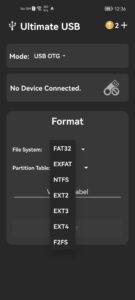
● USB Formatter:
- Format to: FAT16, FAT32, EXFAT, NTFS, EXT2, EXT3, EXT4, F2FS
- Manual file system selection
- Manual partition scheme selection
• Coin cost: 1~2 coins per format
● Partition Wizard:
- Create and delete partitions
- Partition schemes: GPT (UEFI), MBR (Legacy) — manual selection
• Coin cost:
– Single partition setup → 1~2 coins
– Multi-partition setup → up to 3 coins
Other Tools (Free)
● Partition Mounter
● USB Wipe
● Partition Image Manager
● USB Backup & Restore
---
📁 File & Game Tools
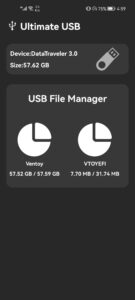
USB File Manager: Browse, copy, delete, and move files
Archive Extractor: Unpack ZIP, RAR, and other formats
● PS2 USB Utils:
- Add, Remove, Rename, Move, and Organize PlayStation 2 Game files
- Clear Unused Games File or Corrupted Files
- Defragment Games (fix "game is fragmented")
- File Conversion (BIN, ISO)
- Support Games > 4GB (any game size)
- Automated conversion to USBExtreme format (needed for >4GB ISOs)
- Creation or editing of OPL-specific configuration files (ul.cfg)
- Full OPL playlist generation
- export .ul game as iso file
- Convert to mbr without losing data
• If USB needs to be formatted it cost 1 coin
---
🔌 Supported Devices
- USB flash drives, SD adapters, hard drives, SSDs, hubs (OTG — no root)
- Internal SD card slot (requires root)
---
💰 Coin System
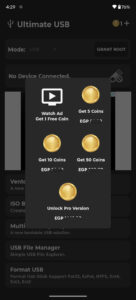
Coins are required only for specific advanced actions. You can:
• Earn coins by watching rewarded ads
• Buy coins directly
• Unlock unlimited access and remove coin limits with Pro
Coin-Based Actions
• Ventoy: Install / Update / Clear → 2 coins
• ISO Burner: Windows ISO → 2 coins
• USB Formatter → 1~2 coins per format
• Partition Wizard: up to 3 coins
• PS2 USB fix with format → 1 coin
---
📢 Ad-Supported Experience
Ultimate USB includes banner ads and rewarded video ads throughout. Ads help keep core features free and support ongoing development.
Upgrade to Pro to:
• Remove all ads
• Unlock unlimited access
• Disable the coin system entirely
---
⚠️ Notes
• Internet is required for rewarded ads
• Disable ad blockers to ensure ads and rewards work
• Keep your device stable during USB operations
• If your phone cannot recognize a formatted USB drive, it means the device does not support the selected file system
– The USB is working perfectly
– To confirm, test the drive on a PC
– Use a more compatible file system like FAT32 if needed
---
Ultimate USB gives you full control over bootable media, partitions, and storage—fast, flexible, and built for real-world use.
Download now and take control of your USB workflow.
Ultimate USB is a complete USB toolkit for Android. Flash operating systems, format drives, manage partitions, and back up data—directly from your phone. No PC required. Most tools work without root. Only the internal SD card slot requires root access.
---
🛠️ Bootable USB Tools
● Ventoy (Unofficial):
- Create multi-boot USB drives with ISO selection at boot
- Supported images: Windows 7, 8, 8.1, 10, 11; all major Linux ISOs
- File systems: NTFS, FAT32, EXFAT (FAT32/EXFAT require Pro)
- Partition schemes: GPT (UEFI), MBR (Legacy) — manual selection
• Coin actions: Install / Update / Clear → 2 coins each
• Free actions: Copy ISO files to USB, download ISO files directly to USB
- Supports bypassing Windows 11 minimum requirements
● ISO Burner:
- Burn single OS images to USB
- Supported formats:
– Windows 7, 8, 8.1, 10, 11
– Linux ISO
– macOS DMG
– Raspberry Pi images
– FreeDos, MS-DOS
- Windows ISO: Manual file system and partition scheme selection → 2 coins
- Supports bypassing Windows 11 minimum requirements
- Linux, DMG, Raspberry Pi: Written as-is; no customization
• Free actions: Burn Linux ISO, DMG, and Raspberry Pi images
● RAW Writer:
- Write raw disk images (IMG, DD) sector-by-sector
- Preserves original layout and boot structure
• No coins required
---
🧹 USB Drive Management
● USB Formatter:
- Format to: FAT16, FAT32, EXFAT, NTFS, EXT2, EXT3, EXT4, F2FS
- Manual file system selection
- Manual partition scheme selection
• Coin cost: 1~2 coins per format
● Partition Wizard:
- Create and delete partitions
- Partition schemes: GPT (UEFI), MBR (Legacy) — manual selection
• Coin cost:
– Single partition setup → 1~2 coins
– Multi-partition setup → up to 3 coins
Other Tools (Free)
● Partition Mounter
● USB Wipe
● Partition Image Manager
● USB Backup & Restore
---
📁 File & Game Tools
USB File Manager: Browse, copy, delete, and move files
Archive Extractor: Unpack ZIP, RAR, and other formats
● PS2 USB Utils:
- Add, Remove, Rename, Move, and Organize PlayStation 2 Game files
- Clear Unused Games File or Corrupted Files
- Defragment Games (fix "game is fragmented")
- File Conversion (BIN, ISO)
- Support Games > 4GB (any game size)
- Automated conversion to USBExtreme format (needed for >4GB ISOs)
- Creation or editing of OPL-specific configuration files (ul.cfg)
- Full OPL playlist generation
- export .ul game as iso file
- Convert to mbr without losing data
• If USB needs to be formatted it cost 1 coin
---
🔌 Supported Devices
- USB flash drives, SD adapters, hard drives, SSDs, hubs (OTG — no root)
- Internal SD card slot (requires root)
---
💰 Coin System
Coins are required only for specific advanced actions. You can:
• Earn coins by watching rewarded ads
• Buy coins directly
• Unlock unlimited access and remove coin limits with Pro
Coin-Based Actions
• Ventoy: Install / Update / Clear → 2 coins
• ISO Burner: Windows ISO → 2 coins
• USB Formatter → 1~2 coins per format
• Partition Wizard: up to 3 coins
• PS2 USB fix with format → 1 coin
---
📢 Ad-Supported Experience
Ultimate USB includes banner ads and rewarded video ads throughout. Ads help keep core features free and support ongoing development.
Upgrade to Pro to:
• Remove all ads
• Unlock unlimited access
• Disable the coin system entirely
---
⚠️ Notes
• Internet is required for rewarded ads
• Disable ad blockers to ensure ads and rewards work
• Keep your device stable during USB operations
• If your phone cannot recognize a formatted USB drive, it means the device does not support the selected file system
– The USB is working perfectly
– To confirm, test the drive on a PC
– Use a more compatible file system like FAT32 if needed
---
Ultimate USB gives you full control over bootable media, partitions, and storage—fast, flexible, and built for real-world use.
Download now and take control of your USB workflow.
Download Ultimate USB APK
Fast, free and safe download.
APK Permissions 20
- android.hardware.usb.action.USB_PERMISSION
- android.permission.ACCESS_ADSERVICES_AD_ID
- android.permission.ACCESS_ADSERVICES_ATTRIBUTION
- android.permission.ACCESS_ADSERVICES_TOPICS
- android.permission.ACCESS_NETWORK_STATE
- android.permission.ACCESS_WIFI_STATE
- android.permission.CHANGE_NETWORK_STATE
- android.permission.FOREGROUND_SERVICE
- android.permission.FOREGROUND_SERVICE_CONNECTED_DEVICE
- android.permission.INTERNET
- android.permission.POST_NOTIFICATIONS
- android.permission.REORDER_TASKS
- android.permission.VIBRATE
- android.permission.WAKE_LOCK
- com.android.vending.BILLING
- com.applovin.array.apphub.permission.BIND_APPHUB_SERVICE
- com.google.android.c2dm.permission.RECEIVE
- com.google.android.finsky.permission.BIND_GET_INSTALL_REFERRER_SERVICE
- com.google.android.gms.permission.AD_ID
- com.mixapplications.ultimateusb.DYNAMIC_RECEIVER_NOT_EXPORTED_PERMISSION
APK Verified
The cryptographic signature guarantees that the file is safe to install and was not tampered with in any way.
Similar in Tools


More by MixApplications


Frequently Asked Questions about Ultimate USB APK
This variant is built for devices that report `arm64-v8a, armeabi-v7a, x86, x86_64` as their primary ABI. If your device's CPU matches, this is the smallest, fastest version to install.
Yes — the APK's signature has been cryptographically verified against the publisher's signing key. The SHA-256 hash is shown in the File Information panel so you can independently confirm the file matches the original release.
Android 24 (API level 36) or newer. Older devices will refuse the install.
Install a free app like 'CPU-Z' or 'Droid Hardware Info' from the Play Store and look at the ABI / Instruction Set row. Most phones made after 2017 are arm64-v8a; if in doubt, download the universal variant.
All variants are functionally identical — same features, same version. They differ only in which CPU architectures the native code is compiled for, and (sometimes) which screen densities the included graphics target. Pick the one that matches your device for the smallest install size, or pick 'Universal' if you're unsure.