
This is the universal build of Mopria Print Service 2.19.7. It contains native libraries for every CPU architecture (arm64-v8a, armeabi-v7a, x86, x86_64), so it installs on any Android device. The trade-off is size — it's larger than per-architecture variants. Pick this one if you're unsure which CPU your phone has, or if you plan to share the APK with multiple devices.
File size: 14.9 MB • Min Android: 26 • Target Android: 34 • Version code: 201900700 • Framework: Native (Java/Kotlin) • Permissions: 17
Screenshots
File Information
| Package Name | org.mopria.printplugin |
|---|---|
| Version Name | 2.19.7 |
| Version Code | 201900700 |
| Architecture | Universal |
| Min Android Version | Android 26 (API 34) |
| Main Activity | org.mopria.printplugin.SplashScreenActivity |
| Framework | Native (Java/Kotlin) |
| File Size | 14.91 MB |
| Signature (SHA1) | 915C1FF0D9E18974938955110C88EF3CDEB63753 |
| File Hash (SHA256) | d09a726405e269e792abb3845f0ce4e334048879c1480e0f2f994d2d1f3d3fab |
What's New
Supports Android 14
Security improvements
Bug fixes and reliability improvements
Security improvements
Bug fixes and reliability improvements
App Description
Mopria Print Service enables printing over Wi-Fi or Wi-Fi Direct from your Android smartphone or tablet to Mopria® certified printers and multi-function printers (MFPs).
If you want to check to see if your printer is Mopria® certified before installing the Mopria Print Service, check here:
mopria.org/certified-products
.
Easily print photos, web pages and documents when your mobile device is connected to a Mopria® certified printer through a wireless network or using Wi-Fi Direct®. Control print settings such as color, number of copies, duplex, paper size, page range, media type and orientation. In the workplace, take advantage of the advanced punching, folding, stapling, PIN printing, user authentication, and accounting features.
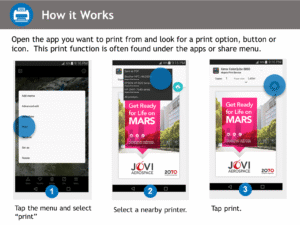
The Mopria Print Service also allows users to print using the Share feature from many of their favorite apps including Facebook, Flipboard, LinkedIn, Twitter and Pinterest, giving users the power to print easily. When using the Share feature, users will see a Mopria Print Service option is included as an option after email and messaging. The Share icon is conspicuously placed and users simply select the Mopria Print Service option, select their printer, adjust settings and print.
Mopria Print Service is pre-installed on some Android and Amazon devices. The device manufacturer determines which devices have the Mopria Print Service pre-installed and if the Mopria Print Service can be uninstalled from such devices.
For more detailed information, visit the following website:
mopria.org/en/faq
.
If you want to check to see if your printer is Mopria® certified before installing the Mopria Print Service, check here:
mopria.org/certified-products
.
Easily print photos, web pages and documents when your mobile device is connected to a Mopria® certified printer through a wireless network or using Wi-Fi Direct®. Control print settings such as color, number of copies, duplex, paper size, page range, media type and orientation. In the workplace, take advantage of the advanced punching, folding, stapling, PIN printing, user authentication, and accounting features.
The Mopria Print Service also allows users to print using the Share feature from many of their favorite apps including Facebook, Flipboard, LinkedIn, Twitter and Pinterest, giving users the power to print easily. When using the Share feature, users will see a Mopria Print Service option is included as an option after email and messaging. The Share icon is conspicuously placed and users simply select the Mopria Print Service option, select their printer, adjust settings and print.
Mopria Print Service is pre-installed on some Android and Amazon devices. The device manufacturer determines which devices have the Mopria Print Service pre-installed and if the Mopria Print Service can be uninstalled from such devices.
For more detailed information, visit the following website:
mopria.org/en/faq
.
Download Mopria Print Service APK
Fast, free and safe download.
APK Permissions 17
- android.permission.ACCESS_COARSE_LOCATION
- android.permission.ACCESS_FINE_LOCATION
- android.permission.ACCESS_NETWORK_STATE
- android.permission.ACCESS_WIFI_STATE
- android.permission.BLUETOOTH
- android.permission.BLUETOOTH_ADMIN
- android.permission.BLUETOOTH_CONNECT
- android.permission.BLUETOOTH_SCAN
- android.permission.CHANGE_NETWORK_STATE
- android.permission.CHANGE_WIFI_MULTICAST_STATE
- android.permission.CHANGE_WIFI_STATE
- android.permission.INTERNET
- android.permission.NEARBY_WIFI_DEVICES
- android.permission.POST_NOTIFICATIONS
- android.permission.WAKE_LOCK
- com.google.android.finsky.permission.BIND_GET_INSTALL_REFERRER_SERVICE
- org.mopria.printplugin.DYNAMIC_RECEIVER_NOT_EXPORTED_PERMISSION
APK Verified
The cryptographic signature guarantees that the file is safe to install and was not tampered with in any way.


Frequently Asked Questions about Mopria Print Service APK
This is the universal variant — a single APK that contains native libraries for every CPU architecture. It installs on any Android device but is larger than per-architecture variants.
Yes — the APK's signature has been cryptographically verified against the publisher's signing key. The SHA-256 hash is shown in the File Information panel so you can independently confirm the file matches the original release.
Android 26 (API level 34) or newer. Older devices will refuse the install.
Install a free app like 'CPU-Z' or 'Droid Hardware Info' from the Play Store and look at the ABI / Instruction Set row. Most phones made after 2017 are arm64-v8a; if in doubt, download the universal variant.
All variants are functionally identical — same features, same version. They differ only in which CPU architectures the native code is compiled for, and (sometimes) which screen densities the included graphics target. Pick the one that matches your device for the smallest install size, or pick 'Universal' if you're unsure.