
Download Clone Phone - OnePlus app APK 15.11.4 arm64-v8a, armeabi-v7a · Android 23+
Download APK
Verified Safe
This is the arm64-v8a, armeabi-v7a build of Clone Phone - OnePlus app 15.11.4. Pick this build if your device's primary ABI matches.
File size: 27.1 MB • Min Android: 23 • Target Android: 35 • Version code: 151104 • Framework: Native (Java/Kotlin) • Permissions: 80
Screenshots
File Information
| Package Name | com.oneplus.backuprestore |
|---|---|
| Version Name | 15.11.4 |
| Version Code | 151104 |
| Architecture | arm64-v8a, armeabi-v7a |
| Min Android Version | Android 23 (API 35) |
| Main Activity | com.oplus.phoneclone.PhoneCloneMainActivity |
| Framework | Native (Java/Kotlin) |
| File Size | 27.07 MB |
| Signature (SHA1) | 23527EF30C2EB107DC50D2800794B5D58E6067FC |
| File Hash (SHA256) | 44514eccc93241b0355df7bfa048d037adc9d04b609f74a2b60f79efca460663 |
What's New
1. OnePlus Switch is now called Clone Phone with improved performance and functionality. Please ensure both new and old devices have Clone Phone installed and updated to the latest version.
2. Optimize issues with device connection.
3. General bug fixes and improvements.
Note:
1. If you cannot find [Backup and Restore] from the [More] button on Clone Phone’s homepage, please try this [Settings] > [Additional settings] > [Back up and reset] > [Back up & restore] > [Local backup].
2. Optimize issues with device connection.
3. General bug fixes and improvements.
Note:
1. If you cannot find [Backup and Restore] from the [More] button on Clone Phone’s homepage, please try this [Settings] > [Additional settings] > [Back up and reset] > [Back up & restore] > [Local backup].
App Description
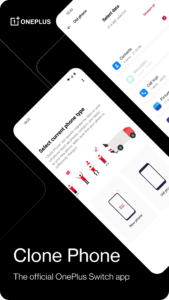
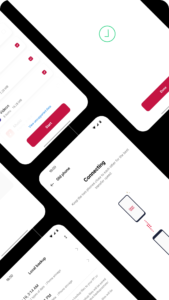
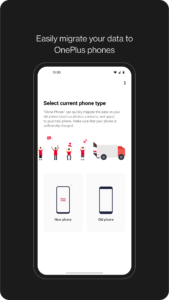
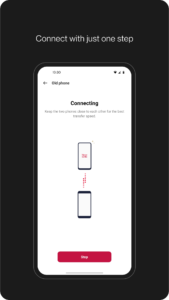
OnePlus Switch is now called Clone Phone. With this app, you can quickly transfer your contacts, messages, photos, and other data from your previous phone to other OnePlus phones.
◆ Data migration
With Clone Phone, you can easily migrate your data from Android devices to OnePlus phones without a network connection.
(Transfers from iOS devices may require a data connection.)
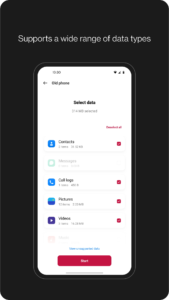
What you can migrate: contacts, SMS, call history, calendar, photos, videos, audio, apps (including the data of certain apps).
◆ Data backup
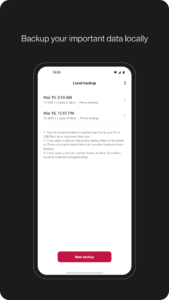
The data backup function can backup your data safely for restoring when required.
What you can backup: contacts, SMS, call history, notes, desktop layouts, apps (excluding data).
Note:
1. Supported data may vary on different systems and Android versions. Please check if the data is still functional after a transfer or a backup restore.
2. If the app crashes, gets stuck, fails to open, or encounters any other issues, please give us feedback or a bug report on the OnePlus Community forums.
3. If Clone Phone notifies you of insufficient storage space, you can try migrating data in batches or clear up storage space on the device.
◆ Data migration
With Clone Phone, you can easily migrate your data from Android devices to OnePlus phones without a network connection.
(Transfers from iOS devices may require a data connection.)
What you can migrate: contacts, SMS, call history, calendar, photos, videos, audio, apps (including the data of certain apps).
◆ Data backup
The data backup function can backup your data safely for restoring when required.
What you can backup: contacts, SMS, call history, notes, desktop layouts, apps (excluding data).
Note:
1. Supported data may vary on different systems and Android versions. Please check if the data is still functional after a transfer or a backup restore.
2. If the app crashes, gets stuck, fails to open, or encounters any other issues, please give us feedback or a bug report on the OnePlus Community forums.
3. If Clone Phone notifies you of insufficient storage space, you can try migrating data in batches or clear up storage space on the device.
Download Clone Phone - OnePlus app APK
Fast, free and safe download.
APK Permissions 80
- android.permission.ACCESS_BACKGROUND_LOCATION
- android.permission.ACCESS_COARSE_LOCATION
- android.permission.ACCESS_FINE_LOCATION
- android.permission.ACCESS_MEDIA_LOCATION
- android.permission.ACCESS_MTP
- android.permission.ACCESS_NETWORK_STATE
- android.permission.ACCESS_WIFI_STATE
- android.permission.BLUETOOTH
- android.permission.BLUETOOTH_ADVERTISE
- android.permission.BLUETOOTH_CONNECT
- android.permission.CAMERA
- android.permission.CHANGE_COMPONENT_ENABLED_STATE
- android.permission.CHANGE_NETWORK_STATE
- android.permission.CHANGE_WIFI_STATE
- android.permission.CLEAR_APP_USER_DATA
- android.permission.DELETE_PACKAGES
- android.permission.DEVICE_POWER
- android.permission.FORCE_STOP_PACKAGES
- android.permission.FOREGROUND_SERVICE
- android.permission.FOREGROUND_SERVICE_LOCATION
- android.permission.FOREGROUND_SERVICE_REMOTE_MESSAGING
- android.permission.GET_PACKAGE_SIZE
- android.permission.INSTALL_PACKAGES
- android.permission.INTERACT_ACROSS_USERS_FULL
- android.permission.INTERNET
- android.permission.MANAGE_APP_OPS_MODES
- android.permission.MANAGE_EXTERNAL_STORAGE
- android.permission.MANAGE_USB
- android.permission.MANAGE_USERS
- android.permission.MODIFY_PHONE_STATE
- android.permission.NEARBY_WIFI_DEVICES
- android.permission.OVERRIDE_WIFI_CONFIG
- android.permission.PACKAGE_USAGE_STATS
- android.permission.PEERS_MAC_ADDRESS
- android.permission.POST_NOTIFICATIONS
- android.permission.QUERY_ALL_PACKAGES
- android.permission.READ_CALENDAR
- android.permission.READ_CALL_LOG
- android.permission.READ_CONTACTS
- android.permission.READ_EXTERNAL_STORAGE
- android.permission.READ_PHONE_STATE
- android.permission.READ_SMS
- android.permission.RECEIVE_BOOT_COMPLETED
- android.permission.SET_WALLPAPER
- android.permission.SET_WALLPAPER_HINTS
- android.permission.SYSTEM_ALERT_WINDOW
- android.permission.UPDATE_APP_OPS_STATS
- android.permission.VIBRATE
- android.permission.WAKE_LOCK
- android.permission.WRITE_CALENDAR
- android.permission.WRITE_CALL_LOG
- android.permission.WRITE_CONTACTS
- android.permission.WRITE_EXTERNAL_STORAGE
- android.permission.WRITE_MEDIA_STORAGE
- android.permission.WRITE_SECURE_SETTINGS
- android.permission.WRITE_SETTINGS
- android.permission.WRITE_SMS
- com.android.permission.GET_INSTALLED_APPS
- com.coloros.operationManual.permission.tipsprovider
- com.oneplus.backuprestore.DYNAMIC_RECEIVER_NOT_EXPORTED_PERMISSION
- com.oneplus.wallpaper.provider.permission.READ_PROVIDER
- com.oneplus.wallpaper.provider.permission.WRITE_PROVIDER
- com.oplus.bootreg.permission.OPLUS_BOOTREG_COMPLETED
- com.oplus.codebook.permission.BACKUP_AND_RESTORE
- com.oplus.permission.safe.AI_APP
- com.oplus.permission.safe.APP_MANAGER
- com.oplus.permission.safe.BACKUP
- com.oplus.permission.safe.CONNECTIVITY
- com.oplus.permission.safe.PASSWORD
- com.oplus.permission.safe.POWER
- com.oplus.permission.safe.PROTECT
- com.oplus.permission.safe.SAU
- com.oplus.permission.safe.SECURITY
- com.oplus.permission.safe.SETTINGS
- com.oplus.permission.safe.SETTINGS_SEARCH
- com.oplus.thirdkit.permission.SECURITY
- heytap.permission.cloud.ACCESS_CLOUD
- net.oneplus.launcher.permission.WRITE_SETTINGS
- oem.backuprestore.remoteservice.RESTORE_SETTINGS
- oplus.permission.OPLUS_COMPONENT_SAFE
APK Verified
The cryptographic signature guarantees that the file is safe to install and was not tampered with in any way.
Similar in Tools


Frequently Asked Questions about Clone Phone - OnePlus app APK
This variant is built for devices that report `arm64-v8a, armeabi-v7a` as their primary ABI. If your device's CPU matches, this is the smallest, fastest version to install.
Yes — the APK's signature has been cryptographically verified against the publisher's signing key. The SHA-256 hash is shown in the File Information panel so you can independently confirm the file matches the original release.
Android 23 (API level 35) or newer. Older devices will refuse the install.
Install a free app like 'CPU-Z' or 'Droid Hardware Info' from the Play Store and look at the ABI / Instruction Set row. Most phones made after 2017 are arm64-v8a; if in doubt, download the universal variant.
All variants are functionally identical — same features, same version. They differ only in which CPU architectures the native code is compiled for, and (sometimes) which screen densities the included graphics target. Pick the one that matches your device for the smallest install size, or pick 'Universal' if you're unsure.