
This is the universal build of Opera GX: Gaming Browser 3.0.0. It contains native libraries for every CPU architecture (arm64-v8a, armeabi-v7a, x86, x86_64), so it installs on any Android device. The trade-off is size — it's larger than per-architecture variants. Pick this one if you're unsure which CPU your phone has, or if you plan to share the APK with multiple devices.
File size: 55.9 MB • Min Android: 29 • Target Android: 36 • Version code: 158 • Framework: Native (Java/Kotlin) • Permissions: 25
Screenshots

File Information
| Package Name | com.opera.gx |
|---|---|
| Version Name | 3.0.0 |
| Version Code | 158 |
| Architecture | Universal |
| Min Android Version | Android 29 (API 36) |
| Main Activity | com.opera.gx.MainActivity |
| Framework | Native (Java/Kotlin) |
| File Size | 55.87 MB |
| Signature (SHA1) | 8FCB5CD8565B9789314CA717E8486A7C5837383C |
| File Hash (SHA256) | f6528fd2d99e16e02b057bdb39803537f685491145f18c5eaa4a40addf8f4b31 |
What's New
Thanks for choosing Opera GX! This version includes latest bug fixes and improvements.
App Description
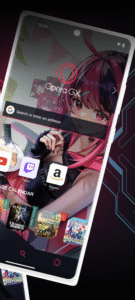
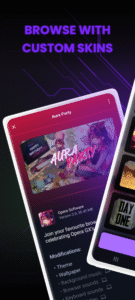
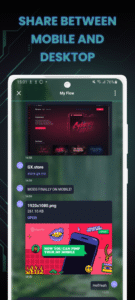
Opera GX brings the gaming lifestyle to your mobile. Express yourself with custom skins, discover free games and the best deals with GX Corner, share links easily between mobile and desktop with My Flow, and much more. All in a secure, private browser.
Designed for gamers
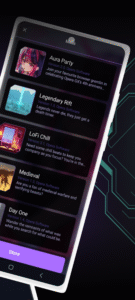
Opera GX’s unique design is inspired by gaming and gaming gear, with the same style that won the desktop GX browser the Red Dot and IF Design awards. Choose from custom themes like GX Classic, Ultra Violet, Purple Haze and White Wolf.
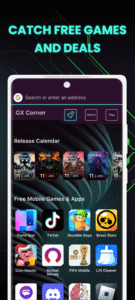
Free games, gaming deals, upcoming releases
Always just a tap away, GX Corner brings you daily gaming news, an upcoming release calendar and trailers. It’s everything a gamer needs to stay on top of the latest news and gaming deals in their mobile web browser.
Connect your phone and computer
Just scan a QR code to connect your phone and computer with Flow. It’s encrypted and safe, with no login, password or account needed. Send links, videos, files and notes to yourself in a single click, and access them instantly in your web browser on all your devices.
Lightning fast browser
Choose between the Fast Action Button (FAB) and standard navigation. The FAB is always within reach of your thumb and uses vibrations when you interact with it, which is perfect when you’re on the move.
Private browser: ad blocker, cookie dialog blocker, and more
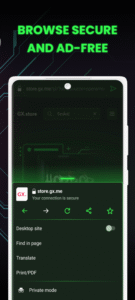
Browse safely and load pages faster with integrated security features like the built-in ad blocker and cookie dialog blocker. This secure browser also comes with cryptojacking protection, stopping others from using your device to mine cryptocurrencies.
About Opera GX
Opera is a global web innovator headquartered in Oslo, Norway and listed on the NASDAQ stock exchange (OPRA). Founded in 1995 on the idea that everyone should be able to browse the web, we have spent the last 25+ years helping millions of people access the internet in a safe, private and innovative way.
By downloading this application, you are agreeing to the End User Licence Agreement at
www.opera.com/eula/mobile
Also, you can learn how Opera handles and protects your data in our Privacy Statement at
www.opera.com/privacy
Designed for gamers
Opera GX’s unique design is inspired by gaming and gaming gear, with the same style that won the desktop GX browser the Red Dot and IF Design awards. Choose from custom themes like GX Classic, Ultra Violet, Purple Haze and White Wolf.
Free games, gaming deals, upcoming releases
Always just a tap away, GX Corner brings you daily gaming news, an upcoming release calendar and trailers. It’s everything a gamer needs to stay on top of the latest news and gaming deals in their mobile web browser.
Connect your phone and computer
Just scan a QR code to connect your phone and computer with Flow. It’s encrypted and safe, with no login, password or account needed. Send links, videos, files and notes to yourself in a single click, and access them instantly in your web browser on all your devices.
Lightning fast browser
Choose between the Fast Action Button (FAB) and standard navigation. The FAB is always within reach of your thumb and uses vibrations when you interact with it, which is perfect when you’re on the move.
Private browser: ad blocker, cookie dialog blocker, and more
Browse safely and load pages faster with integrated security features like the built-in ad blocker and cookie dialog blocker. This secure browser also comes with cryptojacking protection, stopping others from using your device to mine cryptocurrencies.
About Opera GX
Opera is a global web innovator headquartered in Oslo, Norway and listed on the NASDAQ stock exchange (OPRA). Founded in 1995 on the idea that everyone should be able to browse the web, we have spent the last 25+ years helping millions of people access the internet in a safe, private and innovative way.
By downloading this application, you are agreeing to the End User Licence Agreement at
www.opera.com/eula/mobile
Also, you can learn how Opera handles and protects your data in our Privacy Statement at
www.opera.com/privacy
Download Opera GX: Gaming Browser APK
Fast, free and safe download.
APK Permissions 25
- android.permission.ACCESS_ADSERVICES_AD_ID
- android.permission.ACCESS_ADSERVICES_ATTRIBUTION
- android.permission.ACCESS_COARSE_LOCATION
- android.permission.ACCESS_FINE_LOCATION
- android.permission.ACCESS_NETWORK_STATE
- android.permission.ACCESS_WIFI_STATE
- android.permission.CAMERA
- android.permission.FOREGROUND_SERVICE
- android.permission.FOREGROUND_SERVICE_DATA_SYNC
- android.permission.INTERNET
- android.permission.MODIFY_AUDIO_SETTINGS
- android.permission.NFC
- android.permission.POST_NOTIFICATIONS
- android.permission.RECEIVE_BOOT_COMPLETED
- android.permission.RECORD_AUDIO
- android.permission.REQUEST_INSTALL_PACKAGES
- android.permission.VIBRATE
- android.permission.WAKE_LOCK
- android.permission.WRITE_EXTERNAL_STORAGE
- com.android.launcher.permission.INSTALL_SHORTCUT
- com.google.android.c2dm.permission.RECEIVE
- com.google.android.finsky.permission.BIND_GET_INSTALL_REFERRER_SERVICE
- com.google.android.gms.permission.AD_ID
- com.opera.gx.DYNAMIC_RECEIVER_NOT_EXPORTED_PERMISSION
- com.opera.gx.INTERNAL_NAVIGATION
APK Verified
The cryptographic signature guarantees that the file is safe to install and was not tampered with in any way.
Similar in Communication


Frequently Asked Questions about Opera GX: Gaming Browser APK
This is the universal variant — a single APK that contains native libraries for every CPU architecture. It installs on any Android device but is larger than per-architecture variants.
Yes — the APK's signature has been cryptographically verified against the publisher's signing key. The SHA-256 hash is shown in the File Information panel so you can independently confirm the file matches the original release.
Android 29 (API level 36) or newer. Older devices will refuse the install.
Install a free app like 'CPU-Z' or 'Droid Hardware Info' from the Play Store and look at the ABI / Instruction Set row. Most phones made after 2017 are arm64-v8a; if in doubt, download the universal variant.
All variants are functionally identical — same features, same version. They differ only in which CPU architectures the native code is compiled for, and (sometimes) which screen densities the included graphics target. Pick the one that matches your device for the smallest install size, or pick 'Universal' if you're unsure.