
Download KMPlayer - All Video Player APK 35.10.020 Universal · Android 24+
Download APK
Verified Safe
This is the universal build of KMPlayer - All Video Player 35.10.020. It contains native libraries for every CPU architecture (arm64-v8a, armeabi-v7a, x86, x86_64), so it installs on any Android device. The trade-off is size — it's larger than per-architecture variants. Pick this one if you're unsure which CPU your phone has, or if you plan to share the APK with multiple devices.
File size: 235.6 MB • Min Android: 24 • Target Android: 35 • Version code: 3510020 • Framework: Native (Java/Kotlin) • Permissions: 37
Screenshots


File Information
| Package Name | com.kmplayer |
|---|---|
| Version Name | 35.10.020 |
| Version Code | 3510020 |
| Architecture | Universal |
| Min Android Version | Android 24 (API 35) |
| Main Activity | com.kmplayer.SplashActivity |
| Framework | Native (Java/Kotlin) |
| File Size | 235.65 MB |
| Signature (SHA1) | D6BD050EA0ABA99F819F655795C32F14D9C56C34 |
| File Hash (SHA256) | 8f9489f3945a5a9ae47d5fe463d4e58265334343786272aa5e86fe215ea620e6 |
What's New
Thanks to your feedback, we’re getting even better 💜
- Added a scroll bar to lists.
- Video: Moved the shuffle icon position to play options
- Music: Changed the default image, Fixed bottom navigation bar to be visible
- Other: Bug fixes
Thank you.
- Added a scroll bar to lists.
- Video: Moved the shuffle icon position to play options
- Music: Changed the default image, Fixed bottom navigation bar to be visible
- Other: Bug fixes
Thank you.
App Description
💜 KMPlayer, Customer Lounge is here!
👉 Feedback, ideas, and events—all welcome.
cobak.co/en/space/392
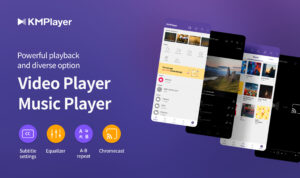
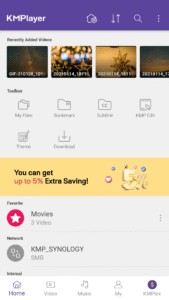
KMPlayer is a perfect media player that can play all forms of high resolution videos, music, and subtitle files.
Along with the flawless playback, enjoy the rich features of the player including quick button, bookmark, subtitle settings, and play speed settings!
KMPlayer has now created KMPlex!
Succeed in mission on KMPlex to earn points, and exchange the points with listed coins. ( Exchangeable coins: MovieBloc Token (MBL), Cobak Token (CBK) )
🎞️ KMPlayer 🎞️
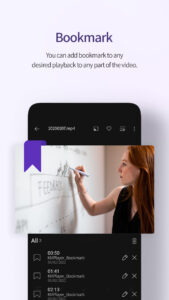
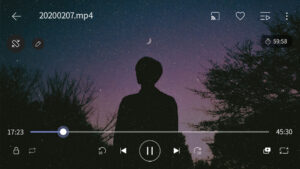
· Bookmark: Add bookmark to the time points to playback any sections you wish to cherish
· Control Color: Change brightness, light intensity, hue, saturation, and gamma information
· Expand & Contract: Expand & contract the video screen being played
· Section Repeat: Repeatedly play a section from point A to point B
· Quick button: Quickly set the player options
· Equalizer: Save separate equalizers for music & video
· Subtitle Settings: Change color, size, and position of subtitles
· Chromecast Support : Watch video on TV using Chromecast
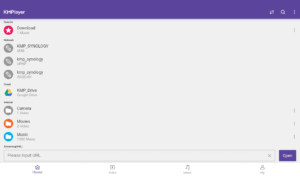
· URL Playing: Enter URL to play any videos on the web (streaming)
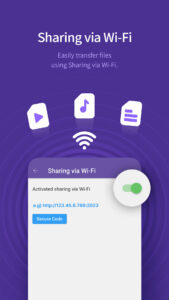
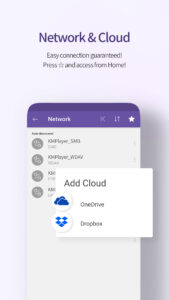
· Network: Supports FTP, UPNP, SMB, WebDav
· Cloud: Supports Dropbox, OneDrive
Video and music : AVI, MP3, WAV, AAC, MOV, MP4, WMV, RMVB, FLAC, 3GP, M4V, MKV, TS, MPG, FLV
Subtitle : DVD, DVB, SSA/ASS Subtitle Track, SubStation Alpha(.ssa/.ass) with full styling.SAMI(.smi) with ruby tag support, SubRip(.srt), MicroDVD(.sub/.txt), VobSub(.sub/.idx), SubViewer2.0(.sub), MPL2(.mpl/.txt), TMPlayer(.txt), Teletext, PJS(.pjs) , WebVTT(.vtt)
💰 KMPlex 💰
Participate in various missions to earn points!
Exchange these earned points with coins and simultaneously send them to your Wallet!
· Access KMPlex through KMPlayer and create your Wallet
· Participate in various missions and earn points (Make sure to participate in the special release event!)
· Collect points to exchange with listed coins ( Coins currently supported: MBL, CBK )
✨ KMPlayer VIP (in-app purchase) ✨
· Torrent client: Real-time play while the downloading
· Cut video & audio: Select a section of a video and audio to cut
· Create GIFs: Create lively GIFs from videos
· MP3 converter: Extract the audio in videos to MP3 files quickly and easily
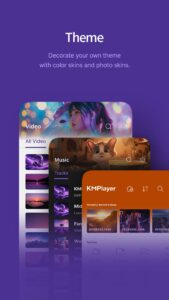
· VIP themes: Create your personal unique theme from various options
· Free trial is limited to 1 time per Google Play account.
· After the free trial period, the selected paid subscription plan will automatically be renewed and charged.
· Subscriptions canceled 24 hours prior to the end of the free trial won’t be charged.
· Subscription can be managed and canceled at any time from Google Play settings.
▶ Permission Details ◀
*Over Android 11
All files access: Requesting permission to access photos, music, and videos stored in the device
You can set this permission by Settings->Security and privacy->Privacy->Permission manager->Files and media->See more apps that can access all files->All files access.
(It may look different depending on the type. Search for access to all files in settings)
*Under Android 11
Storage space: Requesting permission to access photos, music, and videos stored in the device
Phone: User Authentication is used to get points.
Notifications (Over Android 13): send notifications
Draw over other apps: Requesting permission to use pop-up play.
* You may use the basic service without agreeing to the optional permission. (However, features requiring optional permissions will not be available.)
▶ Message from the Developers ◀
KMPlayer’s development team are always open to your opinions to further improve the App. Feel free to request new features and please provide us with plentiful feedback.
Email:
support.mobile@kmplayer.com
👉 Feedback, ideas, and events—all welcome.
cobak.co/en/space/392
KMPlayer is a perfect media player that can play all forms of high resolution videos, music, and subtitle files.
Along with the flawless playback, enjoy the rich features of the player including quick button, bookmark, subtitle settings, and play speed settings!
KMPlayer has now created KMPlex!
Succeed in mission on KMPlex to earn points, and exchange the points with listed coins. ( Exchangeable coins: MovieBloc Token (MBL), Cobak Token (CBK) )
🎞️ KMPlayer 🎞️
· Bookmark: Add bookmark to the time points to playback any sections you wish to cherish
· Control Color: Change brightness, light intensity, hue, saturation, and gamma information
· Expand & Contract: Expand & contract the video screen being played
· Section Repeat: Repeatedly play a section from point A to point B
· Quick button: Quickly set the player options
· Equalizer: Save separate equalizers for music & video
· Subtitle Settings: Change color, size, and position of subtitles
· Chromecast Support : Watch video on TV using Chromecast
· URL Playing: Enter URL to play any videos on the web (streaming)
· Network: Supports FTP, UPNP, SMB, WebDav
· Cloud: Supports Dropbox, OneDrive
Video and music : AVI, MP3, WAV, AAC, MOV, MP4, WMV, RMVB, FLAC, 3GP, M4V, MKV, TS, MPG, FLV
Subtitle : DVD, DVB, SSA/ASS Subtitle Track, SubStation Alpha(.ssa/.ass) with full styling.SAMI(.smi) with ruby tag support, SubRip(.srt), MicroDVD(.sub/.txt), VobSub(.sub/.idx), SubViewer2.0(.sub), MPL2(.mpl/.txt), TMPlayer(.txt), Teletext, PJS(.pjs) , WebVTT(.vtt)
💰 KMPlex 💰
Participate in various missions to earn points!
Exchange these earned points with coins and simultaneously send them to your Wallet!
· Access KMPlex through KMPlayer and create your Wallet
· Participate in various missions and earn points (Make sure to participate in the special release event!)
· Collect points to exchange with listed coins ( Coins currently supported: MBL, CBK )
✨ KMPlayer VIP (in-app purchase) ✨
· Torrent client: Real-time play while the downloading
· Cut video & audio: Select a section of a video and audio to cut
· Create GIFs: Create lively GIFs from videos
· MP3 converter: Extract the audio in videos to MP3 files quickly and easily
· VIP themes: Create your personal unique theme from various options
· Free trial is limited to 1 time per Google Play account.
· After the free trial period, the selected paid subscription plan will automatically be renewed and charged.
· Subscriptions canceled 24 hours prior to the end of the free trial won’t be charged.
· Subscription can be managed and canceled at any time from Google Play settings.
▶ Permission Details ◀
*Over Android 11
All files access: Requesting permission to access photos, music, and videos stored in the device
You can set this permission by Settings->Security and privacy->Privacy->Permission manager->Files and media->See more apps that can access all files->All files access.
(It may look different depending on the type. Search for access to all files in settings)
*Under Android 11
Storage space: Requesting permission to access photos, music, and videos stored in the device
Phone: User Authentication is used to get points.
Notifications (Over Android 13): send notifications
Draw over other apps: Requesting permission to use pop-up play.
* You may use the basic service without agreeing to the optional permission. (However, features requiring optional permissions will not be available.)
▶ Message from the Developers ◀
KMPlayer’s development team are always open to your opinions to further improve the App. Feel free to request new features and please provide us with plentiful feedback.
Email:
support.mobile@kmplayer.com
Download KMPlayer - All Video Player APK
Fast, free and safe download.
APK Permissions 37
- android.permission.ACCESS_ADSERVICES_AD_ID
- android.permission.ACCESS_ADSERVICES_ATTRIBUTION
- android.permission.ACCESS_ADSERVICES_TOPICS
- android.permission.ACCESS_MEDIA_LOCATION
- android.permission.ACCESS_NETWORK_STATE
- android.permission.ACCESS_WIFI_STATE
- android.permission.BLUETOOTH
- android.permission.FOREGROUND_SERVICE
- android.permission.FOREGROUND_SERVICE_MEDIA_PLAYBACK
- android.permission.GET_ACCOUNTS
- android.permission.INTERNET
- android.permission.MANAGE_EXTERNAL_STORAGE
- android.permission.MODIFY_AUDIO_SETTINGS
- android.permission.POST_NOTIFICATIONS
- android.permission.READ_CONTACTS
- android.permission.READ_EXTERNAL_STORAGE
- android.permission.READ_INTERNAL_STORAGE
- ANDROID.permission.READ_INTERNAL_STORAGE
- android.permission.READ_PHONE_NUMBERS
- android.permission.READ_PHONE_STATE
- android.permission.REQUEST_IGNORE_BATTERY_OPTIMIZATIONS
- android.permission.SYSTEM_ALERT_WINDOW
- android.permission.USE_BIOMETRIC
- android.permission.USE_FINGERPRINT
- android.permission.VIBRATE
- android.permission.WAKE_LOCK
- android.permission.WRITE_EXTERNAL_STORAGE
- ANDROID.permission.WRITE_INTERNAL_STORAGE
- android.permission.WRITE_INTERNAL_STORAGE
- com.android.vending.BILLING
- com.applovin.array.apphub.permission.BIND_APPHUB_SERVICE
- com.google.android.c2dm.permission.RECEIVE
- com.google.android.finsky.permission.BIND_GET_INSTALL_REFERRER_SERVICE
- com.google.android.gms.permission.AD_ID
- com.google.android.providers.gsf.permission.READ_GSERVICES
- com.google.com.android.gms.permission.AD_ID
- com.kmplayer.DYNAMIC_RECEIVER_NOT_EXPORTED_PERMISSION
APK Verified
The cryptographic signature guarantees that the file is safe to install and was not tampered with in any way.
Similar in Video Players


Frequently Asked Questions about KMPlayer - All Video Player APK
This is the universal variant — a single APK that contains native libraries for every CPU architecture. It installs on any Android device but is larger than per-architecture variants.
Yes — the APK's signature has been cryptographically verified against the publisher's signing key. The SHA-256 hash is shown in the File Information panel so you can independently confirm the file matches the original release.
Android 24 (API level 35) or newer. Older devices will refuse the install.
Install a free app like 'CPU-Z' or 'Droid Hardware Info' from the Play Store and look at the ABI / Instruction Set row. Most phones made after 2017 are arm64-v8a; if in doubt, download the universal variant.
All variants are functionally identical — same features, same version. They differ only in which CPU architectures the native code is compiled for, and (sometimes) which screen densities the included graphics target. Pick the one that matches your device for the smallest install size, or pick 'Universal' if you're unsure.