
Screenshots
File Information
| Package Name | com.itemstudio.castro |
|---|---|
| Version Name | 4.8.3 |
| Version Code | 368 |
| Architecture | Universal |
| Min Android Version | Android 23 (API 36) |
| Main Activity | com.itemstudio.castro.navigation.NavigationActivity |
| Framework | Native (Java/Kotlin) |
| File Size | 7.70 MB |
| Signature (SHA1) | 3E79F3E4AEDE502E1660CBE682570E8FDE056EAE |
| File Hash (SHA256) | e2d95a2b0a1506ee56548cb9064eefc26cb456993291dc7a51cf184804f70f72 |
What's New
Castro 4.8 "Cell" update is now available and includes full support for Android 16, improvements for HDR display support, and many other fixes and enhancements.
Detailed changelog:
pavlorekun.dev/castro/changelog_release/
Detailed changelog:
pavlorekun.dev/castro/changelog_release/
App Description
Castro is a huge collection of information about your device and a set of tools for monitoring its status. This allows you to check the performance of your device in real-time!
Large collection of the information
Castro processes and displays a huge amount of information, namely:
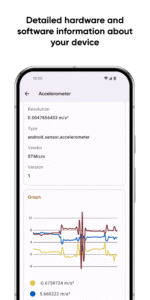
• Detailed processor statistics (CPU and GPU);
• Battery monitoring;
• Consumption of all kinds of memory;
• Data usage via Wi-Fi and mobile networks;
• Real-time sensors data with useful graphs;
• Detailed information about device's cameras;
• Full list of available audio and video codecs;
• Monitoring temperatures of the device;
• And many other features, including DRM and Bluetooth!
The most important thing in the "Dashboard"
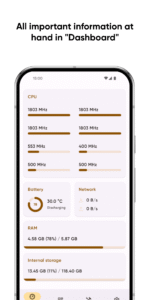
If you are not interested in too detailed information in a larger volume, you can always use the "Dashboard" window, which collects all the most important information - CPU usage, battery status, network usage, and memory load on the device.
More control with useful tools
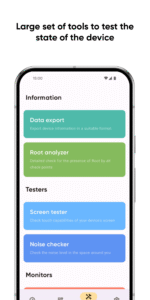
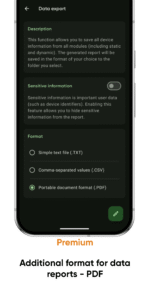
• Share your device information using "Data export";
• Test your display state via "Screen tester";
• Check the noise around you with "Noise checker".
Even more features with the "Premium"
"Premium" users will have access to even more features, such as:
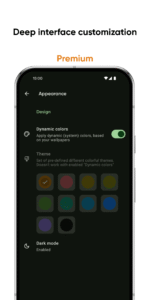
• Deep interface customization with various colors and themes;
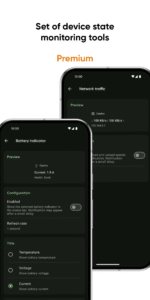
• Battery monitoring tool to track battery properties;
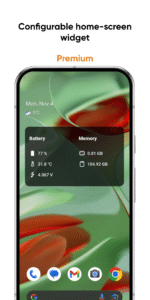
• Configurable home-screen widget, with information about battery, memory, and more;
• Network traffic speed monitor to track your connection speed;
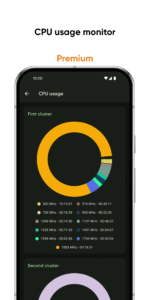
• CPU usage monitor to keep abreast of frequency usage;
• PDF format for information exporting.
FAQ and localization
Looking for answers to frequently asked questions (FAQ)? Visit this page:
pavlorekun.dev/castro/faq/
Want to help in Castro localization? Visit this page:
crowdin.com/project/castro
Large collection of the information
Castro processes and displays a huge amount of information, namely:
• Detailed processor statistics (CPU and GPU);
• Battery monitoring;
• Consumption of all kinds of memory;
• Data usage via Wi-Fi and mobile networks;
• Real-time sensors data with useful graphs;
• Detailed information about device's cameras;
• Full list of available audio and video codecs;
• Monitoring temperatures of the device;
• And many other features, including DRM and Bluetooth!
The most important thing in the "Dashboard"
If you are not interested in too detailed information in a larger volume, you can always use the "Dashboard" window, which collects all the most important information - CPU usage, battery status, network usage, and memory load on the device.
More control with useful tools
• Share your device information using "Data export";
• Test your display state via "Screen tester";
• Check the noise around you with "Noise checker".
Even more features with the "Premium"
"Premium" users will have access to even more features, such as:
• Deep interface customization with various colors and themes;
• Battery monitoring tool to track battery properties;
• Configurable home-screen widget, with information about battery, memory, and more;
• Network traffic speed monitor to track your connection speed;
• CPU usage monitor to keep abreast of frequency usage;
• PDF format for information exporting.
FAQ and localization
Looking for answers to frequently asked questions (FAQ)? Visit this page:
pavlorekun.dev/castro/faq/
Want to help in Castro localization? Visit this page:
crowdin.com/project/castro
Download Castro - system info APK
Fast, free and safe download.
APK Permissions 23
- android.permission.ACCESS_ADSERVICES_AD_ID
- android.permission.ACCESS_ADSERVICES_ATTRIBUTION
- android.permission.ACCESS_NETWORK_STATE
- android.permission.ACCESS_WIFI_STATE
- android.permission.BLUETOOTH
- android.permission.BLUETOOTH_ADMIN
- android.permission.BLUETOOTH_CONNECT
- android.permission.BLUETOOTH_SCAN
- android.permission.FOREGROUND_SERVICE
- android.permission.HIGH_SAMPLING_RATE_SENSORS
- android.permission.INTERNET
- android.permission.POST_NOTIFICATIONS
- android.permission.READ_PHONE_STATE
- android.permission.RECEIVE_BOOT_COMPLETED
- android.permission.RECORD_AUDIO
- android.permission.VIBRATE
- android.permission.WAKE_LOCK
- com.android.vending.CHECK_LICENSE
- com.google.android.c2dm.permission.RECEIVE
- com.google.android.finsky.permission.BIND_GET_INSTALL_REFERRER_SERVICE
- com.google.android.gms.permission.AD_ID
- com.google.android.providers.gsf.permission.READ_GSERVICES
- com.itemstudio.castro.DYNAMIC_RECEIVER_NOT_EXPORTED_PERMISSION
APK Verified
The cryptographic signature guarantees that the file is safe to install and was not tampered with in any way.


