
This is the universal build of Comet: AI Browser & Assistant 1.1.1. It contains native libraries for every CPU architecture (arm64-v8a, armeabi-v7a, x86, x86_64), so it installs on any Android device. The trade-off is size — it's larger than per-architecture variants. Pick this one if you're unsure which CPU your phone has, or if you plan to share the APK with multiple devices.
File size: 107.4 MB • Min Android: 31 • Target Android: 36 • Version code: 10101 • Framework: Native (Java/Kotlin) • Permissions: 26
Screenshots

File Information
| Package Name | ai.perplexity.comet |
|---|---|
| Version Name | 1.1.1 |
| Version Code | 10101 |
| Architecture | Universal |
| Min Android Version | Android 31 (API 36) |
| Main Activity | ai.perplexity.comet.ui.CometActivity |
| Framework | Native (Java/Kotlin) |
| File Size | 107.38 MB |
| Signature (SHA1) | E0E02D4AC09F91457A7F3FFC41D6BF9982DFFAAF |
| File Hash (SHA256) | 19cb02fd9caf415c0227ff50a6c0bdecc15a8d80efdf187ae728b6247eefde53 |
What's New
From version
1.0.0
:
Welcome to Comet.
1.0.0
:
Welcome to Comet.
App Description
We’re excited to bring you what our users have been asking for from day one of our Comet launch: Comet for Android, the first agentic AI browser built for mobile.
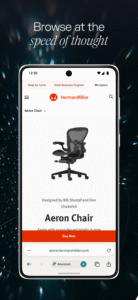
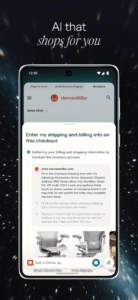
• An AI assistant in your pocket: Browse like you would on Comet, with your personal AI assistant one tap away to help you ask more questions and take action on the tasks you assign it to handle. With Comet Assistant’s expanded reasoning, you can see exactly what actions your Comet Assistant is taking, and step in at any time.
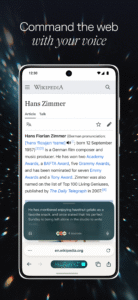
• Chat with your tabs: Users love Voice Mode in the Perplexity app. We’ve brought our voice recognition technology to Comet for Android, allowing you to chat with your Comet Assistant to find information across all your open tabs.
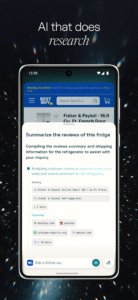
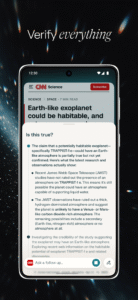
• Summarize your searches: One of the features people love most in Comet is its ability to work across tabs to synthesize information. Smart summarization on Comet for Android gives you the ability to summarize content across all your open tabs, not just the page you have open.
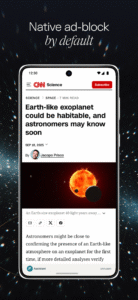
• Focus on what matters: Avoid spam and pop-up ads with a built-in ad blocker. Just like Comet on your desktop, you can whitelist the sites you trust.
• An AI assistant in your pocket: Browse like you would on Comet, with your personal AI assistant one tap away to help you ask more questions and take action on the tasks you assign it to handle. With Comet Assistant’s expanded reasoning, you can see exactly what actions your Comet Assistant is taking, and step in at any time.
• Chat with your tabs: Users love Voice Mode in the Perplexity app. We’ve brought our voice recognition technology to Comet for Android, allowing you to chat with your Comet Assistant to find information across all your open tabs.
• Summarize your searches: One of the features people love most in Comet is its ability to work across tabs to synthesize information. Smart summarization on Comet for Android gives you the ability to summarize content across all your open tabs, not just the page you have open.
• Focus on what matters: Avoid spam and pop-up ads with a built-in ad blocker. Just like Comet on your desktop, you can whitelist the sites you trust.
Download Comet: AI Browser & Assistant APK
Fast, free and safe download.
APK Permissions 26
- ai.perplexity.comet.BIND_GET_INSTALL_REFERRER_SERVICE
- ai.perplexity.comet.DYNAMIC_RECEIVER_NOT_EXPORTED_PERMISSION
- android.permission.ACCESS_ADSERVICES_AD_ID
- android.permission.ACCESS_ADSERVICES_ATTRIBUTION
- android.permission.ACCESS_COARSE_LOCATION
- android.permission.ACCESS_FINE_LOCATION
- android.permission.ACCESS_NETWORK_STATE
- android.permission.CAMERA
- android.permission.FOREGROUND_SERVICE
- android.permission.INTERNET
- android.permission.MODIFY_AUDIO_SETTINGS
- android.permission.QUERY_ALL_PACKAGES
- android.permission.READ_EXTERNAL_STORAGE
- android.permission.READ_PHONE_STATE
- android.permission.RECEIVE_BOOT_COMPLETED
- android.permission.RECORD_AUDIO
- android.permission.USE_BIOMETRIC
- android.permission.USE_FINGERPRINT
- android.permission.VIBRATE
- android.permission.WAKE_LOCK
- android.permission.WRITE_EXTERNAL_STORAGE
- com.android.launcher.permission.INSTALL_SHORTCUT
- com.android.vending.BILLING
- com.android.vending.CHECK_LICENSE
- com.google.android.finsky.permission.BIND_GET_INSTALL_REFERRER_SERVICE
- com.google.android.gms.permission.AD_ID
APK Verified
The cryptographic signature guarantees that the file is safe to install and was not tampered with in any way.
Similar in Communication


More by PerplexityAI

Frequently Asked Questions about Comet: AI Browser & Assistant APK
This is the universal variant — a single APK that contains native libraries for every CPU architecture. It installs on any Android device but is larger than per-architecture variants.
Yes — the APK's signature has been cryptographically verified against the publisher's signing key. The SHA-256 hash is shown in the File Information panel so you can independently confirm the file matches the original release.
Android 31 (API level 36) or newer. Older devices will refuse the install.
Install a free app like 'CPU-Z' or 'Droid Hardware Info' from the Play Store and look at the ABI / Instruction Set row. Most phones made after 2017 are arm64-v8a; if in doubt, download the universal variant.
All variants are functionally identical — same features, same version. They differ only in which CPU architectures the native code is compiled for, and (sometimes) which screen densities the included graphics target. Pick the one that matches your device for the smallest install size, or pick 'Universal' if you're unsure.