
This is the universal build of Knox Asset Intelligence 1.1.22.6. It contains native libraries for every CPU architecture (arm64-v8a, armeabi-v7a, x86, x86_64), so it installs on any Android device. The trade-off is size — it's larger than per-architecture variants. Pick this one if you're unsure which CPU your phone has, or if you plan to share the APK with multiple devices.
File size: 11.3 MB • Min Android: 30 • Target Android: 35 • Version code: 112206020 • Framework: Native (Java/Kotlin) • Permissions: 70
Screenshots
File Information
| Package Name | com.samsung.android.knox.dai |
|---|---|
| Version Name | 1.1.22.6 |
| Version Code | 112206020 |
| Architecture | Universal |
| Min Android Version | Android 30 (API 35) |
| Main Activity | com.samsung.android.knox.dai.framework.activities.MainActivity |
| Framework | Native (Java/Kotlin) |
| File Size | 11.31 MB |
| Signature (SHA1) | 9CA5170F381919DFE0446FCDAB18B19A143B3163 |
| File Hash (SHA256) | ce1a27b7e6a02971bf298e00b537760f3282276dbac891bde6152d8398aad796 |
What's New
This release of KAI brings new features/enhancements:
- General availability of Battery auto optimization
- General availability of Battery auto optimization
App Description
About
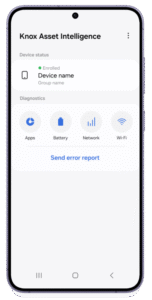
The Knox Asset Intelligence (KAI) agent app enables enterprise organizations to monitor and collect real-time health and usage data for devices in their fleet. The agent is designed to be installed on managed Android devices, and is a requirement in order for devices to enroll into the Knox Asset Intelligence service.
IMPORTANT
– The KAI agent must either be installed on a fully managed device, or in the work profile of a company-owned device running Android Enterprise in order for the device to enroll.
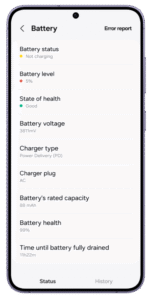
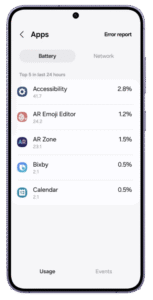
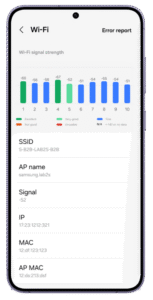
Once devices are enrolled, users can launch the agent to view information related to their apps, battery, and network health, and send error reports to their IT admins whenever device issues occur.
IT admins can then use the Knox Asset Intelligence console to view in-depth, actionable data insights for their fleet, track device locations in real-time, and download diagnostics logs to help analyze and troubleshoot device issues further.
Key console features for IT admins:
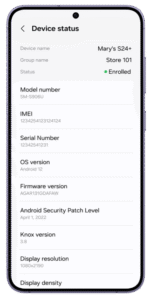
1. View device status information (IMEI, OS version, FW version, Android security patch level)
2. View device health insights using an intuitive, built-in dashboard
o Business app stability (ANR, Crash, Abnormal battery drain)
o Device battery status (Current condition, Health)
o Network connectivity (Unexpected network problem, Latency)
o Knox Service Plugin policy deployment visibility in KAI
o Security (CVE/SVE vulnerability)
o System status (Memory)
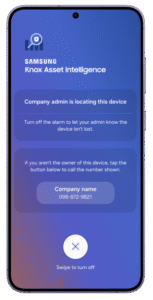
3. View in-depth location tracking information using the device's GPS and remotely trigger alarms to help make device retrieval easier.
Disclaimer:
This is an enterprise business app and all features are accessible with a trial or commercial Knox Suite license. Please note that your experiences may vary depending on the capabilities enabled by your IT administrator.
Collected information
Knox Asset Intelligence collects the following information from your device:
• Serial Number
• IMEI (International Mobile Equipment Identifier)
• Mac Address
• Currently Connected SSID
• Location (latitude & longitude)
Optional permissions
The following permissions need to be granted on your device in order for the features to work in the Knox Asset Intelligence console. Note that you can continue to use the app even if you do not grant these permissions.
• Location permission: Grant this permission to let IT admins use location tracking features in the Knox Asset Intelligence console.
• Notification permission: Grant this permission to let IT admins retrieve diagnostic logs from your device for troubleshooting.
Learn more
To see the full list of supported devices, go to:
https://www.samsungknox.com/en/knox-platform/supported-devices/kai
To learn more about Knox Asset Intelligence, please visit:
https://www.samsungknox.com/kai
To check out the Knox Asset Intelligence documentation, see:
https://docs.samsungknox.com/admin/knox-asset-intelligence/welcome.htm
To check out the Samsung Knox Privacy Policy, see:
https://www.samsungknox.com/en/device-privacy-policy
The Knox Asset Intelligence (KAI) agent app enables enterprise organizations to monitor and collect real-time health and usage data for devices in their fleet. The agent is designed to be installed on managed Android devices, and is a requirement in order for devices to enroll into the Knox Asset Intelligence service.
IMPORTANT
– The KAI agent must either be installed on a fully managed device, or in the work profile of a company-owned device running Android Enterprise in order for the device to enroll.
Once devices are enrolled, users can launch the agent to view information related to their apps, battery, and network health, and send error reports to their IT admins whenever device issues occur.
IT admins can then use the Knox Asset Intelligence console to view in-depth, actionable data insights for their fleet, track device locations in real-time, and download diagnostics logs to help analyze and troubleshoot device issues further.
Key console features for IT admins:
1. View device status information (IMEI, OS version, FW version, Android security patch level)
2. View device health insights using an intuitive, built-in dashboard
o Business app stability (ANR, Crash, Abnormal battery drain)
o Device battery status (Current condition, Health)
o Network connectivity (Unexpected network problem, Latency)
o Knox Service Plugin policy deployment visibility in KAI
o Security (CVE/SVE vulnerability)
o System status (Memory)
3. View in-depth location tracking information using the device's GPS and remotely trigger alarms to help make device retrieval easier.
Disclaimer:
This is an enterprise business app and all features are accessible with a trial or commercial Knox Suite license. Please note that your experiences may vary depending on the capabilities enabled by your IT administrator.
Collected information
Knox Asset Intelligence collects the following information from your device:
• Serial Number
• IMEI (International Mobile Equipment Identifier)
• Mac Address
• Currently Connected SSID
• Location (latitude & longitude)
Optional permissions
The following permissions need to be granted on your device in order for the features to work in the Knox Asset Intelligence console. Note that you can continue to use the app even if you do not grant these permissions.
• Location permission: Grant this permission to let IT admins use location tracking features in the Knox Asset Intelligence console.
• Notification permission: Grant this permission to let IT admins retrieve diagnostic logs from your device for troubleshooting.
Learn more
To see the full list of supported devices, go to:
https://www.samsungknox.com/en/knox-platform/supported-devices/kai
To learn more about Knox Asset Intelligence, please visit:
https://www.samsungknox.com/kai
To check out the Knox Asset Intelligence documentation, see:
https://docs.samsungknox.com/admin/knox-asset-intelligence/welcome.htm
To check out the Samsung Knox Privacy Policy, see:
https://www.samsungknox.com/en/device-privacy-policy
Download Knox Asset Intelligence APK
Fast, free and safe download.
APK Permissions 70
- android.permission.ACCESS_COARSE_LOCATION
- android.permission.ACCESS_FINE_LOCATION
- android.permission.ACCESS_NETWORK_STATE
- android.permission.ACCESS_NOTIFICATION_POLICY
- android.permission.ACCESS_WIFI_STATE
- android.permission.BATTERY_STATS
- android.permission.BLUETOOTH
- android.permission.BLUETOOTH_ADMIN
- android.permission.CHANGE_NETWORK_STATE
- android.permission.CHANGE_WIFI_STATE
- android.permission.CONNECTIVITY_INTERNAL
- android.permission.CONTROL_DISPLAY_BRIGHTNESS
- android.permission.DEVICE_POWER
- android.permission.DUMP
- android.permission.FOREGROUND_SERVICE
- android.permission.FOREGROUND_SERVICE_DATA_SYNC
- android.permission.FOREGROUND_SERVICE_LOCATION
- android.permission.FOREGROUND_SERVICE_MEDIA_PLAYBACK
- android.permission.FOREGROUND_SERVICE_SYSTEM_EXEMPTED
- android.permission.INSTALL_SELF_UPDATES
- android.permission.INTERACT_ACROSS_USERS_FULL
- android.permission.INTERNET
- android.permission.LOCAL_MAC_ADDRESS
- android.permission.MANAGE_ACTIVITY_TASKS
- android.permission.MANAGE_NETWORK_POLICY
- android.permission.MODIFY_AUDIO_SETTINGS
- android.permission.MODIFY_DAY_NIGHT_MODE
- android.permission.NETWORK_SETTINGS
- android.permission.NETWORK_STACK
- android.permission.OVERRIDE_WIFI_CONFIG
- android.permission.PACKAGE_USAGE_STATS
- android.permission.POST_NOTIFICATIONS
- android.permission.QUERY_ALL_PACKAGES
- android.permission.RADIO_SCAN_WITHOUT_LOCATION
- android.permission.READ_LOGS
- android.permission.READ_PRIVILEGED_PHONE_STATE
- android.permission.READ_SEARCH_INDEXABLES
- android.permission.READ_SYNC_SETTINGS
- android.permission.REAL_GET_TASKS
- android.permission.RECEIVE_BOOT_COMPLETED
- android.permission.SCHEDULE_EXACT_ALARM
- android.permission.SET_ACTIVITY_WATCHER
- android.permission.START_ACTIVITIES_FROM_BACKGROUND
- android.permission.STATUS_BAR
- android.permission.STATUS_BAR_SERVICE
- android.permission.SYSTEM_ALERT_WINDOW
- android.permission.UPDATE_DEVICE_STATS
- android.permission.USE_FULL_SCREEN_INTENT
- android.permission.VIBRATE
- android.permission.WAKE_LOCK
- android.permission.WRITE_SECURE_SETTINGS
- com.google.android.c2dm.permission.RECEIVE
- com.samsung.android.app.cocktailbarservice.permission.EDGE_ENABLE
- com.samsung.android.dqagent.permission.READ_CS_DB
- com.samsung.android.knox.dai.DYNAMIC_RECEIVER_NOT_EXPORTED_PERMISSION
- com.samsung.android.knox.dai.permission.DAI_INTERNAL
- com.samsung.android.knox.dai.permission.KAI_EXTERNAL
- com.samsung.android.knox.dai.permission.WRITE_PROVIDER
- com.samsung.android.knox.permission.KNOX_NDA_DATA_ANALYTICS
- com.samsung.android.knox.permission.KNOX_NDA_DEVICE_SETTINGS
- com.samsung.android.knox.permission.KNOX_RTLS
- com.samsung.android.knox.permission.KNOX_SECURITY
- com.samsung.android.knox.permission.KNOX_ZT_SECURITY_LOG_INTERNAL
- com.samsung.android.knox.ppclient.permission.KNOX_PRIVACY_POLICY
- com.samsung.android.permission.SEM_APP_RESTRICTION
- com.samsung.android.security.permission.SAMSUNG_KEYSTORE_PERMISSION
- com.samsung.permission.dc.INVOKE_DC_METHOD
- com.samsung.permission.READ_DW_DATA
- com.samsung.permission.WIFI_DIAGNOSTICS_PROVIDER
- com.sec.spp.permission.SEND
APK Verified
The cryptographic signature guarantees that the file is safe to install and was not tampered with in any way.
Similar in Business


More by Samsung Electronics Co., Ltd.


Frequently Asked Questions about Knox Asset Intelligence APK
This is the universal variant — a single APK that contains native libraries for every CPU architecture. It installs on any Android device but is larger than per-architecture variants.
Yes — the APK's signature has been cryptographically verified against the publisher's signing key. The SHA-256 hash is shown in the File Information panel so you can independently confirm the file matches the original release.
Android 30 (API level 35) or newer. Older devices will refuse the install.
Install a free app like 'CPU-Z' or 'Droid Hardware Info' from the Play Store and look at the ABI / Instruction Set row. Most phones made after 2017 are arm64-v8a; if in doubt, download the universal variant.
All variants are functionally identical — same features, same version. They differ only in which CPU architectures the native code is compiled for, and (sometimes) which screen densities the included graphics target. Pick the one that matches your device for the smallest install size, or pick 'Universal' if you're unsure.