
This is the arm64-v8a build of Samsung Daily Board 15.1.01.3 — the modern 64-bit ARM build that runs on virtually every Android phone released since 2017. It's smaller and faster than the universal variant because Android only loads the native code your CPU actually needs. If your phone is from the last 8 years, this is the right pick.
File size: 21.6 MB • Min Android: 34 • Target Android: 35 • Version code: 1510100003 • Framework: Native (Java/Kotlin) • Permissions: 12
Screenshots
File Information
| Package Name | com.samsung.android.homemode |
|---|---|
| Version Name | 15.1.01.3 |
| Version Code | 1510100003 |
| Architecture | arm64-v8a |
| Min Android Version | Android 34 (API 35) |
| Framework | Native (Java/Kotlin) |
| File Size | 21.59 MB |
| Signature (SHA1) | 9CA5170F381919DFE0446FCDAB18B19A143B3163 |
| File Hash (SHA256) | 29d15ceb4119e92b3e48c5c0549dc508cdae4b207c2ebc2a05714039156d9457 |
What's New
▷ Night clock mode
• It switches to night clock mode so that you can see comfortably in low light levels.
(It works when the ‘Adaptive Brightness’ setting is turned on.)
▷ Bug Fix
• It switches to night clock mode so that you can see comfortably in low light levels.
(It works when the ‘Adaptive Brightness’ setting is turned on.)
▷ Bug Fix
App Description
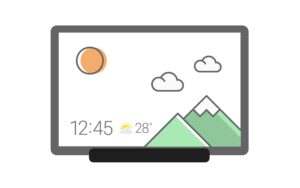
When charging the tablet, Daily Board gives you access to information that you will find useful in your daily life, as well as photos at all times.
A night theme is also available to help you prevent night glare.
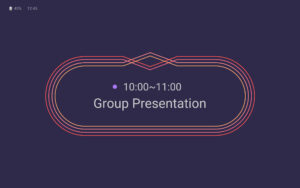
▷ Time, Weather, Calendar
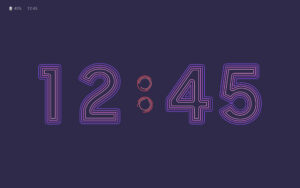
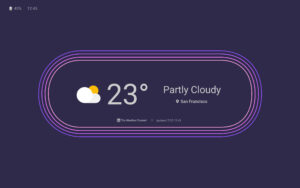
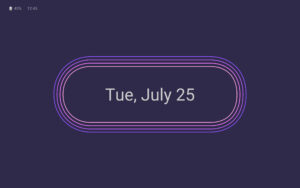
• We tried to make them recognizable even from a distance and highlight their refined beauty.
• Set and use the layout in your desired shape.
▷ Photo Slide Show
• You can always view albums created in Samsung Gallery on the Daily Board.
• You can view photos shared by your friends and family by integrating Samsung Experience Service.
• Add images such as your favorite painting, and use it as your very own decorative piece.
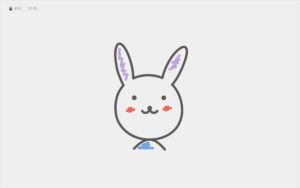
▷ Memo Board
• You can post a to-do list, memos for your family, drawings your child made on the Daily Board, and family members can easily check them at all times.
• Live memo mode presents your memos with an animated view.
(You can switch modes at the bottom-right section of the Memo Board screen.)
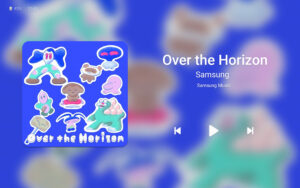
▷ Music Controller
• Control music from the Daily Board. (Play/Pause/Skip)
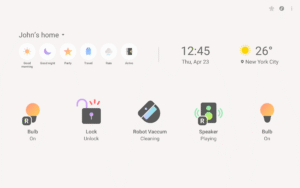
▷ SmartThings
• SmartThings board was added to Daily Board.
• You can check at a glance the status of the devices registered with SmartThings and control them easily and conveniently.
※
-When you connect a USB charger, a notification advising you to open Daily Board appears in the Quick settings panel. Daily Board will open when you tap this notification.
- Or, when connecting to the USB charger, you can tap a quick launch icon for Daily Board displayed on the navigation bar to launch it.
(Available only when the navigation bar style is set to “Navigation buttons.”. )
A night theme is also available to help you prevent night glare.
▷ Time, Weather, Calendar
• We tried to make them recognizable even from a distance and highlight their refined beauty.
• Set and use the layout in your desired shape.
▷ Photo Slide Show
• You can always view albums created in Samsung Gallery on the Daily Board.
• You can view photos shared by your friends and family by integrating Samsung Experience Service.
• Add images such as your favorite painting, and use it as your very own decorative piece.
▷ Memo Board
• You can post a to-do list, memos for your family, drawings your child made on the Daily Board, and family members can easily check them at all times.
• Live memo mode presents your memos with an animated view.
(You can switch modes at the bottom-right section of the Memo Board screen.)
▷ Music Controller
• Control music from the Daily Board. (Play/Pause/Skip)
▷ SmartThings
• SmartThings board was added to Daily Board.
• You can check at a glance the status of the devices registered with SmartThings and control them easily and conveniently.
※
-When you connect a USB charger, a notification advising you to open Daily Board appears in the Quick settings panel. Daily Board will open when you tap this notification.
- Or, when connecting to the USB charger, you can tap a quick launch icon for Daily Board displayed on the navigation bar to launch it.
(Available only when the navigation bar style is set to “Navigation buttons.”. )
Download Samsung Daily Board APK
Fast, free and safe download.
APK Permissions 12
- android.permission.INTERACT_ACROSS_USERS
- android.permission.MANAGE_USERS
- android.permission.WRITE_SETTINGS
- com.samsung.android.homemode.DYNAMIC_RECEIVER_NOT_EXPORTED_PERMISSION
- com.samsung.android.mobileservice.sasettings.permission.USE_SASETTINGS
- com.samsung.android.mobileservice.social.share.contents.provider.permission.WRITE
- com.samsung.android.mobileservice.social.share.item.provider.permission.READ
- com.samsung.android.mobileservice.social.share.request.provider.permission.READ
- com.samsung.android.providers.media.READ
- com.samsung.android.weather.DATA_SERVICE
- com.samsung.android.weather.permission.READ_SYSTEM_PROVIDER
- com.samsung.kidshome.broadcast.DEFAULT_HOME_CHANGE_PERMISSION
APK Verified
The cryptographic signature guarantees that the file is safe to install and was not tampered with in any way.
Similar in Lifestyle


More by Samsung Electronics Co., Ltd.


Frequently Asked Questions about Samsung Daily Board APK
This variant is built for 64-bit ARM (most Android phones made since 2017). If your device's CPU matches, this is the smallest, fastest version to install.
Yes — the APK's signature has been cryptographically verified against the publisher's signing key. The SHA-256 hash is shown in the File Information panel so you can independently confirm the file matches the original release.
Android 34 (API level 35) or newer. Older devices will refuse the install.
Install a free app like 'CPU-Z' or 'Droid Hardware Info' from the Play Store and look at the ABI / Instruction Set row. Most phones made after 2017 are arm64-v8a; if in doubt, download the universal variant.
All variants are functionally identical — same features, same version. They differ only in which CPU architectures the native code is compiled for, and (sometimes) which screen densities the included graphics target. Pick the one that matches your device for the smallest install size, or pick 'Universal' if you're unsure.