
This is the arm64-v8a build of Samsung My Files 15.4.01.13 — the modern 64-bit ARM build that runs on virtually every Android phone released since 2017. It's smaller and faster than the universal variant because Android only loads the native code your CPU actually needs. If your phone is from the last 8 years, this is the right pick.
File size: 28.4 MB • Min Android: 36 • Target Android: 36 • Version code: 1540113000 • Framework: Native (Java/Kotlin) • Permissions: 84
Screenshots
File Information
| Package Name | com.sec.android.app.myfiles |
|---|---|
| Version Name | 15.4.01.13 |
| Version Code | 1540113000 |
| Architecture | arm64-v8a |
| Min Android Version | Android 36 (API 36) |
| Main Activity | com.sec.android.app.myfiles.ui.MainActivity |
| Framework | Native (Java/Kotlin) |
| File Size | 28.43 MB |
| Signature (SHA1) | 9CA5170F381919DFE0446FCDAB18B19A143B3163 |
| File Hash (SHA256) | 54d4f3ff6e5a145b7a7100b6a75f80ddc19e86b2b60f036503664026b5fe4778 |
What's New
- When searching the internal storage, you can immediately add or delete Favorites while checking the folder route.
- When compressing files, you can strengthen the security by entering a password. Compressed files with passwords can also be unzipped.
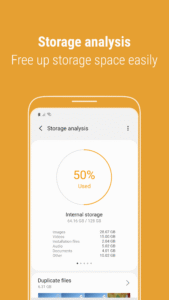
- “Analyze storage” now shows you how much storage is being used by file type on OneDrive/Google Drive.
- When compressing files, you can strengthen the security by entering a password. Compressed files with passwords can also be unzipped.
- “Analyze storage” now shows you how much storage is being used by file type on OneDrive/Google Drive.
App Description
[Introducing My Files]
"My Files" manages all the files on your smartphone, just like a file explorer on your computer.
You can also manage files stored on SD cards, USB drives and files in the cloud storage connected with your smartphone at the same time.
Download and experience "My Files" now.
[New features in My Files]
1. Free up storage space easily by tapping the "Storage Analysis" button on the main screen.
2. You can hide any unused storage space from the main screen via the "Edit My Files home".
3. You can view long file names without ellipses using the "Listview" button.
[Key features]
- Browse and manage files stored on your smartphone, SD card, or USB drive conveniently.
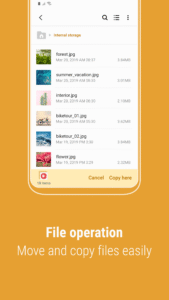
.Users can create folders; move, copy, share, compress, and decompress files; and view file details.
- Try our user-friendly features.
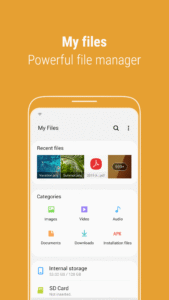
.The Recent Files list: Files the user has downloaded, run, and/or opened
.The Categories list: Types of files, including downloaded, document, image, audio, video, and installation files (.APK)
.Folder and file shortcuts: Show on the device home screen and the My Files main screen
.Provides a function used to analyze and free up storage space.
- Enjoy our convenient Cloud services.
.Google Drive
.OneDrive
※ Supported features may be different depending on models.
The following permissions are required for the app service.
[Required permissions]
-Storage: Used to open, delete, edit, search files and folders on internal / external memory
- Notifications : Used to show the progress of ongoing actions such as moving or copying files and folders
"My Files" manages all the files on your smartphone, just like a file explorer on your computer.
You can also manage files stored on SD cards, USB drives and files in the cloud storage connected with your smartphone at the same time.
Download and experience "My Files" now.
[New features in My Files]
1. Free up storage space easily by tapping the "Storage Analysis" button on the main screen.
2. You can hide any unused storage space from the main screen via the "Edit My Files home".
3. You can view long file names without ellipses using the "Listview" button.
[Key features]
- Browse and manage files stored on your smartphone, SD card, or USB drive conveniently.
.Users can create folders; move, copy, share, compress, and decompress files; and view file details.
- Try our user-friendly features.
.The Recent Files list: Files the user has downloaded, run, and/or opened
.The Categories list: Types of files, including downloaded, document, image, audio, video, and installation files (.APK)
.Folder and file shortcuts: Show on the device home screen and the My Files main screen
.Provides a function used to analyze and free up storage space.
- Enjoy our convenient Cloud services.
.Google Drive
.OneDrive
※ Supported features may be different depending on models.
The following permissions are required for the app service.
[Required permissions]
-Storage: Used to open, delete, edit, search files and folders on internal / external memory
- Notifications : Used to show the progress of ongoing actions such as moving or copying files and folders
Download Samsung My Files APK
Fast, free and safe download.
APK Permissions 84
- android.permission.ACCESS_ALL_DOWNLOADS
- android.permission.DELETE_CACHE_FILES
- android.permission.DELETE_PACKAGES
- android.permission.FOREGROUND_SERVICE
- android.permission.FOREGROUND_SERVICE_DATA_SYNC
- android.permission.INTERACT_ACROSS_USERS
- android.permission.INTERACT_ACROSS_USERS_FULL
- android.permission.INTERNAL_DELETE_CACHE_FILES
- android.permission.INTERNET
- android.permission.MANAGE_EXTERNAL_STORAGE
- android.permission.MOUNT_UNMOUNT_FILESYSTEMS
- android.permission.NFC
- android.permission.PACKAGE_USAGE_STATS
- android.permission.POST_NOTIFICATIONS
- android.permission.QUERY_ALL_PACKAGES
- android.permission.REQUEST_INSTALL_PACKAGES
- android.permission.SYSTEM_ALERT_WINDOW
- android.permission.UPDATE_DEVICE_STATS
- android.permission.WAKE_LOCK
- android.permission.WRITE_MEDIA_STORAGE
- com.android.launcher.permission.INSTALL_SHORTCUT
- com.android.launcher.permission.UNINSTALL_SHORTCUT
- com.samsung.aimodelprovider.objectremovalmodels.AIProvider.READ
- com.samsung.android.aicore.permission.BIND_DOWNLOAD_SERVICE
- com.samsung.android.aicore.permission.BIND_ON_DEVICE_SERVICE
- com.samsung.android.aicore.permission.BIND_WALLPAPER_SERVICE
- com.samsung.android.aicore.permission.SUPPORTED_FEATURE_PROVIDER
- com.samsung.android.app.interpreter.permission.READ_TRANSLATION_SETTINGS
- com.samsung.android.app.networkstoragemanager.permission.START_NSM_SERVICE
- com.samsung.android.app.simplesharing.READ_CONTENTS
- com.samsung.android.app.simplesharing.WRITE_CONTENTS
- com.samsung.android.app.tips.permission.USE_INTENT_SERVICE
- com.samsung.android.intellivoiceservice.ai.asr.permission.BIND_SPEECH_RECOGNITION_SERVICE
- com.samsung.android.intellivoiceservice.ai.asr.permission.SPEECH_RECOGNITION_SERVICE_CONFIG_PROVIDER
- com.samsung.android.intellivoiceservice.ai.asr.permission.SYSTEM_BIND_SPEECH_RECOGNITION_SERVICE
- com.samsung.android.intellivoiceservice.ai.asr.permission.SYSTEM_SPEECH_RECOGNITION_SERVICE_CONFIG_PROVIDER
- com.samsung.android.intellivoiceservice.aitranslator.permission.BIND_TRANSLATION
- com.samsung.android.intellivoiceservice.aitranslator.permission.BIND_TRANSLATION_FOR_EXTERNAL
- com.samsung.android.intellivoiceservice.common.permission.CONFIG_PROVIDER
- com.samsung.android.intellivoiceservice.common.permission.SYSTEM_CONFIG_PROVIDER
- com.samsung.android.intellivoiceservice.permission.BIND_CORRECTION_SERVICE
- com.samsung.android.intellivoiceservice.permission.BIND_FORMAT_CONVERSION_SERVICE
- com.samsung.android.intellivoiceservice.permission.BIND_GENERIC_SERVICE
- com.samsung.android.intellivoiceservice.permission.BIND_SMART_CAPTURE_SERVICE
- com.samsung.android.intellivoiceservice.permission.BIND_SMART_COVER_SERVICE
- com.samsung.android.intellivoiceservice.permission.BIND_SUGGESTION_SERVICE
- com.samsung.android.intellivoiceservice.permission.BIND_TRANSLATION_SERVICE
- com.samsung.android.intellivoiceservice.permission.BIND_USAGE_SERVICE
- com.samsung.android.launcher.permission.READ_SETTINGS
- com.samsung.android.messaging.permission.READ_MESSAGE
- com.samsung.android.permission.ACCESS_MAINTENANCE_MODE
- com.samsung.android.permission.MULTI_CONTROL_RECEIVER_PERMISSION
- com.samsung.android.permission.SEM_MEDIA_CONTENTS
- com.samsung.android.providers.context.permission.WRITE_USE_APP_FEATURE_SURVEY
- com.samsung.android.providers.media.READ
- com.samsung.android.rubin.context.permission.READ_CONTEXT_MANAGER
- com.samsung.android.rubin.debugmode.ACCESS_DEBUG_MODE
- com.samsung.android.rubin.persona.permission.READ_PERSONA_MANAGER
- com.samsung.android.scs.ai.asr.permission.SPEECH_RECOGNITION_SERVICE_CONFIG_PROVIDER
- com.samsung.android.scs.ai.asr.permission.SYSTEM_BIND_SPEECH_RECOGNITION_SERVICE
- com.samsung.android.scs.ai.search.permission.UPDATE_INDEX
- com.samsung.android.scs.ai.search.permission.WRITE
- com.samsung.android.scs.ai.suggestion.permission.SUGGESTION_PROVIDER
- com.samsung.android.scs.ai.text.permission.TEXT_PROVIDER
- com.samsung.android.scs.permission.SUPPORTED_FEATURE_PROVIDER
- com.samsung.android.sdk.ocr.permission.PROVIDE_OCR_RESOURCE
- com.samsung.android.settings.analyzestorage.permission
- com.samsung.android.settings.permission.ACCESS_EPISODE
- com.samsung.android.sharelive.permission.READ_EXTERNAL_SETTINGS_PROVIDER
- com.samsung.android.visual.cloudcore.permission.BIND_DOWNLOAD_SERVICE
- com.samsung.android.visual.cloudcore.permission.BIND_PORTRAIT_SERVICE
- com.samsung.android.visual.cloudcore.permission.SUPPORTED_FEATURE_PROVIDER
- com.samsung.knox.securefolder.REMOTE_CONTENT_PROVIDER
- com.samsung.permission.CAPTURE
- com.sec.android.app.myfiles.DYNAMIC_RECEIVER_NOT_EXPORTED_PERMISSION
- com.sec.android.app.myfiles.permission.MOVE_TO_KNOX_BY_DND
- com.sec.android.app.samsungapps.accesspermission.UPDATE_EXISTS
- com.sec.android.app.voicenote.data.VNAIProvider.READ_PERMISSION
- com.sec.android.diagmonagent.permission.DIAGMON
- com.sec.android.diagmonagent.permission.PROVIDER
- com.sec.android.gallery3d.provider2.READ
- com.sec.knox.bridge.permission.FILE_OPERATION_HANDLER
- com.sec.permission.ACCESSBILITY_SHARING
- com.wssnps.permission.COM_WSSNPS
APK Verified
The cryptographic signature guarantees that the file is safe to install and was not tampered with in any way.
Similar in Tools


More by Samsung Electronics Co., Ltd.


Frequently Asked Questions about Samsung My Files APK
This variant is built for 64-bit ARM (most Android phones made since 2017). If your device's CPU matches, this is the smallest, fastest version to install.
Yes — the APK's signature has been cryptographically verified against the publisher's signing key. The SHA-256 hash is shown in the File Information panel so you can independently confirm the file matches the original release.
Android 36 (API level 36) or newer. Older devices will refuse the install.
Install a free app like 'CPU-Z' or 'Droid Hardware Info' from the Play Store and look at the ABI / Instruction Set row. Most phones made after 2017 are arm64-v8a; if in doubt, download the universal variant.
All variants are functionally identical — same features, same version. They differ only in which CPU architectures the native code is compiled for, and (sometimes) which screen densities the included graphics target. Pick the one that matches your device for the smallest install size, or pick 'Universal' if you're unsure.