
Download Samsung Storage Saver APK 11.0.51 arm64-v8a, armeabi-v7a, x86, x86_64 · Android 28+
Download APK
Verified Safe
This is the arm64-v8a, armeabi-v7a, x86, x86_64 build of Samsung Storage Saver 11.0.51. Pick this build if your device's primary ABI matches.
File size: 6.4 MB • Min Android: 28 • Target Android: 28 • Version code: 1105100100 • Framework: Native (Java/Kotlin) • Permissions: 1
Screenshots
File Information
| Package Name | com.samsung.memorysaver |
|---|---|
| Version Name | 11.0.51 |
| Version Code | 1105100100 |
| Architecture | arm64-v8a, armeabi-v7a, x86, x86_64 |
| Min Android Version | Android 28 (API 28) |
| Framework | Native (Java/Kotlin) |
| File Size | 6.36 MB |
| Signature (SHA1) | 9CA5170F381919DFE0446FCDAB18B19A143B3163 |
| File Hash (SHA256) | f45c374ac90db30db81761048c25f5cdb53417183e7f397aba5a14fdd32a98cf |
What's New
P And Q OS devices support with latest features support.
App Description
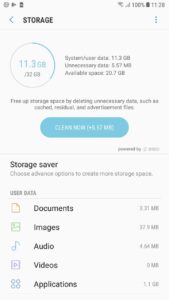
1.S Clean:
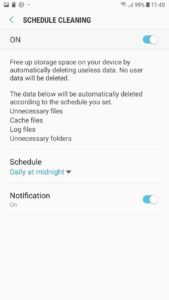
Create available space on your phone by automatically periodic deleting useless data. No user data will be deleted.
Identifying background processes/Services responsible for CPU hogging& excess memory usage
The data below will be automatically deleted according to the schedule you set.
Unnecessary files
Cache files
Log files
Unnecessary folders
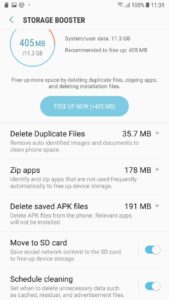
2. Duplicate Remover:
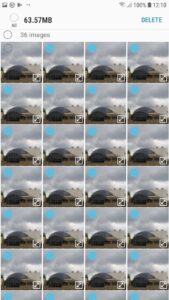
Auto recognize & prompt removal of unnecessary duplicate content. Current days duplicate images are not included for removal to avoid unnecessary scanning of files every time picture is clicked or saved.
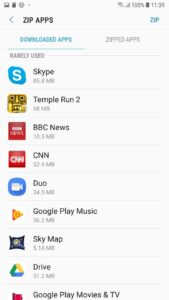
3. S Zip
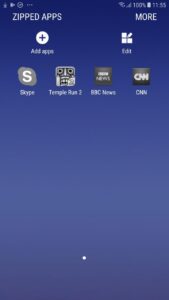
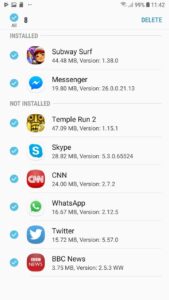
Zip apps to optimize storage. Background Services for Unused Apps. User will not receive any notification from zipped apps. zipped apps can be restored with user data by unzipping from zipped folder or zipped apps list.
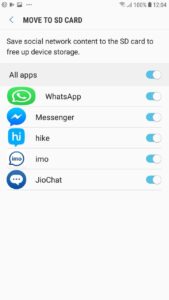
4. Move to SD card
Redirects the social messenger application's media content from device Internal Storage to External SD card for coming out of device storage scarcity without hampering user experience.
Create available space on your phone by automatically periodic deleting useless data. No user data will be deleted.
Identifying background processes/Services responsible for CPU hogging& excess memory usage
The data below will be automatically deleted according to the schedule you set.
Unnecessary files
Cache files
Log files
Unnecessary folders
2. Duplicate Remover:
Auto recognize & prompt removal of unnecessary duplicate content. Current days duplicate images are not included for removal to avoid unnecessary scanning of files every time picture is clicked or saved.
3. S Zip
Zip apps to optimize storage. Background Services for Unused Apps. User will not receive any notification from zipped apps. zipped apps can be restored with user data by unzipping from zipped folder or zipped apps list.
4. Move to SD card
Redirects the social messenger application's media content from device Internal Storage to External SD card for coming out of device storage scarcity without hampering user experience.
Download Samsung Storage Saver APK
Fast, free and safe download.
APK Permissions 1
- android.permission.READ_EXTERNAL_STORAGE
APK Verified
The cryptographic signature guarantees that the file is safe to install and was not tampered with in any way.
Similar in Tools


More by Samsung R&D Institute India Noida


Frequently Asked Questions about Samsung Storage Saver APK
This variant is built for devices that report `arm64-v8a, armeabi-v7a, x86, x86_64` as their primary ABI. If your device's CPU matches, this is the smallest, fastest version to install.
Yes — the APK's signature has been cryptographically verified against the publisher's signing key. The SHA-256 hash is shown in the File Information panel so you can independently confirm the file matches the original release.
Android 28 (API level 28) or newer. Older devices will refuse the install.
Install a free app like 'CPU-Z' or 'Droid Hardware Info' from the Play Store and look at the ABI / Instruction Set row. Most phones made after 2017 are arm64-v8a; if in doubt, download the universal variant.
All variants are functionally identical — same features, same version. They differ only in which CPU architectures the native code is compiled for, and (sometimes) which screen densities the included graphics target. Pick the one that matches your device for the smallest install size, or pick 'Universal' if you're unsure.