
This is the arm64-v8a build of Epson Projector Config Tool 1.2.1 — the modern 64-bit ARM build that runs on virtually every Android phone released since 2017. It's smaller and faster than the universal variant because Android only loads the native code your CPU actually needs. If your phone is from the last 8 years, this is the right pick.
File size: 22.3 MB • Min Android: 28 • Target Android: 35 • Version code: 34 • Framework: Flutter • Permissions: 9
Screenshots
File Information
| Package Name | com.epson.projector.configtool |
|---|---|
| Version Name | 1.2.1 |
| Version Code | 34 |
| Architecture | arm64-v8a |
| Min Android Version | Android 28 (API 35) |
| Main Activity | com.epson.projector.configtool.MainActivity |
| Framework | Flutter |
| File Size | 22.27 MB |
| Signature (SHA1) | D50BA4251A25339B2601E337A1A2108440824D89 |
| File Hash (SHA256) | 46b6d5a4dbec26e7644b8b8ffd4f2b278f59fcc2f94770a916d4dd80bf355b38 |
What's New
Added supported projectors.
App Description
Epson Projector Config Tool is an app that allows you to change projector settings and check information using NFC wireless communications technology. By simply holding an NFC-compatible Android device over the NFC mark on the projector, you can obtain the information and change settings even when the projector is off. You can configure all the network and projection settings before the installation, which can greatly reduce the time and effort that required to install multiple projectors.
Main Features
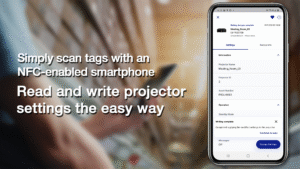
1) Read/write function via NFC tag
You can read or write projector setting information simply by holding the Android device running this app over the NFC tag. NFC writing can be secured by setting password so that only the device administrator can change the settings.
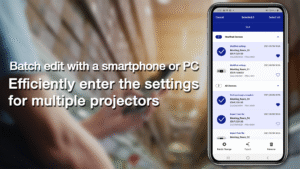
2) Batch change function for setting up multiple projectors
You can use the app to change the up to 1000 projector’s settings as a batch and apply them by holding your Android device over the NFC tags on each projector. In addition, you can export a CSV file to edit multiple projector information using spreadsheet software and then import it into the app to change projector's settings.
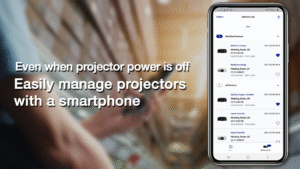
3) Projector management feature
You can make the routine management of projectors a breeze, using information such as operation time and error logs read by NFC tag even when they are powered off.
Projectors that support the app:
Epson high-brightness projectors that support the NFC function
For details, please visit
download2.ebz.epson.net/sec_pubs_visual/apps/config_tool/opeg/EN/
.
We welcome any feedback you have that could help us to improve this app. You can contact us through
"Developer contact". Please note that we cannot reply to individual inquiries. For inquiries regarding personal
information, please contact your regional branch described in the Privacy Statement.
The screenshot is an example and may differ from actual specifications.
Main Features
1) Read/write function via NFC tag
You can read or write projector setting information simply by holding the Android device running this app over the NFC tag. NFC writing can be secured by setting password so that only the device administrator can change the settings.
2) Batch change function for setting up multiple projectors
You can use the app to change the up to 1000 projector’s settings as a batch and apply them by holding your Android device over the NFC tags on each projector. In addition, you can export a CSV file to edit multiple projector information using spreadsheet software and then import it into the app to change projector's settings.
3) Projector management feature
You can make the routine management of projectors a breeze, using information such as operation time and error logs read by NFC tag even when they are powered off.
Projectors that support the app:
Epson high-brightness projectors that support the NFC function
For details, please visit
download2.ebz.epson.net/sec_pubs_visual/apps/config_tool/opeg/EN/
.
We welcome any feedback you have that could help us to improve this app. You can contact us through
"Developer contact". Please note that we cannot reply to individual inquiries. For inquiries regarding personal
information, please contact your regional branch described in the Privacy Statement.
The screenshot is an example and may differ from actual specifications.
Download Epson Projector Config Tool APK
Fast, free and safe download.
APK Permissions 9
- android.permission.ACCESS_ADSERVICES_AD_ID
- android.permission.ACCESS_ADSERVICES_ATTRIBUTION
- android.permission.ACCESS_NETWORK_STATE
- android.permission.INTERNET
- android.permission.NFC
- android.permission.READ_EXTERNAL_STORAGE
- android.permission.WAKE_LOCK
- com.epson.projector.configtool.DYNAMIC_RECEIVER_NOT_EXPORTED_PERMISSION
- com.google.android.finsky.permission.BIND_GET_INSTALL_REFERRER_SERVICE
APK Verified
The cryptographic signature guarantees that the file is safe to install and was not tampered with in any way.
Similar in Productivity


More by Seiko Epson Corporation


Frequently Asked Questions about Epson Projector Config Tool APK
This variant is built for 64-bit ARM (most Android phones made since 2017). If your device's CPU matches, this is the smallest, fastest version to install.
Yes — the APK's signature has been cryptographically verified against the publisher's signing key. The SHA-256 hash is shown in the File Information panel so you can independently confirm the file matches the original release.
Android 28 (API level 35) or newer. Older devices will refuse the install.
Install a free app like 'CPU-Z' or 'Droid Hardware Info' from the Play Store and look at the ABI / Instruction Set row. Most phones made after 2017 are arm64-v8a; if in doubt, download the universal variant.
All variants are functionally identical — same features, same version. They differ only in which CPU architectures the native code is compiled for, and (sometimes) which screen densities the included graphics target. Pick the one that matches your device for the smallest install size, or pick 'Universal' if you're unsure.