
Download Epson TM Print Assistant APK 1.17.0 arm64-v8a, armeabi-v7a, x86_64 · Android 21+
Download APK
Verified Safe
This is the arm64-v8a, armeabi-v7a, x86_64 build of Epson TM Print Assistant 1.17.0. Pick this build if your device's primary ABI matches.
File size: 14.7 MB • Min Android: 21 • Target Android: 35 • Version code: 11700 • Framework: Native (Java/Kotlin) • Permissions: 8
Screenshots
File Information
| Package Name | com.epson.tmassistant |
|---|---|
| Version Name | 1.17.0 |
| Version Code | 11700 |
| Architecture | arm64-v8a, armeabi-v7a, x86_64 |
| Min Android Version | Android 21 (API 35) |
| Main Activity | com.epson.tmassistant.presentation.MainActivity |
| Framework | Native (Java/Kotlin) |
| File Size | 14.67 MB |
| Signature (SHA1) | 161A1A8236D790FFD74CEC000619112156D22A3C |
| File Hash (SHA256) | 08caed3cb7111f44f0328575f9c166aeea6ed542b709e1223e030f30b4ba3141 |
What's New
- For Users in Europe, the Middle East and Africa European Radio Equipment Directive. Changes in the enhanced security specifications.
App Description
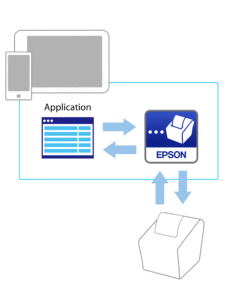
Epson TM Print Assistant allows for printing from Android phone or tablet to an Epson receipt printer.
This application converts print data in the XML or PDF format created with a Web application or native application into printer control commands and sends them to a printer connected via Bluetooth, network or USB.
For details on using Epson TM Print Assistant, refer to the sample manual that can be downloaded from the following URL:
download.epson-biz.com/?content=utl_tmpa_android
We welcome your feedback. Unfortunately, we cannot reply to your e-mail.
Supported printers
-TM-L100
-TM-m10
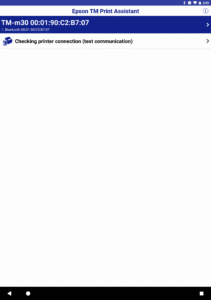
-TM-m30
-TM-m30II Series
-TM-m30III Series
-TM-m50
-TM-m50II Series
-TM-P20
-TM-P20II
-TM-P60II
-TM-P80
-TM-P80II
-TM-T20II
-TM-T20III
-TM-T20IV
-TM-T20IV-SP
-TM-T88V
-TM-T88VI
-TM-T88VII
Supported interfaces
-Bluetooth
-Wireless LAN
-USB
[App Permissions]
The following permissions are required to provide the service.
[Required] Location
To identify and connect to the printer in use.
(Applicable only on Android 12 or later)
[Optional] Nearby devices
To communicate with the printer in use.
* You can use the app even if you do not agree to optional permissions.
* However, some features may not function properly without optional permissions.
This application converts print data in the XML or PDF format created with a Web application or native application into printer control commands and sends them to a printer connected via Bluetooth, network or USB.
For details on using Epson TM Print Assistant, refer to the sample manual that can be downloaded from the following URL:
download.epson-biz.com/?content=utl_tmpa_android
We welcome your feedback. Unfortunately, we cannot reply to your e-mail.
Supported printers
-TM-L100
-TM-m10
-TM-m30
-TM-m30II Series
-TM-m30III Series
-TM-m50
-TM-m50II Series
-TM-P20
-TM-P20II
-TM-P60II
-TM-P80
-TM-P80II
-TM-T20II
-TM-T20III
-TM-T20IV
-TM-T20IV-SP
-TM-T88V
-TM-T88VI
-TM-T88VII
Supported interfaces
-Bluetooth
-Wireless LAN
-USB
[App Permissions]
The following permissions are required to provide the service.
[Required] Location
To identify and connect to the printer in use.
(Applicable only on Android 12 or later)
[Optional] Nearby devices
To communicate with the printer in use.
* You can use the app even if you do not agree to optional permissions.
* However, some features may not function properly without optional permissions.
Download Epson TM Print Assistant APK
Fast, free and safe download.
APK Permissions 8
- android.permission.ACCESS_COARSE_LOCATION
- android.permission.ACCESS_FINE_LOCATION
- android.permission.BLUETOOTH
- android.permission.BLUETOOTH_ADMIN
- android.permission.BLUETOOTH_CONNECT
- android.permission.BLUETOOTH_SCAN
- android.permission.INTERNET
- com.epson.tmassistant.DYNAMIC_RECEIVER_NOT_EXPORTED_PERMISSION
APK Verified
The cryptographic signature guarantees that the file is safe to install and was not tampered with in any way.
Similar in Business


More by Seiko Epson Corporation


Frequently Asked Questions about Epson TM Print Assistant APK
This variant is built for devices that report `arm64-v8a, armeabi-v7a, x86_64` as their primary ABI. If your device's CPU matches, this is the smallest, fastest version to install.
Yes — the APK's signature has been cryptographically verified against the publisher's signing key. The SHA-256 hash is shown in the File Information panel so you can independently confirm the file matches the original release.
Android 21 (API level 35) or newer. Older devices will refuse the install.
Install a free app like 'CPU-Z' or 'Droid Hardware Info' from the Play Store and look at the ABI / Instruction Set row. Most phones made after 2017 are arm64-v8a; if in doubt, download the universal variant.
All variants are functionally identical — same features, same version. They differ only in which CPU architectures the native code is compiled for, and (sometimes) which screen densities the included graphics target. Pick the one that matches your device for the smallest install size, or pick 'Universal' if you're unsure.