
Download Video Editor & Maker VideoShow APK 11.0.0.2 arm64-v8a, armeabi-v7a · Android 21+
Download APK
Verified Safe
This is the arm64-v8a, armeabi-v7a build of Video Editor & Maker VideoShow 11.0.0.2. Pick this build if your device's primary ABI matches.
File size: 234.0 MB • Min Android: 21 • Target Android: 35 • Version code: 1823 • Framework: Native (Java/Kotlin) • Permissions: 24
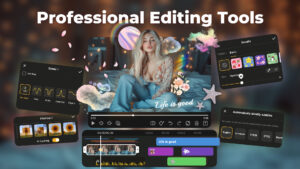
Screenshots







File Information
| Package Name | com.xvideostudio.videoeditor |
|---|---|
| Version Name | 11.0.0.2 |
| Version Code | 1823 |
| Architecture | arm64-v8a, armeabi-v7a |
| Min Android Version | Android 21 (API 35) |
| Main Activity | com.xvideostudio.videoeditor.activity.SplashRCActivity |
| Framework | Native (Java/Kotlin) |
| File Size | 233.97 MB |
| Signature (SHA1) | 9F69AECA84EEEC73D1FF17EB5859D2794734CE4B |
| File Hash (SHA256) | 073f365aafcf64cf0c28444dad3d7b9c8c98f8716b98919ae882e2380d1b8a19 |
What's New
Hey, guys,
With this update:
We provide you with the following functions
- AI Video feature is now available
- Improve performance and optimize experience
Let you enjoy editing!
With this update:
We provide you with the following functions
- AI Video feature is now available
- Improve performance and optimize experience
Let you enjoy editing!
App Description
VideoShow - AI Video Editor, Movie Maker and AI Video Generator!
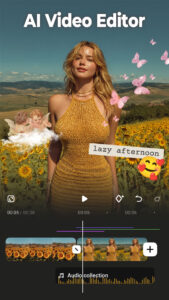
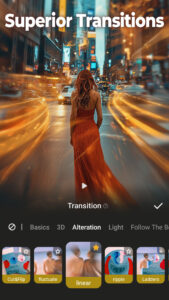
VideoShow offers excellent video editing features, making it easy and fun to create stunning videos. Decorate your videos with AI Effects, romantic stickers, dreamy transitions, and heartfelt music. Let VideoShow help you to become the next star on TikTok, Rednote, Instagram, Facebook, etc!
With this movie maker, creating videos with music, stickers, filters, and AI effects is easy and fun. Personalize your edits with scroll texts, FX, GIFs, transitions, or live dubbing to make unique vlogs, memes, or entertaining videos. Capture precious moments like weddings, birthdays, Halloween, Christmas and Valentine’s Day with ease.
Professional Video Editor & Photo Editor:
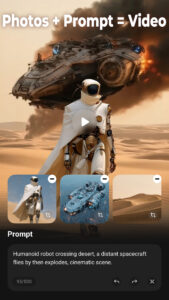
- AI Video Generator. Turn images to videos. Generate AI kiss videos & AI hug videos.
- Ready-Made Templates: A trendy video will be made wth simple steps.
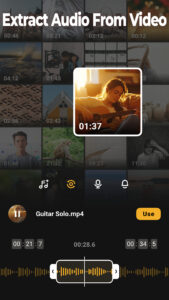
- Audio extractor: Extract clear audio from any video, convert video into music.
- 4K export, save HD video with no quality loss
- Use video overlay, display multiple videos in one screen. Make double exposure effect. Add emojis or animated filter
- Easy-to-use, splice video clips together
- Fully licensed music
- Add voice-over, like a recorder, change your voice into robot, monster...
- There's no watermark/no ads after updating to vip
- Use special lenses to make original video clip
AI Video Generator Tool:
- AI Auto Editing. Just choose, and let AI seamlessly add effects, filters, and themes, crafting stunning visuals effortlessly.
- AI Subtitles. AI-powered speech-to-text tool helps you say goodbye to manual text typing and makes video editing effortless.
- AI Voice Changer. Transform your voice into countless styles – from cute, girlish, mature, to youthful and beyond!
- AI Mosaic. Protect privacy or create stylized effects with AI-powered mosaic tools, ensuring seamless integration.
- AI effects. Customized video filters and video effects, stroke, auto-blur, etc.
All-in-one editor:
- Use elaborate themes to create music video, slideshow or vlog instantly.
- Various background music, you can add local songs from your device too. Easy to shoot video or cut movies.
- Variety of text styles and fonts to create artistic subtitles.
- Add stunning filters to make your video different.
- Blurred background, voice enhancement and speed adjustment features available.
- Multiple music can be added, adjust music volume, use music fade in/ fade out option.
- Easily adjust the video ratio of Instagram/TikTok posts.
- Gif export: make your own funny gifs with pictures from your album, make your video leap.
Powerful video editing tools:
- You can splice or merge video, convert video into MP3 file, collage and loop video clips easily.
- Zoom in or out. Let your audience focus on the region you want.
- Use fast motion/slow motion to adjust the speed of your video clip.
- Video dubbing. Add your own voice or sound effects to make the video cooler.
- Doodle on video, draw anything you like on the screen.
- Use video reverse to make funny video or original vlog.
- Compress Video: You can reduce the size of your video in this video creator.
- Video Trimmer: Turn the soundtrack of your video into mp3 file.
- Fantastic Materials Center: Themes/filters/stickers/gif images/memes/emojis/fonts/sound effects/FX and more.
Share your life story on social networks:
- Support for high-resolution video output including GIF, 480p, 720p, Full HD 1080p, and Ultra HD 4K, meeting all your needs.
- Instantly export your creations to your local album with just one click.
- Effortlessly share to social media platforms such as Instagram Reels, Facebook, TikTok, REDnote (Xiaohongshu), Whatsapp Status, Kwai, and Weibo.
Disclaimer:
VideoShow is not affiliated, associated, sponsored, endorsed by, or in any way officially connected with Instagram, TikTok, WhatsApp, YouTube, Facebook, Twitter, REDnote.
VideoShow offers excellent video editing features, making it easy and fun to create stunning videos. Decorate your videos with AI Effects, romantic stickers, dreamy transitions, and heartfelt music. Let VideoShow help you to become the next star on TikTok, Rednote, Instagram, Facebook, etc!
With this movie maker, creating videos with music, stickers, filters, and AI effects is easy and fun. Personalize your edits with scroll texts, FX, GIFs, transitions, or live dubbing to make unique vlogs, memes, or entertaining videos. Capture precious moments like weddings, birthdays, Halloween, Christmas and Valentine’s Day with ease.
Professional Video Editor & Photo Editor:
- AI Video Generator. Turn images to videos. Generate AI kiss videos & AI hug videos.
- Ready-Made Templates: A trendy video will be made wth simple steps.
- Audio extractor: Extract clear audio from any video, convert video into music.
- 4K export, save HD video with no quality loss
- Use video overlay, display multiple videos in one screen. Make double exposure effect. Add emojis or animated filter
- Easy-to-use, splice video clips together
- Fully licensed music
- Add voice-over, like a recorder, change your voice into robot, monster...
- There's no watermark/no ads after updating to vip
- Use special lenses to make original video clip
AI Video Generator Tool:
- AI Auto Editing. Just choose, and let AI seamlessly add effects, filters, and themes, crafting stunning visuals effortlessly.
- AI Subtitles. AI-powered speech-to-text tool helps you say goodbye to manual text typing and makes video editing effortless.
- AI Voice Changer. Transform your voice into countless styles – from cute, girlish, mature, to youthful and beyond!
- AI Mosaic. Protect privacy or create stylized effects with AI-powered mosaic tools, ensuring seamless integration.
- AI effects. Customized video filters and video effects, stroke, auto-blur, etc.
All-in-one editor:
- Use elaborate themes to create music video, slideshow or vlog instantly.
- Various background music, you can add local songs from your device too. Easy to shoot video or cut movies.
- Variety of text styles and fonts to create artistic subtitles.
- Add stunning filters to make your video different.
- Blurred background, voice enhancement and speed adjustment features available.
- Multiple music can be added, adjust music volume, use music fade in/ fade out option.
- Easily adjust the video ratio of Instagram/TikTok posts.
- Gif export: make your own funny gifs with pictures from your album, make your video leap.
Powerful video editing tools:
- You can splice or merge video, convert video into MP3 file, collage and loop video clips easily.
- Zoom in or out. Let your audience focus on the region you want.
- Use fast motion/slow motion to adjust the speed of your video clip.
- Video dubbing. Add your own voice or sound effects to make the video cooler.
- Doodle on video, draw anything you like on the screen.
- Use video reverse to make funny video or original vlog.
- Compress Video: You can reduce the size of your video in this video creator.
- Video Trimmer: Turn the soundtrack of your video into mp3 file.
- Fantastic Materials Center: Themes/filters/stickers/gif images/memes/emojis/fonts/sound effects/FX and more.
Share your life story on social networks:
- Support for high-resolution video output including GIF, 480p, 720p, Full HD 1080p, and Ultra HD 4K, meeting all your needs.
- Instantly export your creations to your local album with just one click.
- Effortlessly share to social media platforms such as Instagram Reels, Facebook, TikTok, REDnote (Xiaohongshu), Whatsapp Status, Kwai, and Weibo.
Disclaimer:
VideoShow is not affiliated, associated, sponsored, endorsed by, or in any way officially connected with Instagram, TikTok, WhatsApp, YouTube, Facebook, Twitter, REDnote.
Download Video Editor & Maker VideoShow APK
Fast, free and safe download.
APK Permissions 24
- android.permission.ACCESS_NETWORK_STATE
- android.permission.ACCESS_WIFI_STATE
- android.permission.CAMERA
- android.permission.FLASHLIGHT
- android.permission.FOREGROUND_SERVICE
- android.permission.FOREGROUND_SERVICE_DATA_SYNC
- android.permission.FOREGROUND_SERVICE_SYSTEM_EXEMPTED
- android.permission.INTERNET
- android.permission.POST_NOTIFICATIONS
- android.permission.READ_EXTERNAL_STORAGE
- android.permission.READ_MEDIA_AUDIO
- android.permission.READ_MEDIA_IMAGES
- android.permission.READ_MEDIA_VIDEO
- android.permission.RECORD_AUDIO
- android.permission.VIBRATE
- android.permission.WAKE_LOCK
- android.permission.WRITE_EXTERNAL_STORAGE
- com.android.launcher.permission.INSTALL_SHORTCUT
- com.android.launcher.permission.UNINSTALL_SHORTCUT
- com.android.vending.BILLING
- com.google.android.c2dm.permission.RECEIVE
- com.google.android.finsky.permission.BIND_GET_INSTALL_REFERRER_SERVICE
- com.google.android.gms.permission.AD_ID
- com.xvideostudio.videoeditor.DYNAMIC_RECEIVER_NOT_EXPORTED_PERMISSION
APK Verified
The cryptographic signature guarantees that the file is safe to install and was not tampered with in any way.
Developer
Name: VIDEOSHOW Video Editor & Maker & AI Chat Generator
See All Versions View on Google PlaySimilar in Video Players


More by VIDEOSHOW Video Editor & Maker & AI Chat Generator


Frequently Asked Questions about Video Editor & Maker VideoShow APK
This variant is built for devices that report `arm64-v8a, armeabi-v7a` as their primary ABI. If your device's CPU matches, this is the smallest, fastest version to install.
Yes — the APK's signature has been cryptographically verified against the publisher's signing key. The SHA-256 hash is shown in the File Information panel so you can independently confirm the file matches the original release.
Android 21 (API level 35) or newer. Older devices will refuse the install.
Install a free app like 'CPU-Z' or 'Droid Hardware Info' from the Play Store and look at the ABI / Instruction Set row. Most phones made after 2017 are arm64-v8a; if in doubt, download the universal variant.
All variants are functionally identical — same features, same version. They differ only in which CPU architectures the native code is compiled for, and (sometimes) which screen densities the included graphics target. Pick the one that matches your device for the smallest install size, or pick 'Universal' if you're unsure.