
This is the universal build of WiFi Mouse 5.5.5. It contains native libraries for every CPU architecture (arm64-v8a, armeabi-v7a, x86, x86_64), so it installs on any Android device. The trade-off is size — it's larger than per-architecture variants. Pick this one if you're unsure which CPU your phone has, or if you plan to share the APK with multiple devices.
File size: 20.6 MB • Min Android: 27 • Target Android: 35 • Version code: 366 • Framework: Native (Java/Kotlin) • Permissions: 19
Screenshots
File Information
| Package Name | com.necta.wifimousefree |
|---|---|
| Version Name | 5.5.5 |
| Version Code | 366 |
| Architecture | Universal |
| Min Android Version | Android 27 (API 35) |
| Main Activity | com.necta.wifimousefree.material.MainActivity |
| Framework | Native (Java/Kotlin) |
| File Size | 20.59 MB |
| Signature (SHA1) | 900ADAED4F1364A4A3508C47B99F73A1EAAAE1DC |
| File Hash (SHA256) | 96b9e603f804441658eadf071cc4966cba3543498525737442d74b8f0af90147 |
What's New
Fix bugs
App Description
🚀 Your Phone = Ultimate PC Remote: Mouse, Keyboard, Trackpad & MORE! 🚀
Tired of jumping up to control your PC or Mac? Transform your Android phone into a powerful wireless mouse, keyboard, trackpad, and command center! Effortlessly control your Windows, macOS, or Linux computer from your couch, bed, or across the room – all over your local WiFi.
🌟 NEW! Game-Changer: Remotely Shutdown or Restart Your Computer from ANYWHERE
(via internet)!
Unlock the Full Potential of Your Phone:
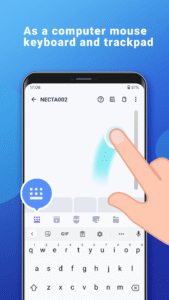
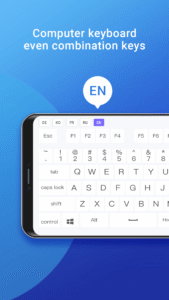
Precision Control: Smooth touchpad, Air Mouse (gyro!), & full keyboard (emoji 😂 included!). Supports any Android keyboard.
Power User Features:
NEW Internet Remote: Shutdown/Restart PC from anywhere!
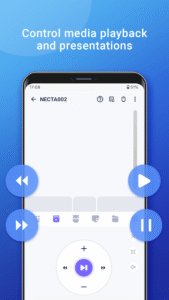
Media Master: Control Spotify, VLC, YouTube (web), Netflix (web), QuickTime & more! (Unlock Premium)
Present Like a Pro: Remote PowerPoint/Keynote control.
Voice to Text: Dictate directly to your PC!
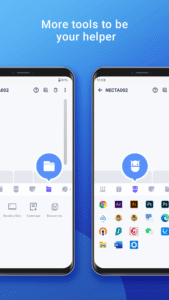
App Launcher & File Browser: Start apps & find files instantly.
Game Pad Mode: Play Roblox & other PC games remotely! (Unlock Premium)
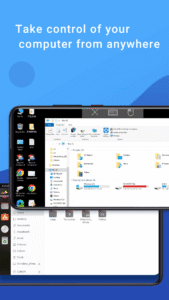
Remote Desktop (RDP): See your PC screen on your phone. (Unlock Premium)
Universal Remote: Control IR TVs (Samsung, LG, Apple TV, TCL) with your phone's IR blaster! (Requires hardware)
Seamless Compatibility: Works flawlessly with Windows 7/10/11, macOS, and Linux (Ubuntu, Debian, Raspberry Pi, Mint & more).
Smart & Secure: Password protection & Dark Mode (Android 10+).
✅ Super Simple Setup in Seconds:
1. Download the FREE Mouse Server for your PC/Mac/Linux: [
wifimouse.necta.us](http://wifimouse.necta.us
)
2. Install & Run it (ensure firewall allows port 1978).
3. Connect your phone & computer to the SAME WiFi.
4. Open the app & control instantly!
🔐 Permissions Explained:
Full Network Access: Essential for connecting to your computer.
Control Vibration: Provides tactile feedback for key presses (feels real!).
Transmit Infrared: Only needed if using the TV remote feature (requires IR blaster).
👉 Ditch the Dongles & Extra Remotes! Download WiFi Mouse NOW and Turn Your Phone into the Ultimate Control Hub!
Tired of jumping up to control your PC or Mac? Transform your Android phone into a powerful wireless mouse, keyboard, trackpad, and command center! Effortlessly control your Windows, macOS, or Linux computer from your couch, bed, or across the room – all over your local WiFi.
🌟 NEW! Game-Changer: Remotely Shutdown or Restart Your Computer from ANYWHERE
(via internet)!
Unlock the Full Potential of Your Phone:
Precision Control: Smooth touchpad, Air Mouse (gyro!), & full keyboard (emoji 😂 included!). Supports any Android keyboard.
Power User Features:
NEW Internet Remote: Shutdown/Restart PC from anywhere!
Media Master: Control Spotify, VLC, YouTube (web), Netflix (web), QuickTime & more! (Unlock Premium)
Present Like a Pro: Remote PowerPoint/Keynote control.
Voice to Text: Dictate directly to your PC!
App Launcher & File Browser: Start apps & find files instantly.
Game Pad Mode: Play Roblox & other PC games remotely! (Unlock Premium)
Remote Desktop (RDP): See your PC screen on your phone. (Unlock Premium)
Universal Remote: Control IR TVs (Samsung, LG, Apple TV, TCL) with your phone's IR blaster! (Requires hardware)
Seamless Compatibility: Works flawlessly with Windows 7/10/11, macOS, and Linux (Ubuntu, Debian, Raspberry Pi, Mint & more).
Smart & Secure: Password protection & Dark Mode (Android 10+).
✅ Super Simple Setup in Seconds:
1. Download the FREE Mouse Server for your PC/Mac/Linux: [
wifimouse.necta.us](http://wifimouse.necta.us
)
2. Install & Run it (ensure firewall allows port 1978).
3. Connect your phone & computer to the SAME WiFi.
4. Open the app & control instantly!
🔐 Permissions Explained:
Full Network Access: Essential for connecting to your computer.
Control Vibration: Provides tactile feedback for key presses (feels real!).
Transmit Infrared: Only needed if using the TV remote feature (requires IR blaster).
👉 Ditch the Dongles & Extra Remotes! Download WiFi Mouse NOW and Turn Your Phone into the Ultimate Control Hub!
Download WiFi Mouse APK
Fast, free and safe download.
APK Permissions 19
- android.permission.ACCESS_ADSERVICES_AD_ID
- android.permission.ACCESS_ADSERVICES_ATTRIBUTION
- android.permission.ACCESS_ADSERVICES_TOPICS
- android.permission.ACCESS_NETWORK_STATE
- android.permission.ACCESS_WIFI_STATE
- android.permission.CHANGE_WIFI_MULTICAST_STATE
- android.permission.FOREGROUND_SERVICE
- android.permission.INTERNET
- android.permission.POST_NOTIFICATIONS
- android.permission.RECEIVE_BOOT_COMPLETED
- android.permission.RECORD_AUDIO
- android.permission.TRANSMIT_IR
- android.permission.VIBRATE
- android.permission.WAKE_LOCK
- com.android.vending.BILLING
- com.google.android.c2dm.permission.RECEIVE
- com.google.android.finsky.permission.BIND_GET_INSTALL_REFERRER_SERVICE
- com.google.android.gms.permission.AD_ID
- com.necta.wifimousefree.DYNAMIC_RECEIVER_NOT_EXPORTED_PERMISSION
APK Verified
The cryptographic signature guarantees that the file is safe to install and was not tampered with in any way.


Frequently Asked Questions about WiFi Mouse APK
This is the universal variant — a single APK that contains native libraries for every CPU architecture. It installs on any Android device but is larger than per-architecture variants.
Yes — the APK's signature has been cryptographically verified against the publisher's signing key. The SHA-256 hash is shown in the File Information panel so you can independently confirm the file matches the original release.
Android 27 (API level 35) or newer. Older devices will refuse the install.
Install a free app like 'CPU-Z' or 'Droid Hardware Info' from the Play Store and look at the ABI / Instruction Set row. Most phones made after 2017 are arm64-v8a; if in doubt, download the universal variant.
All variants are functionally identical — same features, same version. They differ only in which CPU architectures the native code is compiled for, and (sometimes) which screen densities the included graphics target. Pick the one that matches your device for the smallest install size, or pick 'Universal' if you're unsure.