
This is the universal build of Notebook – Notes, Tasks, AI 6.6. It contains native libraries for every CPU architecture (arm64-v8a, armeabi-v7a, x86, x86_64), so it installs on any Android device. The trade-off is size — it's larger than per-architecture variants. Pick this one if you're unsure which CPU your phone has, or if you plan to share the APK with multiple devices.
File size: 42.3 MB • Min Android: 23 • Target Android: 35 • Version code: 92191 • Framework: Native (Java/Kotlin) • Permissions: 46
Screenshots
File Information
| Package Name | com.zoho.notebook |
|---|---|
| Version Name | 6.6 |
| Version Code | 92191 |
| Architecture | Universal |
| Min Android Version | Android 23 (API 35) |
| Main Activity | com.zoho.notebook.activities.NoteBookActivity |
| Framework | Native (Java/Kotlin) |
| File Size | 42.29 MB |
| Signature (SHA1) | 5D870C0503BA30D843DB481631AC654B45EAB205 |
| File Hash (SHA256) | 627a9cc2117feea2941a157ab8c1170cd6e225f6800d240753365942651469b6 |
What's New
From version
6.3.2
:
We're here with updates to make your note-taking experience better.
Multi-task with Notebook using Dex mode.Use Color Picker in Flex mode on your foldable device.Open Text Cards and other windows on a single screen.Drag and drop files/images from another app to Notebook.View your notes in Picture-in-Picture mode while toggling between the other apps.Set reminders anytime in the Note Menu.Create widgets of notecards on your home screen.
We've also fixed some bugs and made enhancements.
6.3.2
:
We're here with updates to make your note-taking experience better.
Multi-task with Notebook using Dex mode.Use Color Picker in Flex mode on your foldable device.Open Text Cards and other windows on a single screen.Drag and drop files/images from another app to Notebook.View your notes in Picture-in-Picture mode while toggling between the other apps.Set reminders anytime in the Note Menu.Create widgets of notecards on your home screen.
We've also fixed some bugs and made enhancements.
App Description
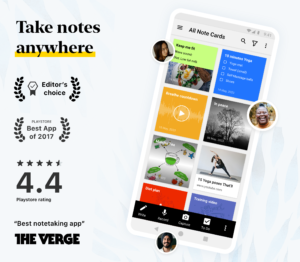
'Google PlayStore's Best App of 2017’ -
play.google.com/store/apps/topic?id=campaign_editorial_apps_productivity_bestof2017
Be more productive with this beautifully simple note-taking app. A Mac app, an iOS app and web clippers for Chrome, Firefox and Safari are also available. You can log into
notebook.zoho.com
to view and take notes online.
*TAKE NOTES*
Notebook provides different ways to take notes and capture your thoughts.
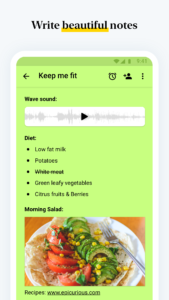
- Write notes. Start with text, add images, checklists, and audio, all in the same text note.
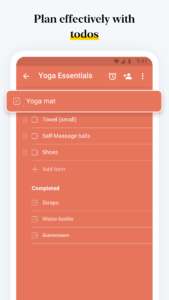
- Create checklists to get stuff done with the dedicated checklist note.
- Record voice notes with the audio note.
- Capture moments using the dedicated photo note.
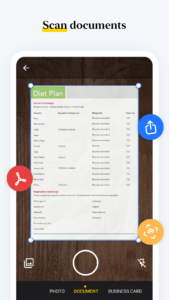
- Scan documents and add to Notebook.
- Attach Microsoft documents, PDF, and other files.
*ORGANISE NOTES*
Keep yourself and your work organised.
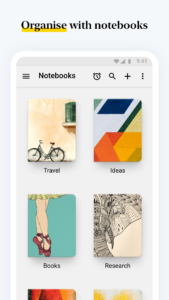
Organise various notes into notebooks.
- Create notecard stacks by grouping notes together.
- Reorder your notes within a notebook.
- Move or copy your notes between notebooks.
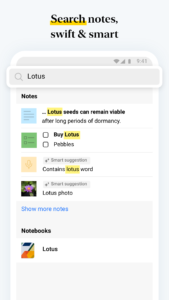
- Search within a notebook or across notebooks.
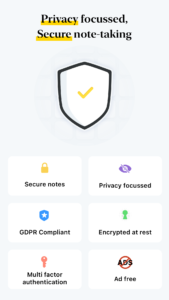
- Securely lock your note with passwords of your choice.
- Use your Touch ID to unlock notes.
*SYNC ACROSS DEVICES*
Access your work anywhere and everywhere with Notebook's ability to sync your notes to the cloud.
Synchronise all your notes and notebooks across devices and to the cloud.
- Take a note on one device, add to it from another. Be it a device or a tablet or a computer or browsers, you name it and we have your notes there.
*NOTABLE GESTURES*
Unlike the other colourful premium notepad apps, the intimate joy of Notebook comes from using the app.
- Swipe your notebook or note for additional information.
- Pinch to group notes into a stack.
- Flick to find the note you need.
- In landscape view, pinch to fold group notes like an accordion.
*CUSTOMISE YOUR NOTEBOOK*
Notebook provides numerous ways to customise your notes.
- Change the colour of your notes.
- Choose a notebook cover or create your own.
- View your notes in either grid or landscape style views.
- Continue recording audio on any screen of your android device.
*SHARE YOUR NOTES*
Notebook provides different ways to share your ideas.
- Share your notes through email and other supporting apps.
- Export notes as PDF and share it with others.
*ANDROID EXCLUSIVE*
- Notebook Widget: View your last 20 modified notes across notebooks and find options to quickly create notes from the widget.
- Access any notebook or note with a single click by creating a shortcut.
- Multi Window Support for mobile devices running Android 7.0 and above.
- Create notes while you're in a meeting with Google Assistant Integration. Ask Google Assistant to ’Take Note’ to instantly create a note.
- Print any note using Google Cloud Print or any other preferred configurations.
- Quickly create notes using 'Launcher Shortcuts'. A long press on the app icon will reveal note creation options.
*NOTEBOOK WEB CLIPPER*
- A beautiful, customizable Clean View for more focused reading while viewing articles.
- Clip page links to create Smart Cards.
- Crop photos and screenshots and save them to Notebook.
*NOTEBOOK FOR STUDENTS*
- Record entire lectures using Audio Card.
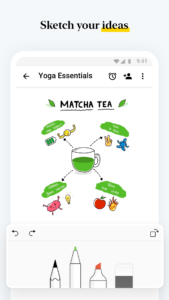
- Draw diagrams and take handwritten notes during discussions with Sketch Card.
- Scan your reference books and make them available for later.
- Clip research content and web page links using Notebook Web Clipper.
*NOTEBOOK IN DAY-TO-DAY LIFE*
- Stay up-to-date with your daily tasks.
- Sketch down your creativity without any second thought.
- Effectively plan trips, weddings, and parties.
- Make Notebook your daily journal.
*NOTEBOOK FOR WEAR OS*
Take notes, create checklists, and record audio on Wear OS watches with the handiest companion note-taking app.
play.google.com/store/apps/topic?id=campaign_editorial_apps_productivity_bestof2017
Be more productive with this beautifully simple note-taking app. A Mac app, an iOS app and web clippers for Chrome, Firefox and Safari are also available. You can log into
notebook.zoho.com
to view and take notes online.
*TAKE NOTES*
Notebook provides different ways to take notes and capture your thoughts.
- Write notes. Start with text, add images, checklists, and audio, all in the same text note.
- Create checklists to get stuff done with the dedicated checklist note.
- Record voice notes with the audio note.
- Capture moments using the dedicated photo note.
- Scan documents and add to Notebook.
- Attach Microsoft documents, PDF, and other files.
*ORGANISE NOTES*
Keep yourself and your work organised.
Organise various notes into notebooks.
- Create notecard stacks by grouping notes together.
- Reorder your notes within a notebook.
- Move or copy your notes between notebooks.
- Search within a notebook or across notebooks.
- Securely lock your note with passwords of your choice.
- Use your Touch ID to unlock notes.
*SYNC ACROSS DEVICES*
Access your work anywhere and everywhere with Notebook's ability to sync your notes to the cloud.
Synchronise all your notes and notebooks across devices and to the cloud.
- Take a note on one device, add to it from another. Be it a device or a tablet or a computer or browsers, you name it and we have your notes there.
*NOTABLE GESTURES*
Unlike the other colourful premium notepad apps, the intimate joy of Notebook comes from using the app.
- Swipe your notebook or note for additional information.
- Pinch to group notes into a stack.
- Flick to find the note you need.
- In landscape view, pinch to fold group notes like an accordion.
*CUSTOMISE YOUR NOTEBOOK*
Notebook provides numerous ways to customise your notes.
- Change the colour of your notes.
- Choose a notebook cover or create your own.
- View your notes in either grid or landscape style views.
- Continue recording audio on any screen of your android device.
*SHARE YOUR NOTES*
Notebook provides different ways to share your ideas.
- Share your notes through email and other supporting apps.
- Export notes as PDF and share it with others.
*ANDROID EXCLUSIVE*
- Notebook Widget: View your last 20 modified notes across notebooks and find options to quickly create notes from the widget.
- Access any notebook or note with a single click by creating a shortcut.
- Multi Window Support for mobile devices running Android 7.0 and above.
- Create notes while you're in a meeting with Google Assistant Integration. Ask Google Assistant to ’Take Note’ to instantly create a note.
- Print any note using Google Cloud Print or any other preferred configurations.
- Quickly create notes using 'Launcher Shortcuts'. A long press on the app icon will reveal note creation options.
*NOTEBOOK WEB CLIPPER*
- A beautiful, customizable Clean View for more focused reading while viewing articles.
- Clip page links to create Smart Cards.
- Crop photos and screenshots and save them to Notebook.
*NOTEBOOK FOR STUDENTS*
- Record entire lectures using Audio Card.
- Draw diagrams and take handwritten notes during discussions with Sketch Card.
- Scan your reference books and make them available for later.
- Clip research content and web page links using Notebook Web Clipper.
*NOTEBOOK IN DAY-TO-DAY LIFE*
- Stay up-to-date with your daily tasks.
- Sketch down your creativity without any second thought.
- Effectively plan trips, weddings, and parties.
- Make Notebook your daily journal.
*NOTEBOOK FOR WEAR OS*
Take notes, create checklists, and record audio on Wear OS watches with the handiest companion note-taking app.
Download Notebook – Notes, Tasks, AI APK
Fast, free and safe download.
APK Permissions 46
- android.hardware.sensor.proximity
- android.permission.ACCESS_COARSE_LOCATION
- android.permission.ACCESS_FINE_LOCATION
- android.permission.ACCESS_NETWORK_STATE
- android.permission.ACCESS_WIFI_STATE
- android.permission.AUTHENTICATE_ACCOUNTS
- android.permission.BLUETOOTH_CONNECT
- android.permission.CAMERA
- android.permission.FOREGROUND_SERVICE
- android.permission.FOREGROUND_SERVICE_DATA_SYNC
- android.permission.FOREGROUND_SERVICE_MEDIA_PROJECTION
- android.permission.FOREGROUND_SERVICE_MICROPHONE
- android.permission.FOREGROUND_SERVICE_PHONE_CALL
- android.permission.GET_ACCOUNTS
- android.permission.INTERNET
- android.permission.MANAGE_ACCOUNTS
- android.permission.MANAGE_OWN_CALLS
- android.permission.MODIFY_AUDIO_SETTINGS
- android.permission.POST_NOTIFICATIONS
- android.permission.READ_CONTACTS
- android.permission.READ_EXTERNAL_STORAGE
- android.permission.READ_MEDIA_AUDIO
- android.permission.READ_MEDIA_IMAGES
- android.permission.READ_MEDIA_VIDEO
- android.permission.READ_MEDIA_VISUAL_USER_SELECTED
- android.permission.READ_PHONE_STATE
- android.permission.RECEIVE_BOOT_COMPLETED
- android.permission.RECORD_AUDIO
- android.permission.SCHEDULE_EXACT_ALARM
- android.permission.USE_BIOMETRIC
- android.permission.USE_CREDENTIALS
- android.permission.USE_FINGERPRINT
- android.permission.VIBRATE
- android.permission.WAKE_LOCK
- android.permission.WRITE_EXTERNAL_STORAGE
- com.android.launcher.permission.INSTALL_SHORTCUT
- com.android.launcher.permission.UNINSTALL_SHORTCUT
- com.android.vending.BILLING
- com.android.vending.CHECK_LICENSE
- com.google.android.c2dm.permission.RECEIVE
- com.google.android.providers.gsf.permission.READ_GSERVICES
- com.samsung.android.mcfds.permission.USE_HANDOFF_PUBLIC_PROVIDER
- com.zoho.notebook.DYNAMIC_RECEIVER_NOT_EXPORTED_PERMISSION
- com.zoho.notebook.permission.MAPS_RECEIVE
- com.zoho.notebook.permission.WRITE_SCHEDULE
- com.zoho.scanner.ocr.receiver.ZDocScanReceiver
APK Verified
The cryptographic signature guarantees that the file is safe to install and was not tampered with in any way.
Similar in Productivity


More by Zoho Corporation


Frequently Asked Questions about Notebook – Notes, Tasks, AI APK
This is the universal variant — a single APK that contains native libraries for every CPU architecture. It installs on any Android device but is larger than per-architecture variants.
Yes — the APK's signature has been cryptographically verified against the publisher's signing key. The SHA-256 hash is shown in the File Information panel so you can independently confirm the file matches the original release.
Android 23 (API level 35) or newer. Older devices will refuse the install.
Install a free app like 'CPU-Z' or 'Droid Hardware Info' from the Play Store and look at the ABI / Instruction Set row. Most phones made after 2017 are arm64-v8a; if in doubt, download the universal variant.
All variants are functionally identical — same features, same version. They differ only in which CPU architectures the native code is compiled for, and (sometimes) which screen densities the included graphics target. Pick the one that matches your device for the smallest install size, or pick 'Universal' if you're unsure.