
Download Video Player – HD & 4K Offline v1.0.130 (120-640dpi) (Android APK v1.0.119 Universal · Android 23+
Download APK
Verified Safe
This is the universal build of Video Player – HD & 4K Offline v1.0.130 (120-640dpi) (Android v1.0.119. It contains native libraries for every CPU architecture (arm64-v8a, armeabi-v7a, x86, x86_64), so it installs on any Android device. The trade-off is size — it's larger than per-architecture variants. Pick this one if you're unsure which CPU your phone has, or if you plan to share the APK with multiple devices.
File size: 25.5 MB • Min Android: 23 • Target Android: 35 • Version code: 119 • Framework: Native (Java/Kotlin) • Permissions: 31
Screenshots

File Information
| Package Name | rocks.video.videoplayer |
|---|---|
| Version Name | v1.0.119 |
| Version Code | 119 |
| Architecture | Universal |
| Min Android Version | Android 23 (API 35) |
| Main Activity | com.rocks.music.videoplayer.Splash |
| Framework | Native (Java/Kotlin) |
| File Size | 25.54 MB |
| Signature (SHA1) | 056F3FBB8E6EF3F6A751D96061A5C195165BBCF4 |
| File Hash (SHA256) | d2209e26374ef7f342b9fb236493e05e93468751f2b150262658f2be8ca289f5 |
What's New
Rocks Video player app Lite version -
⏯ Cast to TV- Chromecast support.
⏯ Support 4k, 8k and 1080p formats.
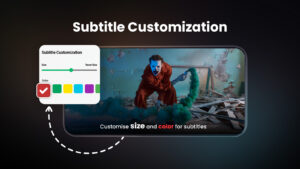
⏯ Dual Audio, Subtitle, Playback speed and Floating player support.
⏯ Manager media files.
⏯ Cast to TV- Chromecast support.
⏯ Support 4k, 8k and 1080p formats.
⏯ Dual Audio, Subtitle, Playback speed and Floating player support.
⏯ Manager media files.
App Description
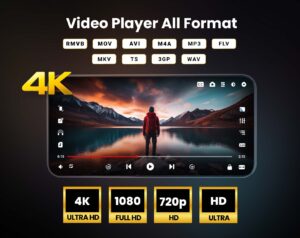
⏯ Play HD videos in all formats, including 4K. Fast, smooth playback with subtitle support
⏯ Rocks Video Player Supports all video formats including 4K and Ultra HD. Features online streaming, caption support, background audio play, hardware acceleration, and gesture controls. Offers dark mode, video casting, dual audio support, and smart playback options.
⏯ Rocks Video player
supports all formats like 4K, mp4, MOV, etc. It gives a list of features to play videos.
This media player supports all video formats like 1080p, Full HD, 4K, and Ultra HD video files. It is one of the best video players for Android.
⏯ Rocks Video Player
provides online streaming, themes, subtitle support, and a status saver where you can save any WhatsApp video or photo. This media player also lets you navigate the app in multiple languages.
Key features
🔸
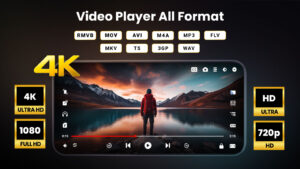
Supports some popular formats like eac3, 1080p, 780p, AAC, AVI, WAV, MP4, 3GP, M4V, MKV, MOV, FLV, TS, RMVB, WMV, MPG, etc.
🔸
Cast Videos to TV
from your Android device.
🔸 Smart
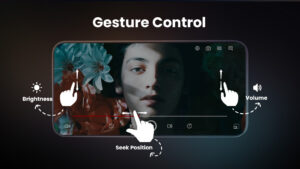
gesture control for volume, playing progress, and brightness.
🔸 Smart playback options like Zoom in and out, auto-rotation, and screen lock.
🔸 Play the video in a pop-up window, and
🎵 Play-In background as an audio
file.
🔸
Hardware acceleration with the new HW+ decoder
🔸
🎵Playback Speed and Dual Audio
support in mp4 player.
Extra Features make Rocks video player easy to use:
● Ultra Rocks HD video player supports 4K, 8k, FHD, and all types of video formats.
● Handle Recently played videos, start-over options, and resumes in the media player.
●
Dark Mode to protect eyes from blue light, Fast Mute option in Player screen.
● Identify all video files on your device and
scan the SD Card
automatically.
● Easily manage or share videos.
● Multiple gradients, flat, and custom themes.
● 🎵 Powerful Equalizer with Bass Boost and Virtualizer
⏯ Rocks Video Player for all formats
Play all video formats like MP4, FLV, WMV, MPG, MKV, M4V, MOV, 3GP, RMVB, TS, etc.
⏯ 4K Video Player
Play HD, 4K, 1080p, Full HD, and all types of video files smoothly in an MP4 player and Media Player.
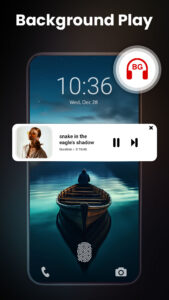
🎵Play-in Background Video Player
Play videos in the background as audio in the Rocks video player. You can play the video in the background as audio playback and you can watch a video in a way of multi-tasking in an HD video player.
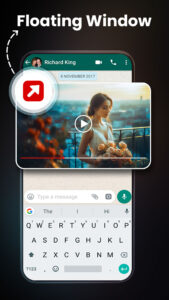
⏯ Floating Video Player support
The floating Player helps you watch videos when you are using other apps. Enjoy videos on the split-screen and use other apps as usual.
⏯ Rocks Video player with complete control in media files
Recently played video queue, create a playlist, search videos.
It is noted that our app is not sponsored or affiliated with YouTube, Facebook, Instagram, and other social sites.
⏯ Rocks video player for all formats
is totally free 4K video player for Android. We love to hear your suggestions and feedback @ <
feedback@rareprob.com">88>feedback@rareprob.com
⏯ Rocks Video Player Supports all video formats including 4K and Ultra HD. Features online streaming, caption support, background audio play, hardware acceleration, and gesture controls. Offers dark mode, video casting, dual audio support, and smart playback options.
⏯ Rocks Video player
supports all formats like 4K, mp4, MOV, etc. It gives a list of features to play videos.
This media player supports all video formats like 1080p, Full HD, 4K, and Ultra HD video files. It is one of the best video players for Android.
⏯ Rocks Video Player
provides online streaming, themes, subtitle support, and a status saver where you can save any WhatsApp video or photo. This media player also lets you navigate the app in multiple languages.
Key features
🔸
Supports some popular formats like eac3, 1080p, 780p, AAC, AVI, WAV, MP4, 3GP, M4V, MKV, MOV, FLV, TS, RMVB, WMV, MPG, etc.
🔸
Cast Videos to TV
from your Android device.
🔸 Smart
gesture control for volume, playing progress, and brightness.
🔸 Smart playback options like Zoom in and out, auto-rotation, and screen lock.
🔸 Play the video in a pop-up window, and
🎵 Play-In background as an audio
file.
🔸
Hardware acceleration with the new HW+ decoder
🔸
🎵Playback Speed and Dual Audio
support in mp4 player.
Extra Features make Rocks video player easy to use:
● Ultra Rocks HD video player supports 4K, 8k, FHD, and all types of video formats.
● Handle Recently played videos, start-over options, and resumes in the media player.
●
Dark Mode to protect eyes from blue light, Fast Mute option in Player screen.
● Identify all video files on your device and
scan the SD Card
automatically.
● Easily manage or share videos.
● Multiple gradients, flat, and custom themes.
● 🎵 Powerful Equalizer with Bass Boost and Virtualizer
⏯ Rocks Video Player for all formats
Play all video formats like MP4, FLV, WMV, MPG, MKV, M4V, MOV, 3GP, RMVB, TS, etc.
⏯ 4K Video Player
Play HD, 4K, 1080p, Full HD, and all types of video files smoothly in an MP4 player and Media Player.
🎵Play-in Background Video Player
Play videos in the background as audio in the Rocks video player. You can play the video in the background as audio playback and you can watch a video in a way of multi-tasking in an HD video player.
⏯ Floating Video Player support
The floating Player helps you watch videos when you are using other apps. Enjoy videos on the split-screen and use other apps as usual.
⏯ Rocks Video player with complete control in media files
Recently played video queue, create a playlist, search videos.
It is noted that our app is not sponsored or affiliated with YouTube, Facebook, Instagram, and other social sites.
⏯ Rocks video player for all formats
is totally free 4K video player for Android. We love to hear your suggestions and feedback @ <
feedback@rareprob.com">88>feedback@rareprob.com
Download Video Player – HD & 4K Offline v1.0.130 (120-640dpi) (Android APK
Fast, free and safe download.
APK Permissions 31
- android.permission.ACCESS_ADSERVICES_AD_ID
- android.permission.ACCESS_ADSERVICES_ATTRIBUTION
- android.permission.ACCESS_ADSERVICES_TOPICS
- android.permission.ACCESS_NETWORK_STATE
- android.permission.ACCESS_WIFI_STATE
- android.permission.BROADCAST_STICKY
- android.permission.CHANGE_WIFI_STATE
- android.permission.FOREGROUND_SERVICE
- android.permission.FOREGROUND_SERVICE_MEDIA_PLAYBACK
- android.permission.INTERNET
- android.permission.MODIFY_AUDIO_SETTINGS
- android.permission.POST_NOTIFICATIONS
- android.permission.READ_EXTERNAL_STORAGE
- android.permission.READ_MEDIA_VIDEO
- android.permission.READ_MEDIA_VISUAL_USER_SELECTED
- android.permission.RECEIVE_BOOT_COMPLETED
- android.permission.SYSTEM_ALERT_WINDOW
- android.permission.VIBRATE
- android.permission.WAKE_LOCK
- android.permission.WRITE_EXTERNAL_STORAGE
- android.permission.WRITE_SETTINGS
- com.android.vending.BILLING
- com.applovin.array.apphub.permission.BIND_APPHUB_SERVICE
- com.google.android.c2dm.permission.RECEIVE
- com.google.android.finsky.permission.BIND_GET_INSTALL_REFERRER_SERVICE
- com.google.android.gm.permission.READ_GMAIL
- com.google.android.gm.permission.WRITE_GMAIL
- com.google.android.gms.permission.AD_ID
- com.google.android.googleapps.permission.GOOGLE_AUTH
- com.google.android.providers.gmail.permission.READ_GMAIL
- rocks.video.videoplayer.DYNAMIC_RECEIVER_NOT_EXPORTED_PERMISSION
APK Verified
The cryptographic signature guarantees that the file is safe to install and was not tampered with in any way.
Similar in Video Players


More by ASD Dev Video Player for All Format


Frequently Asked Questions about Video Player – HD & 4K Offline v1.0.130 (120-640dpi) (Android APK
This is the universal variant — a single APK that contains native libraries for every CPU architecture. It installs on any Android device but is larger than per-architecture variants.
Yes — the APK's signature has been cryptographically verified against the publisher's signing key. The SHA-256 hash is shown in the File Information panel so you can independently confirm the file matches the original release.
Android 23 (API level 35) or newer. Older devices will refuse the install.
Install a free app like 'CPU-Z' or 'Droid Hardware Info' from the Play Store and look at the ABI / Instruction Set row. Most phones made after 2017 are arm64-v8a; if in doubt, download the universal variant.
All variants are functionally identical — same features, same version. They differ only in which CPU architectures the native code is compiled for, and (sometimes) which screen densities the included graphics target. Pick the one that matches your device for the smallest install size, or pick 'Universal' if you're unsure.