
Download Life360: Family Safety & GPS APK 25.36.0 Universal · Android 29+
Download APK
Verified Safe
This is the universal build of Life360: Family Safety & GPS 25.36.0. It contains native libraries for every CPU architecture (arm64-v8a, armeabi-v7a, x86, x86_64), so it installs on any Android device. The trade-off is size — it's larger than per-architecture variants. Pick this one if you're unsure which CPU your phone has, or if you plan to share the APK with multiple devices.
File size: 113.0 MB • Min Android: 29 • Target Android: 35 • Version code: 2842360 • Framework: Native (Java/Kotlin) • Permissions: 43
Screenshots
File Information
| Package Name | com.life360.android.safetymapd |
|---|---|
| Version Name | 25.36.0 |
| Version Code | 2842360 |
| Architecture | Universal |
| Min Android Version | Android 29 (API 35) |
| Main Activity | com.life360.koko.root.RootActivity |
| Framework | Native (Java/Kotlin) |
| File Size | 112.99 MB |
| Signature (SHA1) | 19C0868F028757F49FD8F7BDF39FF70C771D622B |
| File Hash (SHA256) | 0cc57def16ce539d3a497394d3a525c900b0be93fcfeb936b4ac82162b9c3cd6 |
What's New
Every second counts in an emergency. And we have improved the SOS feature to make it easier to trigger or cancel an alert without any hassle — even in stressful situations.
App Description
Stay connected and secure with Life360, the ultimate family connection and safety company. With Life360 you’ve got the location of everyone (and everything) that matters most right in the palm of your hand. That means less worrying and fewer “where r u?” texts. For more than 66 million people across the globe, Life360 is woven into the fabric of their daily lives, simplifying how they communicate and connect.
Life360 is the premium option for users looking to upgrade their location sharing experiences with unbeatable safety and protection features for families, friends and more.
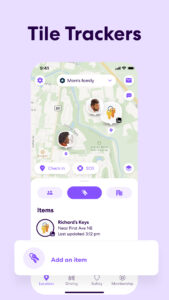
In addition to focusing on safety, Life360’s Tile trackers extend this connection to pets and all your essential items like 🔑 Keys, 👛 Wallets, 🧳 Luggage, 🚲 Bikes.
Life360 memberships include essential safety features like:
🆘 SOS Alerts: Send silent alerts with your precise location to friends, family members, emergency contacts, and responders.
🚓 24/7 Emergency Dispatch: We're here for your loved ones, always ready to respond, even when you can't make the call.
🕵️♂️ Identity Theft Protection: Safeguard sensitive digital information for each family member, backed by a white-glove restoration service.
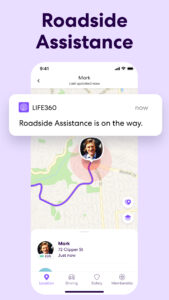
⚠️ Roadside Assistance: Free towing, jumpstarts, tire changes, lockout assistance, refueling and more.
With Life360, you can:
☑️ Find your friends
☑️ Find your family
☑️ Find your kids
☑️ Find your phone
☑️ Track everything that matters most
Download now to access:
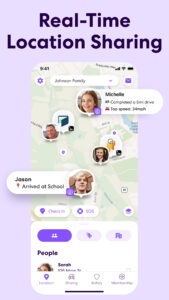
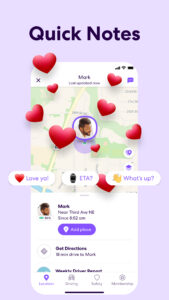
📍 Location Sharing
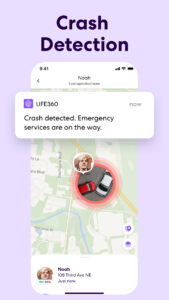
🚗 Crash Detection
🔔 Smart Notifications
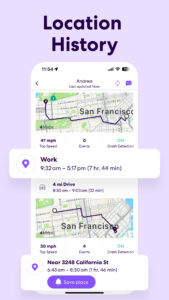
📌 Location History
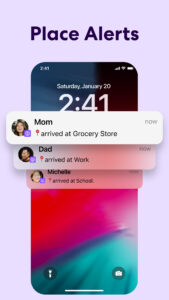
🏠 Place Alerts
🆘 SOS Help Alerts
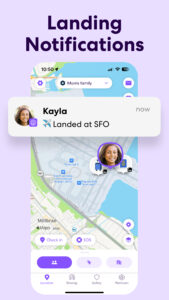
✈️ Flight Landing Notifications
💬 … and more!
Keep tabs on your family members as they come and go from key locations like home, school and work.
Life360 Silver - Simplify your safety with features like:
▪️ 2 Places with unlimited Alerts 🔔
▪️ 2 days of Location History 📌
▪️ Crash Detection 💥🚗
▪️ Family Driving Summary
▪️ Data Breach Alerts
▪️ SOS Help Alerts During Emergencies 🆘
Life360 Gold* - Keep your family secure on the go with all the features of Life360 Silver, plus:
- 30 days of Location History 📌
- Unlimited Place Alerts 🔔
- Individual Driver Reports
- Crash Detection with emergency dispatch and live agent support 🚓
- 24/7 Roadside Assistance ⚠️
- $250 in Stolen Phone Protection
- ID Theft Protection and Data Breach Alerts
- $25,000 in Stolen Fund Reimbursement
Life360 Platinum* - Prepare for anything, anywhere, with all the features of Life360 Gold, plus:
- $1 million in Stolen Fund Reimbursement
- 50 miles of Free towing
- $500 in Stolen Phone Protection
- Travel Support with Disaster Assistance
- Medical Support 🩺
Download Life360 for peace of mind, knowing your loved ones and valuables are secure. Join millions who trust Life360 for location sharing.
www.life360.com/privacy_policy/
www.life360.com/terms_of_use/
Explanation for App Permissions [Optional Permissions]
○ Camera: App accesses user’s camera to allow users to take photos or videos on the app.
○ Location: App accesses location information to allow users to share location information to other Circle members.
○ Microphone: App accesses microphone to allow users to record and share voice memos.
○ Music and audio: App accesses music and audio to play music and audio.
○ Nearby devices: App accesses nearby devices to find, connect to and determine the relative position of nearby devices by using Bluetooth.
○ Notifications: App accesses notification to send notification to users.
○ Phone: App accesses user’s phone to allow users to make phone calls on the app
○ Photos and videos: App accesses photos and videos to allow users to view photos and videos on the app.
○ Physical activity: App accesses physical activities to calculate and detect driving events, such as driving speed, use of breaks, and accident detection.
You may still use the app even if you withhold optional permissions. However, app features requiring permission may not be available in such case.
Life360 is the premium option for users looking to upgrade their location sharing experiences with unbeatable safety and protection features for families, friends and more.
In addition to focusing on safety, Life360’s Tile trackers extend this connection to pets and all your essential items like 🔑 Keys, 👛 Wallets, 🧳 Luggage, 🚲 Bikes.
Life360 memberships include essential safety features like:
🆘 SOS Alerts: Send silent alerts with your precise location to friends, family members, emergency contacts, and responders.
🚓 24/7 Emergency Dispatch: We're here for your loved ones, always ready to respond, even when you can't make the call.
🕵️♂️ Identity Theft Protection: Safeguard sensitive digital information for each family member, backed by a white-glove restoration service.
⚠️ Roadside Assistance: Free towing, jumpstarts, tire changes, lockout assistance, refueling and more.
With Life360, you can:
☑️ Find your friends
☑️ Find your family
☑️ Find your kids
☑️ Find your phone
☑️ Track everything that matters most
Download now to access:
📍 Location Sharing
🚗 Crash Detection
🔔 Smart Notifications
📌 Location History
🏠 Place Alerts
🆘 SOS Help Alerts
✈️ Flight Landing Notifications
💬 … and more!
Keep tabs on your family members as they come and go from key locations like home, school and work.
Life360 Silver - Simplify your safety with features like:
▪️ 2 Places with unlimited Alerts 🔔
▪️ 2 days of Location History 📌
▪️ Crash Detection 💥🚗
▪️ Family Driving Summary
▪️ Data Breach Alerts
▪️ SOS Help Alerts During Emergencies 🆘
Life360 Gold* - Keep your family secure on the go with all the features of Life360 Silver, plus:
- 30 days of Location History 📌
- Unlimited Place Alerts 🔔
- Individual Driver Reports
- Crash Detection with emergency dispatch and live agent support 🚓
- 24/7 Roadside Assistance ⚠️
- $250 in Stolen Phone Protection
- ID Theft Protection and Data Breach Alerts
- $25,000 in Stolen Fund Reimbursement
Life360 Platinum* - Prepare for anything, anywhere, with all the features of Life360 Gold, plus:
- $1 million in Stolen Fund Reimbursement
- 50 miles of Free towing
- $500 in Stolen Phone Protection
- Travel Support with Disaster Assistance
- Medical Support 🩺
Download Life360 for peace of mind, knowing your loved ones and valuables are secure. Join millions who trust Life360 for location sharing.
www.life360.com/privacy_policy/
www.life360.com/terms_of_use/
Explanation for App Permissions [Optional Permissions]
○ Camera: App accesses user’s camera to allow users to take photos or videos on the app.
○ Location: App accesses location information to allow users to share location information to other Circle members.
○ Microphone: App accesses microphone to allow users to record and share voice memos.
○ Music and audio: App accesses music and audio to play music and audio.
○ Nearby devices: App accesses nearby devices to find, connect to and determine the relative position of nearby devices by using Bluetooth.
○ Notifications: App accesses notification to send notification to users.
○ Phone: App accesses user’s phone to allow users to make phone calls on the app
○ Photos and videos: App accesses photos and videos to allow users to view photos and videos on the app.
○ Physical activity: App accesses physical activities to calculate and detect driving events, such as driving speed, use of breaks, and accident detection.
You may still use the app even if you withhold optional permissions. However, app features requiring permission may not be available in such case.
Download Life360: Family Safety & GPS APK
Fast, free and safe download.
APK Permissions 43
- android.permission.ACCESS_ADSERVICES_AD_ID
- android.permission.ACCESS_ADSERVICES_ATTRIBUTION
- android.permission.ACCESS_ADSERVICES_TOPICS
- android.permission.ACCESS_BACKGROUND_LOCATION
- android.permission.ACCESS_COARSE_LOCATION
- android.permission.ACCESS_FINE_LOCATION
- android.permission.ACCESS_NETWORK_STATE
- android.permission.ACCESS_NOTIFICATION_POLICY
- android.permission.ACCESS_WIFI_STATE
- android.permission.ACTIVITY_RECOGNITION
- android.permission.BLUETOOTH
- android.permission.BLUETOOTH_ADMIN
- android.permission.BLUETOOTH_ADVERTISE
- android.permission.BLUETOOTH_CONNECT
- android.permission.BLUETOOTH_SCAN
- android.permission.CALL_PHONE
- android.permission.CAMERA
- android.permission.CHANGE_WIFI_STATE
- android.permission.DETECT_SCREEN_CAPTURE
- android.permission.FOREGROUND_SERVICE
- android.permission.FOREGROUND_SERVICE_CONNECTED_DEVICE
- android.permission.FOREGROUND_SERVICE_DATA_SYNC
- android.permission.FOREGROUND_SERVICE_LOCATION
- android.permission.INTERNET
- android.permission.NFC
- android.permission.POST_NOTIFICATIONS
- android.permission.READ_CONTACTS
- android.permission.READ_USER_DICTIONARY
- android.permission.RECEIVE_BOOT_COMPLETED
- android.permission.RECORD_AUDIO
- android.permission.REQUEST_IGNORE_BATTERY_OPTIMIZATIONS
- android.permission.SCHEDULE_EXACT_ALARM
- android.permission.VIBRATE
- android.permission.WAKE_LOCK
- android.permission.WRITE_EXTERNAL_STORAGE
- com.android.vending.BILLING
- com.google.android.c2dm.permission.RECEIVE
- com.google.android.finsky.permission.BIND_GET_INSTALL_REFERRER_SERVICE
- com.google.android.gms.permission.ACTIVITY_RECOGNITION
- com.google.android.gms.permission.AD_ID
- com.huawei.appmarket.service.commondata.permission.GET_COMMON_DATA
- com.life360.android.safetymapd.DYNAMIC_RECEIVER_NOT_EXPORTED_PERMISSION
- com.samsung.android.mapsagent.permission.READ_APP_INFO
APK Verified
The cryptographic signature guarantees that the file is safe to install and was not tampered with in any way.


Frequently Asked Questions about Life360: Family Safety & GPS APK
This is the universal variant — a single APK that contains native libraries for every CPU architecture. It installs on any Android device but is larger than per-architecture variants.
Yes — the APK's signature has been cryptographically verified against the publisher's signing key. The SHA-256 hash is shown in the File Information panel so you can independently confirm the file matches the original release.
Android 29 (API level 35) or newer. Older devices will refuse the install.
Install a free app like 'CPU-Z' or 'Droid Hardware Info' from the Play Store and look at the ABI / Instruction Set row. Most phones made after 2017 are arm64-v8a; if in doubt, download the universal variant.
All variants are functionally identical — same features, same version. They differ only in which CPU architectures the native code is compiled for, and (sometimes) which screen densities the included graphics target. Pick the one that matches your device for the smallest install size, or pick 'Universal' if you're unsure.